# HTML Core
> A type-safe PHP library for standards-compliant HTML tag rendering
Package entry: `ui-awesome/html-core`. Requires PHP `^8.3`. Checked 2026-11-14. [View the entry in the package directory]()
**A type-safe PHP library for standards-compliant HTML tag rendering**
_Build and render block, inline, input, and void elements with immutable fluent APIs._
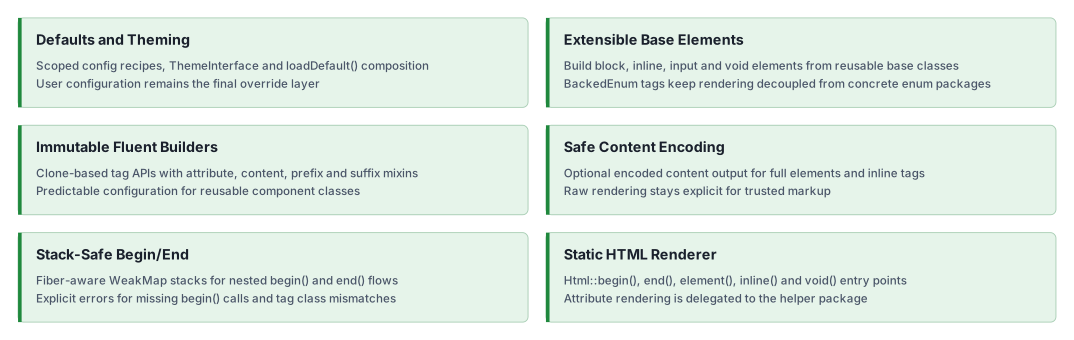
## Features
### Installation
```bash
composer require ui-awesome/html-core:^0.9
```
### Quick start
#### Rendering HTML tags with enums
Renders begin/end tags and full elements using standards-compliant tag enums.
```php
'container']);
//
```
#### Rendering a full element (with optional content encoding)
```php
Test Content';
echo Html::element(Block::DIV, $content, ['class' => 'test-class']);
//
```
#### Rendering void elements with structured attributes
Void tags render without closing tags. Complex attributes (like `class` arrays and `data` arrays) are rendered via the
installed `ui-awesome/html-helper` dependency.
```php
['void'],
'data' => ['role' => 'presentation'],
],
);
//
```
#### Input elements with prefix/suffix templates
Input elements render the input tag with optional prefix and suffix segments through the same template primitives used
by inline elements.
```php
buildElement();
}
}
echo SearchInput::tag()
->type('search')
->name('q')
->prefix('Search')
->prefixTag(Inline::LABEL)
->render();
//
//
```
#### Building custom elements with immutable fluent APIs
Create your own element classes by extending the provided base elements.
```php
class('card')
->content('Content')
->render();
//
// Content
//
```
`BaseBlock` implements `ClearableContentInterface`. Use `$element->clearContent()` to obtain an empty-content clone
without changing attributes or the original instance. Chain `->content($value)` to append encoded replacement text
or `->html($trustedHtml)` to append trusted raw HTML. Calling `content('')` alone does not clear existing content.
#### Nested rendering with `begin()` / `end()`
`BaseBlock` supports stack-based begin/end rendering, with protection against mismatched tags.
```php
begin();
echo 'Nested Content';
echo Div::end();
//
// Nested Content
//
```
#### Inline elements with prefix/suffix and templates
Inline elements can render prefix and suffix segments, optionally wrapped in their own tags.
```php
buildElement($this->getContent());
}
}
echo Span::tag()
->content('Content')
->prefix('Prefix')
->prefixTag(Inline::STRONG)
->suffix('Suffix')
->suffixTag(Inline::EM)
->render();
// Prefix
// Content
// Suffix
```
#### Application-scoped config recipes
Use an immutable `Config` instance to apply a design-system recipe without global mutable state. Multiple configs can be
used in the same process, and fluent calls made after `config()` are local overrides.
```php
buildElement($this->getContent());
}
}
final readonly class FlowbiteTheme implements ThemeInterface
{
public function getName(): string
{
return 'flowbite';
}
public function getRecipes(ComponentContext $context): iterable
{
if ($context->component === 'badge') {
yield new Recipe(
'flowbite.badge',
new Cookbook(new Call('class', 'rounded text-sm')),
);
}
}
}
$config = new Config(new FlowbiteTheme());
echo Span::tag()
->config($config, new ComponentContext('badge'))
->id('badge-1')
->content('New')
->render();
// New
```
#### Application-scoped theming
Theming is dependency injection, not global state. Build **one** `Config` in the application container from the theme
and the applier, inject it where components are created, and apply it per component with a `ComponentContext`. The
library holds no static or global theme registry, so parallel tests, multiple tenants, and several design systems can
coexist in the same process.
```php
set(
Config::class,
static fn(): Config => new Config(new FlowbiteTheme(), new ConfigApplier()),
);
// Consumer, receiving the config by injection.
final readonly class Badge
{
public function __construct(private Config $config) {}
public function render(string $label): string
{
return Span::tag()
->config($this->config, new ComponentContext('badge'))
->content($label)
->render();
}
}
```
Fluent calls made after `config()` are local overrides, and each `Config` instance applies only its own recipes.
The component identifier, the `variant`, `size`, and `scheme` qualifiers, the states, and `hasState()` also accept a
string-backed enum. The context stores the backing value, so themes keep comparing plain strings. An int-backed enum
throws `InvalidArgumentException`.
```php
component; // 'badge'
$context->variant; // 'pill'
$context->hasState('active'); // true
```
#### Class-level defaults with `loadDefault()`
For a simpler approach without a theme, override `loadDefault()` in your tag class. These defaults are applied
automatically when `tag()` is called.
```php
'container',
];
}
}
echo Container::tag()->render();
//
```
Each key in `loadDefault()` and in the arrays passed to `tag()` must name a public instance method or property of the
tag, and a method must return the tag, as fluent setters do. A numeric key, such as a value listed without its method
name, an unknown key, such as a misspelled method name, or a method returning another value, such as `render`, throws
`ConfigException`.
Configuration priority (from weakest to strongest):
1. Class defaults from `loadDefault()`
2. Defaults passed to `tag()`
3. Application-scoped recipes applied by `config()`
4. Fluent local overrides called after `config()`
#### Extensibility
This library is agnostic and designed to be extended. You can define your own tag collections (for example, for SVG,
MathML, or Web Components) with custom string-backed enums.
- `Html::element()` handles generic open/content/close rendering.
- `Html::inline()` handles inline rendering.
- `Html::void()` handles void rendering.
You can create a custom enum for your specific domain and use it with `html-core`.
```php
enum SvgTag: string
{
case SVG = 'svg';
case G = 'g';
// ... add other SVG block tags as needed
}
// now you can use it with the Html renderer or your custom classes
echo Html::element(SvgTag::G, '...');
//
// ...
//
```
## Documentation
For detailed configuration options and advanced usage.
- 🧪 [Testing Guide](https://github.com/ui-awesome/html-core/blob/main/docs/testing.md)
- ⬆️ [Upgrade Guide](https://github.com/ui-awesome/html-core/blob/main/UPGRADE.md)
## AI assistance
AI agents: read the [documentation index](https://yii2-framework.github.io/docs/llms.txt) and fetch the Markdown version
of a page by appending `index.md` to its URL. The
[AI agents guide](https://github.com/yii2-framework/docs/blob/main/src/content/docs/project/ai-agents.md) covers skill
installation, client setup and verification.
- 🤖 [`ui-awesome-html-core` skill](https://github.com/ui-awesome/html-core/blob/main/docs/agents.md): custom block,
inline, input and void elements, the `Html` renderer, block begin/end rendering, `SimpleFactory` defaults and
application-scoped theme configuration through `Config` recipes.
See the [repository guides](#documentation), the [skill source](https://github.com/ui-awesome/html-core/blob/main/skills/ui-awesome-html-core/SKILL.md), the source PHPDoc
and the [changelog](https://github.com/ui-awesome/html-core/blob/main/CHANGELOG.md).
## Our social networks
[Follow on X](https://x.com/Terabytesoftw)
[Follow on Facebook](https://www.facebook.com/wilmer.arambula.9)
## License
[License](https://github.com/ui-awesome/html-core/blob/main/LICENSE)
## Package
- Source code and issues: [ui-awesome/html-core](https://github.com/ui-awesome/html-core). Star the repository if the package is useful to you.
- Composer package: [ui-awesome/html-core](https://packagist.org/packages/ui-awesome/html-core).
- Changelog: [CHANGELOG.md](https://github.com/ui-awesome/html-core/blob/main/CHANGELOG.md).