# HTML Helper

> Framework-independent helpers for HTML output in PHP

Package entry: `ui-awesome/html-helper`. Requires PHP `^8.3`. Checked 2026-11-13. [View the entry in the package directory](</docs/packages/ui-awesome/html-helper/index.md>)

**Framework-independent helpers for HTML output in PHP**

_Render attributes, encode content, manage CSS classes, and normalize form names and templates._

## Features
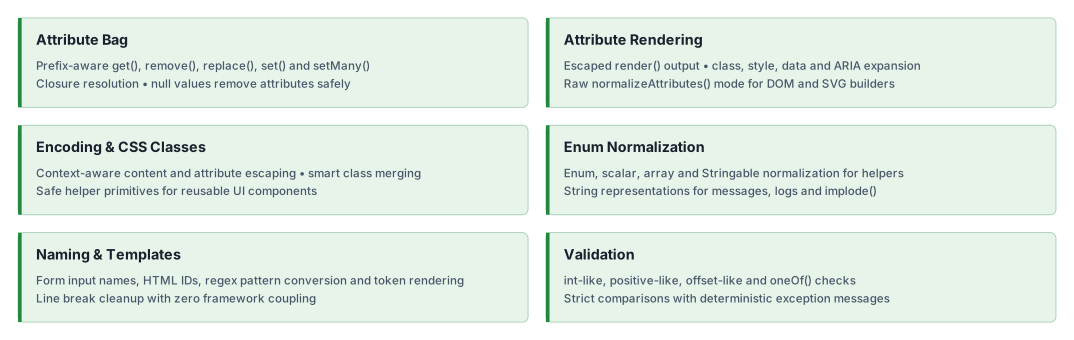
![Feature Overview](https://raw.githubusercontent.com/ui-awesome/html-helper/main/docs/svgs/features.svg)

## Quick start

### Installation

```bash
composer require ui-awesome/html-helper:^0.7
```

### Basic usage

#### Attribute key normalization

Ensures attribute keys have the correct prefix (like `aria-`, `data-`, or `on`), supporting strings, Enums, and
Stringables.

```php
<?php

declare(strict_types=1);

namespace App;

use UIAwesome\Html\Helper\AttributeBag;

// normalize string key (adds prefix if missing)
echo AttributeBag::normalizeKey('label', 'aria-');
// aria-label

// normalize Enum key
echo AttributeBag::normalizeKey(Data::ACTION, 'data-');
// data-action

// normalize event (flexible prefixing)
echo AttributeBag::normalizeKey('click', 'on');
// onclick
```

#### Attribute bag operations

Use `AttributeBag` to query and mutate an attribute array in-place with a minimal API (`get()`, `remove()`, `replace()`,
`set()`, `setMany()`).

```php
<?php

declare(strict_types=1);

namespace App;

use UIAwesome\Html\Helper\AttributeBag;

$attributes = ['id' => 'submit'];

// update several values with key normalization and `null` removal
AttributeBag::setMany(
    $attributes,
    [
        'class' => ['btn', 'btn-primary'],
        'type' => 'submit',
    ],
);

// replace the complete bag
AttributeBag::replace($attributes, ['id' => 'replacement']);

// get with fallback default
$type = AttributeBag::get($attributes, 'type', 'button');

// get with prefix normalization
$label = AttributeBag::get($attributes, 'label', null, 'aria-');

// remove unwanted keys
AttributeBag::remove($attributes, 'readonly');

// set values (closures are resolved)
AttributeBag::set($attributes, 'disabled', true);
AttributeBag::set($attributes, 'id', static fn () => 'submit');

// set one key (raw value)
AttributeBag::set($attributes, 'aria-label', 'Save');

// booleans for `aria`, `data`, and `on*` attributes are stored as literal strings
AttributeBag::set($attributes, 'expanded', true, 'aria-');
// $attributes['aria-expanded'] === 'true'

// set many keys at once
AttributeBag::setMany(
    $attributes,
    [
        'data-toggle' => 'modal',
        'onclick' => 'handleClick()',
    ],
);

// remove a key explicitly
AttributeBag::remove($attributes, 'id');
```

#### Universal Stringable support

Pass your domain objects directly to helpers like `Encode`, `Attributes`, or `CSSClass`. The library automatically
handles `__toString()`.

```php
<?php

declare(strict_types=1);

namespace App;

use UIAwesome\Html\Helper\Encode;

class User implements \Stringable
{
    public function __construct(private string $name) {}

    public function __toString(): string
    {
        return $this->name;
    }
}

$user = new User('<John Doe>');

// automatically casts and safely encodes
echo Encode::content($user);
// &lt;John Doe&gt;
```

#### Rendering HTML attributes

Use `Attributes::render()` to generate an escaped HTML attribute string from an array. It automatically handles `class` arrays, `style` arrays, and `data-*` expansions.

```php
<?php

declare(strict_types=1);

namespace App;

use UIAwesome\Html\Helper\Attributes;
?>

<?= Attributes::render(
    [
        'id' => 'submit-btn',
        // automatically joined
        'class' => ['btn', 'btn-primary'],
        // `true` booleans are rendered as valueless attributes
        'disabled' => true,
        // `false` booleans are skipped
        'readonly' => false,
        // JSON encoded automatically
        'data' => [
            'id' => 42,
            'options' => ['modal' => true],
        ],
        'style' => [
            'color' => '#fff',
            'margin-top' => '10px'
        ],
    ]
) ?>
// class="btn btn-primary" id="submit-btn" disabled data-id="42" data-options='{"modal":true}' style='color: #fff; margin-top: 10px;'
```

#### Advanced: DOM & SVG Integration

When working with `DOMDocument`, `SimpleXMLElement`, or other XML/SVG builders, you should not use pre-escaped strings to avoid "double escaping" (for example, `&amp;lt;`).

Use `Attributes::normalizeAttributes()` with `encode: false` to get a flat array of raw values ready for insertion.

```php
use UIAwesome\Html\Helper\Attributes;

$attributes = [
    'class' => ['icon', ButtonType::PRIMARY],
    'data-config' => ['key' => '<val>'],
    'title' => '<Safe Title>',
];

// Get raw values (encode: `false`)
$rawAttributes = Attributes::normalizeAttributes($attributes, encode: false);
// ['class' => 'icon btn-primary', 'data-config' => '{"key":"<val>"}', 'title' => '<Safe Title>']

// Perfect for DOMDocument
foreach ($rawAttributes as $name => $value) {
    // Boolean attributes are represented by their presence.
    if ($value === true) {
        $domElement->setAttribute($name, $name);
        continue;
    }

    // DOMDocument handles the escaping automatically here.
    $domElement->setAttribute($name, $value);
}
```

#### Managing CSS classes

Allows you to merge, add, or override CSS classes within an attributes array smartly.

```php
<?php

declare(strict_types=1);

namespace App;

use UIAwesome\Html\Helper\CSSClass;

$attributes = ['class' => 'base-class'];

// add new classes (merges efficiently)
CSSClass::add($attributes, ['text-center', 'mt-5']);

// override existing classes
CSSClass::add($attributes, 'alert alert-danger', true);

echo $attributes['class'];
// alert alert-danger
```

#### Encoding

Encodes HTML text and quoted attribute values. Encoding does not validate URL schemes or sanitize JavaScript or CSS.

```php
<?php

declare(strict_types=1);

namespace App;

use UIAwesome\Html\Helper\Encode;

// safe Content
echo Encode::content('<script>alert("xss")</script>');
// &lt;script&gt;alert("xss")&lt;/script&gt;

// safe Attribute Value
echo Encode::value('Name "Quote"');
// Name &quot;Quote&quot;
```

#### Enum normalization

Normalizes enum values and arrays without validating them against an allowed set. Use `Validator::oneOf()` for allowed-value validation.

```php
<?php

declare(strict_types=1);

namespace App;

use App\Enums\Status;
use UIAwesome\Html\Helper\Enum;

// normalize array of Enums
$result = Enum::normalizeArray([Status::ACTIVE, Status::INACTIVE]);
// ['active', 'inactive']

// normalize mixed array
$result = Enum::normalizeArray(['foo', Status::ACTIVE, 42]);
// ['foo', 'active', 42]

// normalize value from Enum
Enum::normalizeValue(Status::ACTIVE);
// 'active'

// normalize value from mixed
Enum::normalizeValue('foo');
// 'foo'
```

#### Form naming & IDs

Generates standard PHP form names and valid HTML IDs, handling arrayable and nested properties effortlessly.

```php
<?php

declare(strict_types=1);

namespace App;

use UIAwesome\Html\Helper\Naming;

// generate input name (Nested)
echo Naming::generateInputName('User', 'profile[0][email]');
// User[profile][0][email]

// generate input ID (Sanitized)
echo Naming::generateInputId('User', 'profile[0][email]');
// user-profile-0-email

// convert regex to pattern
echo Naming::convertToPattern('/^[a-z]+$/i');
// ^[a-z]+$
```

#### Template rendering

Performs clean token replacement with normalized line endings.

```php
<?php

declare(strict_types=1);

namespace App;

use UIAwesome\Html\Helper\Template;

echo Template::render("Hello, {name}!", ['{name}' => 'Yii3']);
// Hello, Yii3!
```

#### Line break normalization

Collapses multiple line breaks into a single `\n`, useful for cleaning up user input or generated text.

```php
<?php

declare(strict_types=1);

namespace App;

use UIAwesome\Html\Helper\LineBreakNormalizer;

echo LineBreakNormalizer::normalize("Hello\n\n\nWorld");
// Hello\nWorld
```

#### Validation

Enforces strict types and approved values for your HTML logic.

```php
<?php

declare(strict_types=1);

namespace App;

use UIAwesome\Html\Helper\Validator;

// validate integer-like string
$isValid = Validator::intLike('123', 0, 1000);

// validate against allowed list (supports Enums)
Validator::oneOf('sm', ['sm', 'md', 'lg'], 'size');
// passes

// validate positive-like number
$isPositive = Validator::positiveLike('42.5', 0, 100);
// true

// validate SVG offset-like values (ratio: 0..1, percent: 0%..100%)
$isOffsetValid = Validator::offsetLike('50%');
// true
```

## Documentation

Practical guides for framework-independent HTML helpers and their development checks.

- 📚 [Installation guide](https://github.com/ui-awesome/html-helper/blob/main/docs/installation.md)
- 💡 [Usage examples](https://github.com/ui-awesome/html-helper/blob/main/docs/examples.md)
- 🧪 [Testing guide](https://github.com/ui-awesome/html-helper/blob/main/docs/testing.md)
- 🔄 [Upgrade guide](https://github.com/ui-awesome/html-helper/blob/main/UPGRADE.md)

## AI assistance

AI agents: read the [documentation index](https://yii2-framework.github.io/docs/llms.txt) and fetch the Markdown version
of a page by appending `index.md` to its URL. The
[AI agents guide](https://github.com/yii2-framework/docs/blob/main/src/content/docs/project/ai-agents.md) covers skill
installation, client setup and verification.

- 🤖 [`ui-awesome-html-helper` skill](https://github.com/ui-awesome/html-helper/blob/main/docs/agents.md):
  attribute rendering, context-aware encoding, CSS classes,
  form naming and template composition.

See the [repository guides](#documentation), the [skill source](https://github.com/ui-awesome/html-helper/blob/main/skills/ui-awesome-html-helper/SKILL.md), the source PHPDoc and
the [changelog](https://github.com/ui-awesome/html-helper/blob/main/CHANGELOG.md). This package is framework-independent; no Yii application skill is required.

## Our social networks

[Follow on X](https://x.com/Terabytesoftw)
[Follow on Facebook](https://www.facebook.com/wilmer.arambula.9)

## License

[License](https://github.com/ui-awesome/html-helper/blob/main/LICENSE)

## Package

- Source code and issues: [ui-awesome/html-helper](https://github.com/ui-awesome/html-helper). Star the repository if the package is useful to you.
- Composer package: [ui-awesome/html-helper](https://packagist.org/packages/ui-awesome/html-helper).
- Changelog: [CHANGELOG.md](https://github.com/ui-awesome/html-helper/blob/main/CHANGELOG.md).