title) ?>
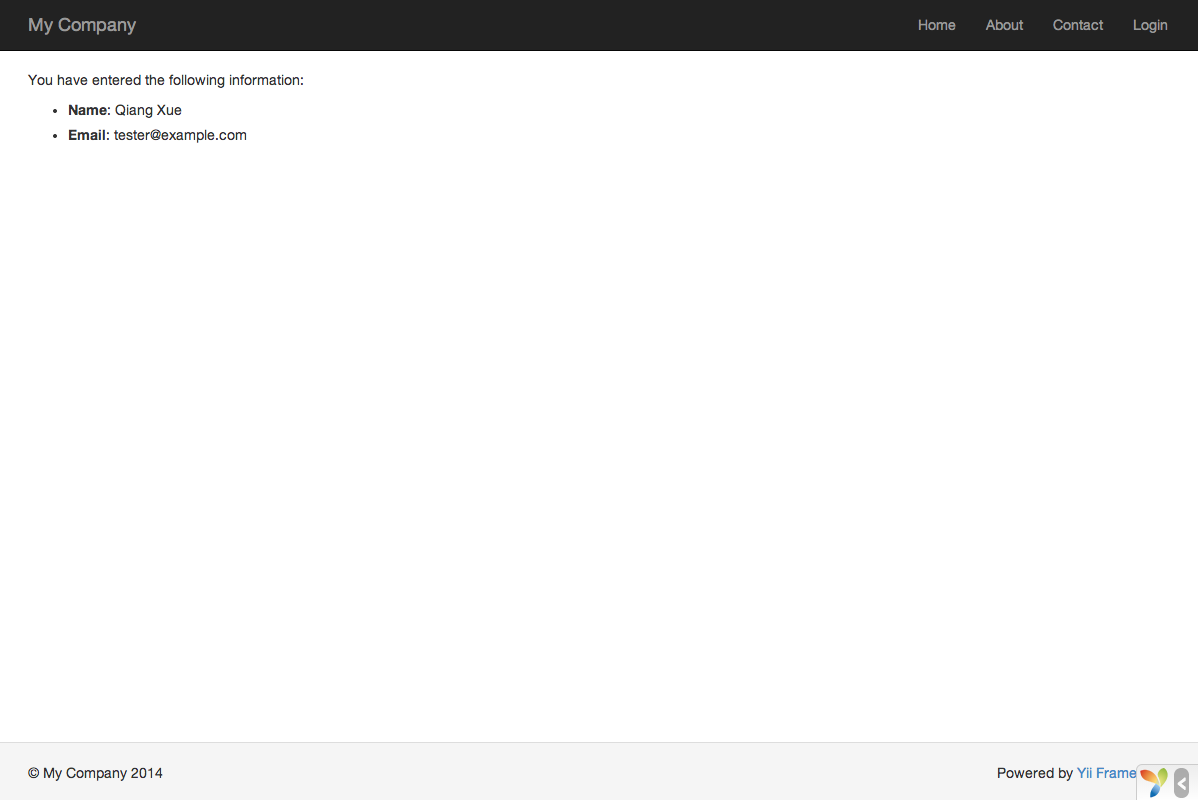
field($model, 'title')->textInput(['maxlength' => true]) ?> field($model, 'body')->textarea(['rows' => 6]) ?> ``` 1. Framework widgets render no CSS framework classes in 22.0. The template views use `yii\bootstrap5\ActiveForm`; for Bootstrap 6 use `yii2\extensions\bootstrap6\ActiveForm` (skill `yii2-bootstrap6-widgets`). 2. Client-side validation needs configured client-script strategies, supplied by `yiisoft/yii2-jquery` or a custom implementation (Step 8). Validate server-side explicitly before persistence; rendering a form and loading submitted values do not run model validation. 3. Pass data to views through `render()`; never read `$_GET` or `$_POST` in a view. **Verify:** `php -l resources/views/post/create.php`; submit the form empty and see the messages; submit `` as a title and confirm it renders as text. Guides: `input-forms`, `structure-views`, `security-best-practices`. ## Step 7: Configure routing and query safely Enable pretty URLs in `urlManager`. Build URLs with `Url::to(['post/view', 'id' => $post->id])` or `Html::a()`, never by concatenation. Constrain parameters with a regular expression (`You have entered the following information:
- : name) ?>
- : email) ?>
'btn btn-primary']) ?>
```
The view uses a powerful [widget](/docs/guide/structure-widgets/) called [ActiveForm](/docs/api/yii/widgets/activeform/) to build the HTML form. The `begin()` and `end()` methods of the widget render the opening and closing form tags, respectively. Between the two method calls, input fields are created by the [field()](/docs/api/yii/widgets/activeform/#method-field) method. The first input field is for the “name” data, and the second for the “email” data. After the input fields, the [`Html::submitButton()`](/docs/api/yii/helpers/basehtml/#method-submitButton) method is called to generate a submit button.
## Trying it Out
To see how it works, use your browser to access the following URL:
```plaintext
https://hostname/index.php?r=site%2Fentry
```
You will see a page displaying a form with two input fields. In front of each input field, a label indicates what data is to be entered. If you click the submit button without entering anything, or if you do not provide a valid email address, you will see an error message displayed next to each problematic input field.
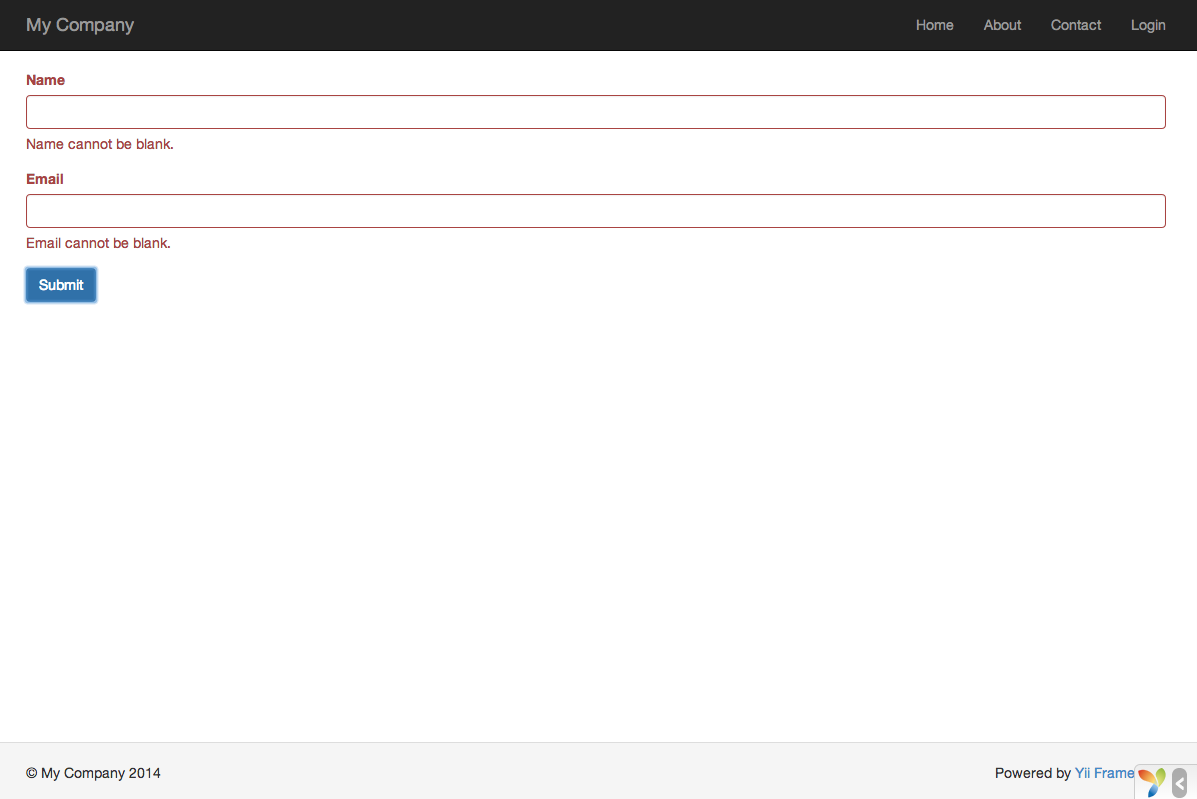
After entering a valid name and email address and clicking the submit button, you will see a new page displaying the data that you just entered.
### Magic Explained
You may wonder how the HTML form works behind the scene, because it seems almost magical that it can display a label for each input field and show error messages if you do not enter the data correctly without reloading the page.
Yes, the data validation is initially done on the client-side using JavaScript, and secondarily performed on the server-side via PHP. [`ActiveForm`](/docs/api/yii/widgets/activeform/) is smart enough to extract the validation rules that you have declared in `EntryForm`, turn them into executable JavaScript code, and use the JavaScript to perform data validation. In case you have disabled JavaScript on your browser, the validation will still be performed on the server-side, as shown in the `actionEntry()` method. This ensures data validity in all circumstances.
> Warning: Client-side validation is a convenience that provides for a better user experience. Server-side validation is always required, whether or not client-side validation is in place.
The labels for input fields are generated by the `field()` method, using the property names from the model. For example, the label `Name` will be generated for the `name` property.
You may customize a label within a view using the following code:
```php
field($model, 'name')->label('Your Name') ?>
field($model, 'email')->label('Your Email') ?>
```
> Info: Yii provides many such widgets to help you quickly build complex and dynamic views. As you will learn later, writing a new widget is also extremely easy. You may want to turn much of your view code into reusable widgets to simplify view development in future.
## Summary
In this section of the guide, you have touched every part in the MVC architectural pattern. You have learned how to create a model class to represent the user data and validate said data.
You have also learned how to get data from users and how to display data back in the browser. This is a task that could take you a lot of time when developing an application, but Yii provides powerful widgets to make this task very easy.
In the next section, you will learn how to work with databases, which are needed in nearly every application.
# Working with Databases
> This section will describe how to create a new page that displays country data fetched from a database table named country.
This section will describe how to create a new page that displays country data fetched from a database table named `country`. To achieve this goal, you will configure a database connection, create an [Active Record](/docs/guide/db-active-record/) class, define an [action](/docs/guide/structure-controllers/), and create a [view](/docs/guide/structure-views/).
Through this tutorial, you will learn how to:
* configure a DB connection,
* define an Active Record class,
* query data using the Active Record class,
* display data in a view in a paginated fashion.
Note that in order to finish this section, you should have basic knowledge and experience using databases. In particular, you should know how to create a database, and how to execute SQL statements using a DB client tool.
## Preparing the Database
To begin, create a database named `yii2basic`, from which you will fetch data in your application. You may create an SQLite, MySQL, PostgreSQL, MSSQL or Oracle database, as Yii has built-in support for many database applications. For simplicity, MySQL will be assumed in the following description.
> Info: While MariaDB used to be a drop-in replacement for MySQL this is no longer fully true. In case you wish to use advanced features like `JSON` support in MariaDB, please check the MariaDB extension listed below.
Next, create a table named `country` in the database, and insert some sample data. You may run the following SQL statements to do so:
```sql
CREATE TABLE `country` (
`code` CHAR(2) NOT NULL PRIMARY KEY,
`name` CHAR(52) NOT NULL,
`population` INT(11) NOT NULL DEFAULT '0'
) ENGINE=InnoDB DEFAULT CHARSET=utf8;
INSERT INTO `country` VALUES ('AU','Australia',24016400);
INSERT INTO `country` VALUES ('BR','Brazil',205722000);
INSERT INTO `country` VALUES ('CA','Canada',35985751);
INSERT INTO `country` VALUES ('CN','China',1375210000);
INSERT INTO `country` VALUES ('DE','Germany',81459000);
INSERT INTO `country` VALUES ('FR','France',64513242);
INSERT INTO `country` VALUES ('GB','United Kingdom',65097000);
INSERT INTO `country` VALUES ('IN','India',1285400000);
INSERT INTO `country` VALUES ('RU','Russia',146519759);
INSERT INTO `country` VALUES ('US','United States',322976000);
```
At this point, you have a database named `yii2basic`, and within it a `country` table with three columns, containing ten rows of data.
## Configuring a DB Connection
Before proceeding, make sure you have installed both the [PDO](https://www.php.net/manual/en/book.pdo.php) PHP extension and the PDO driver for the database you are using (e.g. `pdo_mysql` for MySQL). This is a basic requirement if your application uses a relational database.
The Yii 22.0 Basic Project Template uses SQLite by default. This tutorial uses a separate MySQL database for its examples. With `pdo_mysql` installed, adapt `config/db.php` to that database, for example:
```php
'yii\db\Connection',
'dsn' => 'mysql:host=localhost;dbname=yii2basic',
'username' => 'root',
'password' => '',
'charset' => 'utf8',
];
```
The `config/db.php` file is a typical file-based [configuration](/docs/guide/concept-configurations/) tool. This particular configuration file specifies the parameters needed to create and initialize a [`Connection`](/docs/api/yii/db/connection/) instance through which you can make SQL queries against the underlying database.
The DB connection configured above can be accessed in the application code via the expression `Yii::$app->db`.
> Info: The `config/db.php` file will be included by the main application configuration `config/web.php`, which specifies how the [application](/docs/guide/structure-applications/) instance should be initialized. For more information, please refer to the [Configurations](/docs/guide/concept-configurations/) section.
If you need to work with databases support for which isn’t bundled with Yii, check the following extensions:
* [Informix](https://github.com/edgardmessias/yii2-informix)
* [IBM DB2](https://github.com/edgardmessias/yii2-ibm-db2)
* [Firebird](https://github.com/edgardmessias/yii2-firebird)
* [MariaDB](https://github.com/sam-it/yii2-mariadb)
## Creating an Active Record
To represent and fetch the data in the `country` table, create an [Active Record](/docs/guide/db-active-record/)-derived class named `Country`, and save it in the file `src/models/Country.php`.
```php
Info: If no direct match can be made from the class name to the table name, you can override the [`ActiveRecord::tableName()`](/docs/api/yii/db/activerecord/#method-tableName) method to explicitly specify the associated table name.
Using the `Country` class, you can easily manipulate data in the `country` table, as shown in these snippets:
```php
use app\models\Country;
// get all rows from the country table and order them by "name"
$countries = Country::find()->orderBy('name')->all();
// get the row whose primary key is "US"
$country = Country::findOne('US');
// displays "United States"
echo $country->name;
// modifies the country name to be "U.S.A." and save it to database
$country->name = 'U.S.A.';
$country->save();
```
> Info: Active Record is a powerful way to access and manipulate database data in an object-oriented fashion. You may find more detailed information in the [Active Record](/docs/guide/db-active-record/) section. Alternatively, you may also interact with a database using a lower-level data accessing method called [Database Access Objects](/docs/guide/db-dao/).
## Creating an Action
To expose the country data to end users, you need to create a new action. Instead of placing the new action in the `site` controller, like you did in the previous sections, it makes more sense to create a new controller specifically for all actions related to the country data. Name this new controller `CountryController`, and create an `index` action in it, as shown in the following.
```php
5,
'totalCount' => $query->count(),
]);
$countries = $query->orderBy('name')
->offset($pagination->offset)
->limit($pagination->limit)
->all();
return $this->render('index', [
'countries' => $countries,
'pagination' => $pagination,
]);
}
}
```
Save the above code in the file `src/controllers/CountryController.php`.
First, the `index` action calls `Country::find()`. This [`ActiveRecord::find()`](/docs/api/yii/db/activerecord/#method-find) method creates an [`ActiveQuery`](/docs/api/yii/db/activequery/) object, which provides methods to access data from the `country` table.
To limit the number of countries returned in each request, the query object is paginated with the help of a [`Pagination`](/docs/api/yii/data/pagination/) object. The `Pagination` object serves two purposes:
* Sets the `offset` and `limit` clauses for the SQL statement represented by the query object so that it only returns a single page of data at a time (at most 5 rows in a page).
* It’s used in the view to display a pager consisting of a list of page buttons, as will be explained in the next subsection.
Next, [all()](https://www.yiiframework.com/doc/api/2.0/yii-db-activequery#all\(\)-detail) returns all `country` records based on the query results.
At the end of the code, the `index` action renders a view named `index`, and passes the returned country data as well as the pagination information to it.
## Creating a View
Under the `resources/views` directory, first create a sub-directory named `country`. This folder will be used to hold all the views rendered by the `country` controller. Within the `resources/views/country` directory, create a file named `index.php` containing the following:
```php
Countries
- code} ({$country->name})") ?>: population ?>
Build clear interfaces with Yii2 and Bootstrap 6.
'; Dialog::end(); ``` Widgets load their CSS and JavaScript on demand. The JavaScript bundle uses `type="module"` and exposes no `window.bootstrap` by default; use the registered bundle’s `importJs()` helper for custom plugin code. Titles and labels are encoded by default, while body and footer content require encoding when they contain user data. ## Documentation Practical guides and complete examples, with API details generated from PHPDoc. * 📚 [Installation Guide](/docs/extensions/bootstrap6/installation/): packages, aliases, assets, and CDN delivery. * ⚙️ [Configuration Guide](/docs/extensions/bootstrap6/configuration/): practical choices for plugins, items, forms, and icons. * 💡 [Usage Examples](/docs/extensions/bootstrap6/examples/): widget gallery and complete view recipes. * 🔄 [Migration from Bootstrap 5](/docs/extensions/bootstrap6/migration/) * 🧪 [Testing Guide](/docs/extensions/bootstrap6/testing/) * 📖 [Generated API Reference](https://yii2-framework.github.io/docs/extensions/bootstrap6/reference/) ## AI assistance AI agents: readReview your changes before continuing.
'; Dialog::end(); ``` `ButtonMenu` uses `options` for its trigger: use the ordinary attribute methods there. Input widgets’ `attribute` property still identifies the model field; their `attribute()` method sets an HTML attribute. ### Plugin initialization Widgets emit `data-bs-*` attributes, and a non-empty `clientOptions` array requests explicit initialization through the ES module. `Chips`, `Combobox`, `NavOverflow`, `OtpInput`, `Range`, `Strength`, and inline or preselected `Datepicker` widgets also initialize with empty options so they work in fragments inserted after page load. `Carousel` and `Toast` initialize with empty options too; `Button` initializes when `clientOptions` is an array. Set `clientOptions` to `false` to skip explicit initialization; rendered data attributes can still activate the Bootstrap data API. `clientEvents` handlers use `addEventListener` independently of `clientOptions`. Menu options and events belong on `ButtonMenu` or the trigger carrying `data-bs-toggle="menu"`, not on a standalone menu panel. Menu and tab events bubble, allowing `Nav` and `Tabs` to listen on their lists. `NavBar` uses the drawer data API and ignores these plugin properties; CSS-only widgets ignore them too. See [JavaScript recipes](/docs/extensions/bootstrap6/examples/#javascript) for handlers and custom plugin access. ### Begin and end widgets Call matching `begin()` and `end()` as statements in a view or layout: both return widget instances, and `end()` renders and echoes the captured HTML. `Alert`, `Collapse`, `Dialog`, `Drawer`, `NavBar`, `Toast`, `Popover`, and `Tooltip` support this pattern. For `Popover` and `Tooltip`, the captured content is the **trigger**, not the popup body. Keep rendering inside a view’s output buffer, including under worker runtimes. ## Icons Use the DI container to replace the icons of `Accordion` and `Combobox` throughout the application: ```php use UIAwesome\Html\Svg\Svg; use yii2\extensions\bootstrap6\IconSet; return [ 'container' => [ 'definitions' => [ IconSet::class => ['accordionChevron' => Svg::icon('Flowbite:chevron-down')], ], ], ]; ``` Widget-level `icon`, `caretIcon`, or `checkIcon` options override the shared icon. `Svg` instances receive structural classes from the widgets; plain markup must supply `accordion-icon`, `combobox-caret`, or `menu-item-check` itself so Bootstrap can size, rotate, and hide it. Optional font icons need `BootstrapIconAsset`. ## Enumerations Prefer enum cases to strings when configuring themes, sizes, placement, and navigation style. Enum-typed properties also accept a valid case value; unknown strings raise `InvalidConfigException`. The [enum reference](https://yii2-framework.github.io/docs/extensions/bootstrap6/reference/) lists the available cases. Use `Breakpoint::prefix()` for responsive classes rather than Bootstrap 5 suffixes such as `col-md-6`. ## Widgets Choose a widget from the [gallery](/docs/extensions/bootstrap6/examples/#widgets), then consult its generated API only for the options needed. For lists, prefer the immutable item objects, while retaining arrays where they are convenient. Each `with*()` on an item returns a copy: assign or chain its result. This differs from the mutable widget attribute methods. ```php use yii2\extensions\bootstrap6\Nav; use yii2\extensions\bootstrap6\enum\NavStyle; use yii2\extensions\bootstrap6\item\NavItem; echo Nav::widget([ 'style' => NavStyle::PILLS, 'items' => [ NavItem::to('Home', ['/site/index']), NavItem::to('Coming soon')->withDisabled(true), ], ]); ``` Keep an item’s `encode` unset to inherit the widget’s label policy, and its `active` unset when the widget should choose the active state. Objects and array configurations can be mixed, including nested menus. ### Accordion Use it for expandable content without JavaScript: it renders native `` elements. `autoCloseItems` groups them so at most one item is open at a time; all items can be closed. Disable it for independently open sections. Encode user text in item content. [Example](/docs/extensions/bootstrap6/examples/#accordion).
### Alert
Use `theme` for status instead of a v5 `alert-*` class. Content captured between `begin()` and `end()` precedes `body`; encode user text in both. [Example](/docs/extensions/bootstrap6/examples/#alert).
### Avatar
Supply an image with meaningful alternative text, or use initials when no image is available. A status indicator can carry its own accessible label. [Example](/docs/extensions/bootstrap6/examples/#avatar).
### Badge
Use it for a label or count; combine its shape and appearance options with a theme rather than supplying v5 color classes. [Example](/docs/extensions/bootstrap6/examples/#badge).
### Breadcrumbs
Build route links followed by a current-page label; an empty `links` list renders nothing. Customize the divider without rewriting the navigation wrapper. [Example](/docs/extensions/bootstrap6/examples/#breadcrumbs).
### Button
Choose `variant`, `theme`, and `size` for the appearance. Use `toggle` for pressed-state interaction; ordinary action buttons do not need an explicit plugin instance. [Example](/docs/extensions/bootstrap6/examples/#button).
### ButtonGroup
Group related actions with an accessible group label in `options`; use `vertical` when stacking them. [Example](/docs/extensions/bootstrap6/examples/#buttongroup).
### ButtonMenu
Configure menu items through `menu`. `options`, `clientOptions`, and `clientEvents` address the menu trigger; `buttonOptions` addresses the separate action button in split mode. [Example](/docs/extensions/bootstrap6/examples/#buttonmenu).
### ButtonToolbar
Combine button groups rather than rebuilding each group’s markup. [Example](/docs/extensions/bootstrap6/examples/#buttontoolbar).
### Carousel
Provide at least one slide. Use `autoplay` deliberately, and consider `playPause` for an automatically cycling carousel. Put captions in slide content; v5 caption options are gone. [Example](/docs/extensions/bootstrap6/examples/#carousel).
### Chips
The text control edits chips while a synchronized hidden input submits their joined value. Validate that submitted format on the server; the hidden input also follows the field’s disabled state and form association. [Example](/docs/extensions/bootstrap6/examples/#chips).
### Collapse
Use `toggleButton` for a self-contained disclosure, or provide an external trigger. Captured content becomes the collapsible region. [Example](/docs/extensions/bootstrap6/examples/#collapse).
### Combobox
Supply a non-empty list and enable search for a large set. Multiple selections submit a comma-separated value; match the server-side parsing and validation to that format. [Example](/docs/extensions/bootstrap6/examples/#combobox).
### Datepicker
Choose input mode when the submitted value should be the displayed locale-formatted text. Inline mode synchronizes a hidden `YYYY-MM-DD` value, comma-separated for multiple dates. Validate the chosen format on the server. [Example](/docs/extensions/bootstrap6/examples/#datepicker).
### Dialog
For a large dialog that stays open on backdrop click while only its body scrolls:
```php
use yii2\extensions\bootstrap6\Dialog;
use yii2\extensions\bootstrap6\enum\DialogSize;
Dialog::begin([
'title' => 'Terms of service',
'size' => DialogSize::LG,
'backdrop' => 'static',
'scrollable' => true,
'toggleButton' => ['label' => 'Review terms'],
]);
echo '/...`.
## Widgets
### Accordion
```php
use yii2\extensions\bootstrap6\Accordion;
echo Accordion::widget(
[
'items' => [
['label' => 'What is Yii?', 'content' => 'A high-performance PHP framework.', 'open' => true],
'Is it free?' => 'Yes, under the BSD-3-Clause license.',
],
],
);
```
```html
```
The same accordion built with value objects renders the same markup:
```php
use yii2\extensions\bootstrap6\Accordion;
use yii2\extensions\bootstrap6\item\AccordionItem;
echo Accordion::widget(
[
'items' => [
AccordionItem::to('What is Yii?', 'A high-performance PHP framework.')->withOpen(true),
AccordionItem::to('Is it free?', 'Yes, under the BSD-3-Clause license.'),
],
],
);
```
### Alert
```php
use yii2\extensions\bootstrap6\Alert;
use yii2\extensions\bootstrap6\enum\Theme;
echo Alert::widget(['body' => 'Profile saved.', 'heading' => 'Done', 'theme' => Theme::SUCCESS]);
```
```html
```
Content between `begin()` and `end()` is not encoded:
```php
Alert::begin(['theme' => Theme::WARNING, 'closeButton' => false]);
echo 'Check your input.';
Alert::end();
```
```html
 ```
### Badge
```php
use yii2\extensions\bootstrap6\Badge;
use yii2\extensions\bootstrap6\enum\Theme;
echo Badge::widget(['label' => 'New', 'theme' => Theme::SUCCESS, 'pill' => true]);
```
```html
New
```
### Breadcrumbs
```php
use yii2\extensions\bootstrap6\Breadcrumbs;
echo Breadcrumbs::widget(['links' => [['label' => 'Library', 'url' => ['/library/index']], 'Data']]);
```
```html
```
The same trail built with value objects renders the same markup:
```php
use yii2\extensions\bootstrap6\Breadcrumbs;
use yii2\extensions\bootstrap6\item\BreadcrumbLink;
echo Breadcrumbs::widget(
['links' => [BreadcrumbLink::to('Library', ['/library/index']), BreadcrumbLink::to('Data')]],
);
```
### Button
```php
use yii2\extensions\bootstrap6\Button;
use yii2\extensions\bootstrap6\enum\{ButtonVariant, Size, Theme};
echo Button::widget(['label' => 'Save', 'theme' => Theme::PRIMARY]);
echo Button::widget(['label' => 'Bold', 'variant' => ButtonVariant::OUTLINE, 'size' => Size::SM, 'toggle' => true]);
```
```html
```
### ButtonGroup
```php
use yii2\extensions\bootstrap6\ButtonGroup;
echo ButtonGroup::widget(
[
'buttons' => [['label' => 'Left'], ['label' => 'Middle'], ['label' => 'Right']],
'options' => ['aria-label' => 'Alignment'],
],
);
```
```html
```
### ButtonMenu
```php
use yii2\extensions\bootstrap6\ButtonMenu;
use yii2\extensions\bootstrap6\enum\Theme;
echo ButtonMenu::widget(
[
'label' => 'Actions',
'theme' => Theme::PRIMARY,
'menu' => [
'items' => [
['label' => 'Edit', 'url' => ['/post/update', 'id' => 1]],
['label' => 'Archive'],
'-',
['label' => 'Delete', 'disabled' => true],
],
],
],
);
```
```html
```
A split button renders the action button and a separate toggle inside `.btn-group`:
```php
use yii2\extensions\bootstrap6\enum\Placement;
echo ButtonMenu::widget(
[
'label' => 'Save',
'split' => true,
'placement' => Placement::BOTTOM_END,
'menu' => ['items' => [['label' => 'Save as draft']]],
],
);
```
```html
```
### ButtonToolbar
```php
use yii2\extensions\bootstrap6\ButtonToolbar;
echo ButtonToolbar::widget(
[
'buttonGroups' => [
['buttons' => [['label' => '1'], ['label' => '2']], 'options' => ['class' => 'me-2']],
['buttons' => [['label' => '3']]],
],
],
);
```
```html
```
### Carousel
```php
use yii2\extensions\bootstrap6\Carousel;
echo Carousel::widget(
[
'autoplay' => true,
'playPause' => true,
'items' => [
'
```
### Badge
```php
use yii2\extensions\bootstrap6\Badge;
use yii2\extensions\bootstrap6\enum\Theme;
echo Badge::widget(['label' => 'New', 'theme' => Theme::SUCCESS, 'pill' => true]);
```
```html
New
```
### Breadcrumbs
```php
use yii2\extensions\bootstrap6\Breadcrumbs;
echo Breadcrumbs::widget(['links' => [['label' => 'Library', 'url' => ['/library/index']], 'Data']]);
```
```html
```
The same trail built with value objects renders the same markup:
```php
use yii2\extensions\bootstrap6\Breadcrumbs;
use yii2\extensions\bootstrap6\item\BreadcrumbLink;
echo Breadcrumbs::widget(
['links' => [BreadcrumbLink::to('Library', ['/library/index']), BreadcrumbLink::to('Data')]],
);
```
### Button
```php
use yii2\extensions\bootstrap6\Button;
use yii2\extensions\bootstrap6\enum\{ButtonVariant, Size, Theme};
echo Button::widget(['label' => 'Save', 'theme' => Theme::PRIMARY]);
echo Button::widget(['label' => 'Bold', 'variant' => ButtonVariant::OUTLINE, 'size' => Size::SM, 'toggle' => true]);
```
```html
```
### ButtonGroup
```php
use yii2\extensions\bootstrap6\ButtonGroup;
echo ButtonGroup::widget(
[
'buttons' => [['label' => 'Left'], ['label' => 'Middle'], ['label' => 'Right']],
'options' => ['aria-label' => 'Alignment'],
],
);
```
```html
```
### ButtonMenu
```php
use yii2\extensions\bootstrap6\ButtonMenu;
use yii2\extensions\bootstrap6\enum\Theme;
echo ButtonMenu::widget(
[
'label' => 'Actions',
'theme' => Theme::PRIMARY,
'menu' => [
'items' => [
['label' => 'Edit', 'url' => ['/post/update', 'id' => 1]],
['label' => 'Archive'],
'-',
['label' => 'Delete', 'disabled' => true],
],
],
],
);
```
```html
```
A split button renders the action button and a separate toggle inside `.btn-group`:
```php
use yii2\extensions\bootstrap6\enum\Placement;
echo ButtonMenu::widget(
[
'label' => 'Save',
'split' => true,
'placement' => Placement::BOTTOM_END,
'menu' => ['items' => [['label' => 'Save as draft']]],
],
);
```
```html
```
### ButtonToolbar
```php
use yii2\extensions\bootstrap6\ButtonToolbar;
echo ButtonToolbar::widget(
[
'buttonGroups' => [
['buttons' => [['label' => '1'], ['label' => '2']], 'options' => ['class' => 'me-2']],
['buttons' => [['label' => '3']]],
],
],
);
```
```html
```
### Carousel
```php
use yii2\extensions\bootstrap6\Carousel;
echo Carousel::widget(
[
'autoplay' => true,
'playPause' => true,
'items' => [
' ',
['content' => '
',
['content' => ' '],
],
],
);
```
```html
```
The plugin is always created:
```js
import("/assets/
'],
],
],
);
```
```html
```
The plugin is always created:
```js
import("/assets//bootstrap.bundle.js").then((bootstrap) => { bootstrap.Carousel.getOrCreateInstance(document.getElementById("w0"), {}); });
```
The same slides as value objects render the same markup:
```php
use yii2\extensions\bootstrap6\Carousel;
use yii2\extensions\bootstrap6\item\CarouselItem;
echo Carousel::widget(
[
'autoplay' => true,
'playPause' => true,
'items' => [
CarouselItem::to(''),
CarouselItem::to(''),
],
],
);
```
### Chips
```php
use yii2\extensions\bootstrap6\Chips;
echo Chips::widget(['name' => 'tags', 'value' => ['php', 'yii'], 'placeholder' => 'Add a tag']);
```
```html
```
### Dialog
```php
use yii2\extensions\bootstrap6\Dialog;
Dialog::begin(
[
'title' => 'Delete post',
'toggleButton' => ['label' => 'Delete'],
'footer' => '',
],
);
echo '
```
### Placeholder
```php
use yii2\extensions\bootstrap6\Placeholder;
use yii2\extensions\bootstrap6\enum\Size;
echo Placeholder::widget(['width' => 6, 'animation' => 'wave']);
echo Placeholder::widget(['width' => 8, 'animation' => 'pulse', 'container' => true, 'size' => Size::LG]);
```
```html
```
Stacked segments size the `.progress` elements:
```php
echo Progress::widget(
[
'bars' => [
['percent' => 30, 'theme' => Theme::PRIMARY, 'ariaLabel' => 'Segment one'],
['percent' => 20, 'theme' => Theme::WARNING, 'ariaLabel' => 'Segment two'],
],
],
);
```
```html
```
The same segments as value objects render the same markup:
```php
use yii2\extensions\bootstrap6\item\ProgressBar;
echo Progress::widget(
[
'bars' => [
ProgressBar::to(30)->withTheme(Theme::PRIMARY)->withAriaLabel('Segment one'),
ProgressBar::to(20)->withTheme(Theme::WARNING)->withAriaLabel('Segment two'),
],
],
);
```
### Range
```php
use yii2\extensions\bootstrap6\Range;
echo Range::widget(
[
'name' => 'volume',
'value' => 40,
'min' => 0,
'max' => 100,
'step' => 10,
'bubble' => true,
'ticks' => [0 => 'Mute', 50 => null, 100 => 'Max'],
],
);
```
```html
```
### Spinner
```php
use yii2\extensions\bootstrap6\Spinner;
use yii2\extensions\bootstrap6\enum\Theme;
echo Spinner::widget(['theme' => Theme::PRIMARY]);
echo Spinner::widget(['type' => Spinner::TYPE_GROW, 'small' => true, 'label' => '']);
```
```html
Profile
```
The same stepper built with value objects renders the same markup:
```php
use yii2\extensions\bootstrap6\item\StepItem;
echo Stepper::widget(
[
'horizontal' => Breakpoint::MD,
'items' => [
StepItem::to('Account', 'Create your login')->withActive(true),
StepItem::to('Profile')->withUrl(['/profile']),
],
],
);
```
### Strength
```php
use yii2\extensions\bootstrap6\{Html, Strength};
echo Html::passwordInput('password', null, ['class' => 'form-control']);
echo Strength::widget(['showText' => true, 'messages' => ['weak' => 'Too weak', 'strong' => 'Great']]);
```
```html
```
`messages` are passed to the plugin constructor:
```js
import("/assets//bootstrap.bundle.js").then((bootstrap) => { bootstrap.Strength.getOrCreateInstance(document.getElementById("w0"), {"messages":{"weak":"Too weak","strong":"Great"}}); });
```
### Tabs
```php
use yii2\extensions\bootstrap6\Tabs;
echo Tabs::widget(
[
'items' => [
['label' => 'Home', 'content' => 'Home pane.'],
['label' => 'Profile', 'content' => 'Profile pane.'],
['label' => 'Disabled', 'disabled' => true],
],
],
);
```
```html
```
The same tabs built with value objects render the same markup:
```php
use yii2\extensions\bootstrap6\item\TabItem;
use yii2\extensions\bootstrap6\Tabs;
echo Tabs::widget(
[
'items' => [
TabItem::to('Home', 'Home pane.'),
TabItem::to('Profile', 'Profile pane.'),
TabItem::to('Disabled')->withDisabled(true),
],
],
);
```
### Toast
```php
use yii2\extensions\bootstrap6\Toast;
echo Toast::widget(['title' => 'Bootstrap', 'body' => 'Hello, world! This is a toast message.']);
```
```html
```
The widget creates the plugin instance but does not show the toast. Show it from the view with the bundle helper:
```php
use yii2\extensions\bootstrap6\asset\BootstrapPluginAsset;
$bundle = BootstrapPluginAsset::register($this);
$this->registerJs(
$bundle->importJs($this, 'bootstrap.Toast.getOrCreateInstance(document.getElementById("w0")).show();'),
);
```
Set `dateTime` to render a relative time such as `2 minutes ago` in the header.
### ToggleButtonGroup
```php
use yii2\extensions\bootstrap6\ToggleButtonGroup;
use yii2\extensions\bootstrap6\enum\Theme;
echo ToggleButtonGroup::widget(
[
'name' => 'style',
'type' => ToggleButtonGroup::TYPE_RADIO,
'items' => ['b' => 'Bold', 'i' => 'Italic'],
'value' => 'b',
'theme' => Theme::PRIMARY,
],
);
```
```html
```
### Toggler
```php
use yii2\extensions\bootstrap6\Toggler;
echo Toggler::widget(['label' => 'Toggle highlight', 'value' => 'theme-primary']);
echo Toggler::widget(['label' => 'Show details', 'target' => '#details']);
```
```html
```
With `target`, the matching elements carry their own `data-bs-value` and `data-bs-attribute` attributes.
### Tooltip
```php
use yii2\extensions\bootstrap6\Tooltip;
use yii2\extensions\bootstrap6\enum\Placement;
Tooltip::begin(['title' => 'Copied!', 'placement' => Placement::TOP]);
echo 'Hover me';
Tooltip::end();
```
```html
Hover me
```
## Forms
The examples use this model, validated with an invalid `email` so the forms show the error state; the CSRF input rendered after `
```
### Horizontal layout
```php
$form = ActiveForm::begin(['action' => '/signup', 'layout' => ActiveForm::LAYOUT_HORIZONTAL]);
echo $form->field($model, 'email');
echo $form->field($model, 'remember')->checkbox();
ActiveForm::end();
```
With an error on `email`:
```html
```
Change the grid through `fieldConfig`:
```php
$form = ActiveForm::begin(
[
'action' => '/signup',
'layout' => ActiveForm::LAYOUT_HORIZONTAL,
'fieldConfig' => [
'horizontalCssClasses' => [
'label' => 'md:col-3 col-form-label',
'offset' => 'md:col-9 md:offset-3',
'wrapper' => 'md:col-9',
],
],
],
);
echo $form->field($model, 'username');
ActiveForm::end();
```
```html
```
### Floating layout
The label comes before the control inside `.form-floating`; the hint and the error follow the wrapper. The wrapper receives `is-invalid` on the server so the sibling feedback is displayed. On the client, a `:has()` rule registered once per form displays the feedback when the control carries `is-invalid`, so client validation needs no jQuery:
```php
$form = ActiveForm::begin(['action' => '/signup', 'layout' => ActiveForm::LAYOUT_FLOATING]);
echo $form->field($model, 'email');
ActiveForm::end();
```
```html
```
### Inline layout
```php
$form = ActiveForm::begin(['action' => '/signup', 'layout' => ActiveForm::LAYOUT_INLINE]);
echo $form->field($model, 'email');
echo $form->field($model, 'remember')->checkbox();
ActiveForm::end();
```
```html
```
### Switch
```php
echo $form->field($model, 'notify')->checkbox(['switch' => true, 'switchOptions' => ['class' => 'theme-success']]);
```
```html
```
### Checkbox and radio lists
```php
echo $form->field($model, 'topics')->inline()->checkboxList(['php' => 'PHP', 'js' => 'JavaScript']);
echo $form->field($model, 'plan')->radioList(['free' => 'Free', 'pro' => 'Pro']);
```
```html
```
### Select, range, static control, and input group
```php
echo $form->field($model, 'country')->dropDownList(['es' => 'Spain', 've' => 'Venezuela'], ['prompt' => 'Select...']);
echo $form->field($model, 'volume')->rangeInput(
['min' => 0, 'max' => 100, 'rangeOptions' => ['data-bs-bubble' => 'true']],
);
echo $form->field($model, 'username')->staticControl();
echo $form->field(
$model,
'amount',
['inputTemplate' => '
```
Bootstrap 6 uses `.form-control` for `
Read the terms before continuing.
'; Dialog::end(); ``` `backdrop: false` hides the backdrop; it does not mean “keep open on click”. Escape still closes the dialog unless `keyboard` is disabled. Supply a title or an accessible label, and encode user data echoed into the body or footer. [More examples](/docs/extensions/bootstrap6/examples/#dialog). ### Drawer Choose placement through `DrawerPlacement`. A responsive drawer becomes inline content above the selected breakpoint; page scrolling and fullscreen display are separate choices. [Example](/docs/extensions/bootstrap6/examples/#drawer). ### LinkPager For consistent pagination in every grid and list, define the package `LinkPager` as the DI replacement for `yii\widgets\LinkPager`. Custom page labels contain HTML, so encode user text. [Example](/docs/extensions/bootstrap6/examples/#linkpager). ### Menu Use `ButtonMenu` or `Nav` for a complete trigger/panel pair. Standalone `Menu` renders only the panel and must follow its trigger; configure plugin options on that trigger. [Example](/docs/extensions/bootstrap6/examples/#menu). ### Nav Use route arrays and leave `active` unset to let the widget detect the current route. Explicit active state is useful when the navigation does not follow the current controller route. [Example](/docs/extensions/bootstrap6/examples/#nav). ### NavBar Navigation collapses into a drawer. Set `drawerOptions` to `false` for content that should always render inline; configure drawer behavior there rather than through the navbar’s `clientOptions`. [Example](/docs/extensions/bootstrap6/examples/#navbar). ### NavOverflow Use it when a navigation row should move excess links into a “More” menu instead of wrapping. [Example](/docs/extensions/bootstrap6/examples/#navoverflow). ### OtpInput Use the model/name binding for the submitted code and `groups` for presentation. `options` targets the input, while `containerOptions` targets its visual slots. [Example](/docs/extensions/bootstrap6/examples/#otpinput). ### Placeholder Use skeletons while content loads. `pulse` and `glow` animations require a container; `wave` can apply directly. [Example](/docs/extensions/bootstrap6/examples/#placeholder). ### Popover and Tooltip Capture the trigger between `begin()` and `end()`. Set a popover’s `content` separately; keep `html` disabled for plain text. [Popover example](/docs/extensions/bootstrap6/examples/#popover), [tooltip example](/docs/extensions/bootstrap6/examples/#tooltip). ### Progress Use a descriptive accessible label, and keep values inside the configured bounds. Use `ProgressBar` items for stacked segments. [Example](/docs/extensions/bootstrap6/examples/#progress). ### Range `options` targets the input, while `containerOptions` targets the plugin wrapper. Supply meaningful tick labels when the scale needs explanation. [Example](/docs/extensions/bootstrap6/examples/#range). ### Spinner Keep a descriptive status label for assistive technology, especially when nearby text does not explain the pending operation. [Example](/docs/extensions/bootstrap6/examples/#spinner). ### Stepper Provide at least one step. Mark the current step explicitly and add URLs when users may revisit earlier steps. [Example](/docs/extensions/bootstrap6/examples/#stepper). ### Strength Render it beside the password input, or set `input` to a selector. Its client-side feedback does not replace server-side password validation. [Example](/docs/extensions/bootstrap6/examples/#strength). ### Tabs When no item is active, the first visible, enabled pane is activated. Keep label and content encoding separate; content is HTML. [Example](/docs/extensions/bootstrap6/examples/#tabs). ### Toast A toast initializes its plugin but stays hidden until `show()` is called. This view shows a dismissible notification using the same ES module URL as the registered bundle: ```php use yii2\extensions\bootstrap6\Toast; use yii2\extensions\bootstrap6\asset\BootstrapPluginAsset; echo Toast::widget([ 'options' => ['id' => 'notice'], 'title' => 'Saved', 'body' => 'Your changes have been saved.', ]); $bundle = BootstrapPluginAsset::register($this); $this->registerJs($bundle->importJs( $this, 'bootstrap.Toast.getOrCreateInstance(document.getElementById("notice")).show();', )); ``` For a user-supplied body, pass `Html::encode($text)`. Use `dateTime: null` to omit the time; the v5 `false` value is not accepted. [More examples](/docs/extensions/bootstrap6/examples/#toast). ### ToggleButtonGroup Choose checkbox or radio behavior to match the model attribute. With a model, the hidden input submits an empty value when nothing is selected; `options['unselect']` changes that value. [Example](/docs/extensions/bootstrap6/examples/#togglebuttongroup). ### Toggler Use it to toggle a class or attribute on target elements. It is independent of the model `attribute` concept used by input widgets. [Example](/docs/extensions/bootstrap6/examples/#toggler). ## Forms ### ActiveForm Use this package’s `ActiveForm` so its fields render Bootstrap 6 markup. Given a model with `email` and `notify` attributes, this view uses a floating email field and a switch: ```php use yii2\extensions\bootstrap6\ActiveForm; $form = ActiveForm::begin(['layout' => ActiveForm::LAYOUT_FLOATING, 'nativeValidation' => true]); echo $form->field($model, 'email')->textInput(['type' => 'email']); echo $form->field($model, 'notify')->checkbox(['switch' => true]); ActiveForm::end(); ``` `nativeValidation` opts into Bootstrap’s `:user-invalid` styling; `'valid'` also styles valid controls. Server-side validation still uses `is-invalid`, and remains necessary regardless of the browser styling. ### Layouts Choose stacked fields for general forms, horizontal fields for aligned labels, inline fields for short toolbars, and floating fields for controls suited to floating labels. Use the package `LAYOUT_*` constants and customize individual fields through `fieldConfig`. Floating checkbox/radio lists fall back to stacked markup; inline fields omit the individual error elements. See the [form recipes](/docs/extensions/bootstrap6/examples/#forms) before choosing that tradeoff. ### ActiveField Use `checkbox(['switch' => true])` for a switch. Set `inputTemplate` for an input group, and override the horizontal label/wrapper grid through `horizontalCssClasses`. List values replace the corresponding default classes. A caller-supplied class on a select retains `form-control`; select controls do not inherit an input placeholder. [Field recipes](/docs/extensions/bootstrap6/examples/#select-range-static-control-and-input-group). ## HTML helpers Use `yii2\extensions\bootstrap6\Html` when helper output must match Bootstrap 6 controls, badges, validation feedback, or theme classes. It extends Yii’s HTML helper, including `encode()`. Its generated API documents signatures; [helper recipes](/docs/extensions/bootstrap6/examples/#html-helpers) show combinations. ## Next steps * [Installation](/docs/extensions/bootstrap6/installation/). * [Usage examples](/docs/extensions/bootstrap6/examples/). * [Migration from Bootstrap 5](/docs/extensions/bootstrap6/migration/). * [Agent skill](/docs/extensions/bootstrap6/agents/). * [Testing](/docs/extensions/bootstrap6/testing/). # Usage examples > Each snippet renders in a fresh view, so widget id values start at w0. Each snippet renders in a fresh view, so widget `id` values start at `w0`. Long inline SVG icons are shortened to ``, and asset URLs are shown as `/assets/What is Yii?
A high-performance PHP framework.
Is it free?
Yes, under the BSD-3-Clause license.
Done
Profile saved.
Check your input.
```
### Avatar
```php
use yii2\extensions\bootstrap6\Avatar;
use yii2\extensions\bootstrap6\enum\{Size, Theme};
echo Avatar::widget(['initials' => 'WA', 'size' => Size::LG, 'theme' => Theme::PRIMARY, 'status' => 'online']);
echo Avatar::widget(['src' => '/img/user.png', 'alt' => 'Wilmer']);
```
```html
WA
```
### Badge
```php
use yii2\extensions\bootstrap6\Badge;
use yii2\extensions\bootstrap6\enum\Theme;
echo Badge::widget(['label' => 'New', 'theme' => Theme::SUCCESS, 'pill' => true]);
```
```html
New
```
### Breadcrumbs
```php
use yii2\extensions\bootstrap6\Breadcrumbs;
echo Breadcrumbs::widget(['links' => [['label' => 'Library', 'url' => ['/library/index']], 'Data']]);
```
```html
```
The same trail built with value objects renders the same markup:
```php
use yii2\extensions\bootstrap6\Breadcrumbs;
use yii2\extensions\bootstrap6\item\BreadcrumbLink;
echo Breadcrumbs::widget(
['links' => [BreadcrumbLink::to('Library', ['/library/index']), BreadcrumbLink::to('Data')]],
);
```
### Button
```php
use yii2\extensions\bootstrap6\Button;
use yii2\extensions\bootstrap6\enum\{ButtonVariant, Size, Theme};
echo Button::widget(['label' => 'Save', 'theme' => Theme::PRIMARY]);
echo Button::widget(['label' => 'Bold', 'variant' => ButtonVariant::OUTLINE, 'size' => Size::SM, 'toggle' => true]);
```
```html
```
### ButtonGroup
```php
use yii2\extensions\bootstrap6\ButtonGroup;
echo ButtonGroup::widget(
[
'buttons' => [['label' => 'Left'], ['label' => 'Middle'], ['label' => 'Right']],
'options' => ['aria-label' => 'Alignment'],
],
);
```
```html
',
['content' => ''],
],
],
);
```
```html
'),
CarouselItem::to(''),
],
],
);
```
### Chips
```php
use yii2\extensions\bootstrap6\Chips;
echo Chips::widget(['name' => 'tags', 'value' => ['php', 'yii'], 'placeholder' => 'Add a tag']);
```
```html
php
yii
```
The widget keeps the hidden input in sync with the plugin:
```js
document.getElementById("w0-chips").addEventListener("change.bs.chips", (event) => { document.getElementById("w0-value").value = event.values.join(","); });
```
### Collapse
```php
use yii2\extensions\bootstrap6\Collapse;
Collapse::begin(['toggleButton' => ['label' => 'Details']]);
echo 'Hidden content.';
Collapse::end();
```
```html
Hidden content.
```
The fluent methods chain on the value returned by `begin()`. A toggler method enables the toggle button, and a class added to it replaces the default `btn-solid theme-primary`:
```php
Collapse::begin()
->addClass('border-bottom')
->addCssStyle(['max-width' => '30rem'])
->addTogglerClass('btn-outline', 'theme-secondary');
echo 'Hidden content.';
Collapse::end();
```
```html
Hidden content.
```
### Combobox
```php
use yii2\extensions\bootstrap6\Combobox;
echo Combobox::widget(
[
'name' => 'fruit',
'items' => ['apple' => 'Apple', 'pear' => 'Pear'],
'placeholder' => 'Choose a fruit',
'value' => 'pear',
],
);
```
```html
```
`multiple`, `search`, and `check` add `data-bs-multiple="true"`, `data-bs-search="true"`, the `.combobox-search` field, the `.combobox-no-results` element, and a `.menu-item-check` icon in every item.
Note
Bootstrap `6.0.0-alpha.1` logs a harmless `Bootstrap doesn't allow more than one instance per element` console error when a combobox opens. The message comes from the upstream bundle, not from the widget.
### Datepicker
```php
use yii2\extensions\bootstrap6\Datepicker;
echo Datepicker::widget(['name' => 'date', 'locale' => 'en-US', 'dateMin' => '2026-01-01']);
```
```html
```
In input mode the field submits the locale-formatted text shown to the user, so parse it with the same locale on the server. Inline mode keeps the `YYYY-MM-DD` values in a hidden input:
```php
echo Datepicker::widget(
[
'name' => 'range',
'inline' => true,
'selectionMode' => 'multiple-ranged',
'value' => '2026-10-01,2026-10-05',
],
);
```
```html
This action cannot be undone.
'; Dialog::end(); ``` ```html ``` The same dialog configured with the fluent methods, which chain on the value returned by `begin()`; the `dialog` class is still added while rendering: ```php Dialog::begin(['title' => 'Delete post', 'toggleButton' => ['label' => 'Delete']]) ->addClass('shadow-lg') ->addTogglerClass('btn-outline', 'theme-danger') ->addTogglerAttribute('aria-haspopup', 'dialog'); echo 'This action cannot be undone.
'; Dialog::end(); ``` ```html ``` Sizes, responsive fullscreen, and backdrop behavior: ```php use yii2\extensions\bootstrap6\enum\{Breakpoint, DialogSize}; Dialog::begin( [ 'title' => 'Terms of service', 'toggleButton' => ['label' => 'Read the terms'], 'size' => DialogSize::LG, 'fullscreenBelow' => Breakpoint::MD, 'backdrop' => 'static', 'scrollable' => true, ], ); echo 'A static backdrop keeps the dialog open on outside clicks; close it with the button.
'; echo 'The body scrolls inside the dialog when the content is taller than the viewport.
'; Dialog::end(); ``` ```html ``` ### Drawer ```php use yii2\extensions\bootstrap6\Drawer; use yii2\extensions\bootstrap6\enum\DrawerPlacement; Drawer::begin( ['title' => 'Filters', 'placement' => DrawerPlacement::END, 'toggleButton' => ['label' => 'Show filters']], ); echo 'Filter form'; Drawer::end(); ``` ```html ``` `'responsive' => Breakpoint::LG` renders `class="lg:drawer drawer-start"`: the content is a drawer below `lg` and inline from `lg` up. ### LinkPager ```php use yii\data\Pagination; use yii2\extensions\bootstrap6\LinkPager; use yii2\extensions\bootstrap6\enum\{Size, Theme}; echo LinkPager::widget( [ 'pagination' => new Pagination(['totalCount' => 30, 'pageSize' => 10, 'page' => 1, 'route' => 'post/index']), 'size' => Size::SM, 'theme' => Theme::PRIMARY, ], ); ``` ```html ``` Use it in every grid and list view through the DI container: add the definition to `container.definitions` in `config/web.php`, or set it at runtime: ```php use yii\data\ArrayDataProvider; use yii\widgets\ListView; // config/web.php: 'container' => ['definitions' => [\yii\widgets\LinkPager::class => LinkPager::class]] Yii::$container->set(\yii\widgets\LinkPager::class, LinkPager::class); echo ListView::widget( [ 'dataProvider' => new ArrayDataProvider( ['allModels' => range(1, 30), 'pagination' => ['pageSize' => 10, 'route' => 'post/index']], ), 'itemView' => static fn(int $number): string => "Post $number", 'layout' => '{pager}', ], ); ``` ### Menu `Menu` renders only the panel; place it after your own toggle: ```php use yii2\extensions\bootstrap6\{Html, Menu}; echo Html::button('Options', ['class' => 'btn-solid', 'data-bs-toggle' => 'menu', 'aria-expanded' => 'false']); echo Menu::widget( [ 'items' => [ ['header' => 'Account'], ['label' => 'Profile', 'url' => ['/user/profile'], 'active' => true], ['label' => 'More', 'items' => [['label' => 'Settings', 'url' => '#']]], '-', ['text' => 'Signed in as admin'], ], ], ); ``` ```html ``` The same panel built with value objects renders the same markup: ```php use yii2\extensions\bootstrap6\item\MenuItem; use yii2\extensions\bootstrap6\Menu; echo Menu::widget( [ 'items' => [ MenuItem::header('Account'), MenuItem::link('Profile', ['/user/profile'])->withActive(true), MenuItem::submenu('More', [MenuItem::link('Settings', '#')]), MenuItem::divider(), MenuItem::text('Signed in as admin'), ], ], ); ``` The Menu plugin binds to the toggle, so `clientOptions` and `clientEvents` set on a standalone `Menu` target the panel and have no effect on the toggle. Put the options on the toggle as `data-bs-*` attributes, or use `ButtonMenu`. ### Nav ```php use yii2\extensions\bootstrap6\Nav; use yii2\extensions\bootstrap6\enum\NavStyle; echo Nav::widget( [ 'style' => NavStyle::PILLS, 'items' => [ ['label' => 'Home', 'url' => ['/site/index'], 'active' => true], ['label' => 'Docs', 'items' => [['label' => 'Guide', 'url' => '#'], ['label' => 'API', 'url' => '#']]], ['label' => 'Disabled', 'disabled' => true], ], ], ); ``` ```html ``` The same nav built with value objects renders the same markup; leave `active` as `null` to detect it from the route: ```php use yii2\extensions\bootstrap6\enum\NavStyle; use yii2\extensions\bootstrap6\item\{MenuItem, NavItem}; use yii2\extensions\bootstrap6\Nav; echo Nav::widget( [ 'style' => NavStyle::PILLS, 'items' => [ NavItem::to('Home', ['/site/index'])->withActive(true), NavItem::menu('Docs', [MenuItem::link('Guide', '#'), MenuItem::link('API', '#')]), NavItem::to('Disabled')->withDisabled(true), ], ], ); ``` ### NavBar ```php use yii2\extensions\bootstrap6\{Nav, NavBar}; NavBar::begin(['brandLabel' => 'My App', 'brandUrl' => '/', 'options' => ['class' => 'bg-1']]); echo Nav::widget( [ 'options' => ['class' => 'navbar-nav'], 'items' => [['label' => 'Home', 'url' => '/', 'active' => true], ['label' => 'About', 'url' => '/about']], ], ); NavBar::end(); ``` ```html ``` `'drawerOptions' => false` renders the content inline without toggler and drawer, and `'expand' => null` renders `navbar-expand` for every width. ### NavOverflow ```php use yii2\extensions\bootstrap6\NavOverflow; use yii2\extensions\bootstrap6\enum\NavStyle; echo NavOverflow::widget( [ 'moreText' => 'More', 'nav' => [ 'style' => NavStyle::UNDERLINE, 'items' => [['label' => 'Overview', 'url' => '#', 'active' => true], ['label' => 'Reports', 'url' => '#']], ], ], ); ``` ```html ``` ### OtpInput ```php use yii2\extensions\bootstrap6\OtpInput; echo OtpInput::widget(['name' => 'code', 'length' => 6, 'groups' => [3, 3]]); ``` ```html``` ### Popover ```php use yii2\extensions\bootstrap6\Popover; use yii2\extensions\bootstrap6\enum\Placement; Popover::begin(['title' => 'Popover title', 'content' => 'And here is some content.', 'placement' => Placement::RIGHT]); echo ''; Popover::end(); ``` ```html ``` ### Progress ```php use yii2\extensions\bootstrap6\Progress; use yii2\extensions\bootstrap6\enum\Theme; echo Progress::widget( ['percent' => 60, 'label' => '60%', 'theme' => Theme::SUCCESS, 'striped' => true, 'ariaLabel' => 'Upload'], ); ``` ```html
Loading...
```
### Stepper
```php
use yii2\extensions\bootstrap6\Stepper;
use yii2\extensions\bootstrap6\enum\Breakpoint;
echo Stepper::widget(
[
'items' => [
['label' => 'Cart', 'active' => true],
['label' => 'Shipping', 'active' => true],
['label' => 'Payment'],
],
],
);
```
```html
- Cart
- Shipping
- Payment
Account
Create your login
Home pane.
Profile pane.
Bootstrap
Hello, world! This is a toast message.
Email is not a valid email address.
Email is not a valid email address.
${input}
'],
);
```
```html
$