This is the abridged developer documentation for PHP Ecosystem. For indexing tools (Cursor, Context7 and similar), about 450k tokens: do not read it whole. Agents: start at https://yii2-framework.github.io/docs/llms.txt and fetch single pages or topic bundles. # PHP packages and documentation > Useful PHP packages, compatibility evidence and documentation from Yii2 Extensions, PHP Forge, UI Awesome and the community. Useful packages, with the context to use them. Explore Yii2 Extensions, PHP Forge and UI Awesome alongside a curated community catalog. Curated by Wilmer Arambula (terabytesoftw), this independent portal is not an official Yii website. ## Explore packages [Browse the package catalog](/docs/packages/index.md) for Yii2, Yii3 and reusable PHP libraries. Each record identifies its maintainer, literal PHP and framework requirements, license, and inspected source revision. A source snapshot does not establish a latest published release or every tested combination. ## Project families [Yii2 Extensions, PHP Forge and UI Awesome](/docs/projects/) cover application features, package development and interface building blocks. Community listings retain their own authorship and are distinguished from maintained projects. ## Documentation [Choose documentation](/docs/documentation/), [read the Yii2 guide](/docs/guide/), [look up an API](/docs/api/), or [explore Yii3](/docs/ecosystems/yii3/). The Yii2 framework guide covers the 22.0 development line. Consult each package’s own requirements before selecting a version. [Run a local application with Docker](/docs/development-tools/docker/installation/) or [connect your coding agent](/docs/project/ai-agents/) to focused Markdown pages, API catalogs and package-owned skills. ## Community and support [Propose a package](/docs/contribute/) through reviewed catalog data. Proposals do not install packages or execute third-party code. [About the portal](/docs/about/) explains its independence, professional support and sponsorship principles. # What do you need to know > The Yii learning curve is not as steep as other PHP frameworks but still there are some things you should learn before starting with Yii. The Yii learning curve is not as steep as other PHP frameworks but still there are some things you should learn before starting with Yii. ## PHP Yii is a PHP framework so make sure you [read and understand language reference](https://www.php.net/manual/en/langref.php). When developing with Yii you will be writing code in an object-oriented fashion, so make sure you are familiar with [Classes and Objects](https://www.php.net/manual/en/language.oop5.basic.php) as well as [namespaces](https://www.php.net/manual/en/language.namespaces.php). ## Object oriented programming Basic understanding of object-oriented programming is required. If you’re not familiar with it, check one of the many tutorials available such as [the one from tuts+](https://code.tutsplus.com/tutorials/object-oriented-php-for-beginners--net-12762). Note that the more complicated your application is the more advanced OOP concepts you should learn in order to successfully manage that complexity. ## Command line and composer Yii extensively uses de-facto standard PHP package manager, [Composer](https://getcomposer.org/) so make sure you read and understand its [guide](https://getcomposer.org/doc/01-basic-usage.md). If you are not familiar with using command line it is time to start trying. Once you learn the basics you’ll never want to work without it. # Installing Yii > Create a Yii 22.0 application with Composer, run it from public/, and check the installed development tools. Start with the [Basic Project Template, branch `22`](https://github.com/yiisoft/yii2-app-basic/tree/22). It provides controllers, views, authentication, a SQLite database, and a console application. This guide follows that template’s `src/`, `resources/`, and `public/` layout. Yii 22.0 and this template are development versions. Keep the explicit version constraint below: an unversioned `composer create-project` can install the older Yii 2.0 template. ## Installing via Composer Install these prerequisites before creating the application: * PHP 8.3 or newer, with `mbstring` and `pdo_sqlite` for the template’s database; * [Composer 2](https://getcomposer.org/download/), available as `composer`; * Node.js and npm, used by the template’s Foxy integration to install CSS and JavaScript dependencies. See the [template requirements](https://github.com/yiisoft/yii2-app-basic/blob/22/README.md#requirements) and [Composer troubleshooting](https://getcomposer.org/doc/articles/troubleshooting.md) if dependency installation fails. ### Installing Yii Run these commands in the directory where you keep your projects: ```bash composer create-project --prefer-dist --stability=dev yiisoft/yii2-app-basic:^22.0 basic cd basic mkdir -p runtime ./yii migrate ./yii serve --docroot=public ``` On Windows, create `runtime` if it is missing and use `php yii` in place of `./yii`. Review and confirm the migration prompt to create the database tables. Open `http://localhost:8080/` to use the application. Choose another port with `./yii serve --docroot=public --port=8888` if needed. Composer installs the dependencies and its template scripts generate a random `cookieValidationKey` in `config/web.php`. Keep this secret out of version control. The initial administrator credentials come from `config/params.php`; change them before deployment. Next, learn the [application structure](/docs/guide/start-workflow/). To work with a coding agent, follow [the application skill setup](/docs/project/ai-agents/#install-the-relevant-skill) from the new application’s directory. ## Installing from an Archive File Composer’s `--prefer-dist` option already uses distribution archives when available. A source archive of `yiisoft/yii2-app-basic` does not contain installed dependencies; it still needs `composer install` and the template’s setup steps. Archives for the Yii 2.0 template are not interchangeable with the `22` branch. The distribution excludes some development files. See [Development checks](#development-checks) before trying to run the template’s test and analysis scripts. ## Other Installation Options For an existing application, add the framework with: ```bash composer require yiisoft/yii2:^22.0@dev ``` This installs the framework without creating entry scripts, configuration, or application code. Check the [Composer autoload mappings](/docs/guide/concept-autoloading/) and each extension’s Yii 22.0 requirements when migrating an older application. Use only templates that explicitly support Yii 22.0. ## Installing Assets The Basic Project Template uses [Foxy](https://github.com/php-forge/foxy) and npm to install JavaScript and CSS packages alongside Composer dependencies. Keep its `config.foxy` and `config.allow-plugins` configuration and make npm available when running Composer. Its `@npm` alias points to the application’s `node_modules/` directory. Follow each extension’s asset instructions and version constraints. The Yii 22.0 core does not require jQuery; this template adds `yiisoft/yii2-jquery` and Bootstrap 5 for its views. Do not add the old global Composer asset plugin or Bower packages to reproduce a Yii 2.0 installation. See [Assets](/docs/guide/structure-assets/#bower-npm-assets). ## Verifying the Installation From the application’s root directory, run: ```bash composer validate composer check-platform-reqs php requirements.php php -l public/index.php ./yii help ``` Also request the home page through the development server. A successful dependency install alone does not verify that the database, assets, and application configuration work together. ### Development checks Inspect `composer.json` and `composer run-script --list` before running project-specific quality checks. The template source defines `ecs`, `static`, and `tests`, but its [distribution rules](https://github.com/yiisoft/yii2-app-basic/blob/22/.gitattributes) exclude `tests/`, `ecs.php`, `phpstan*.neon*`, and `codeception.yml`. A script being listed does not mean its configuration was installed. If you need the template’s development setup, obtain the needed files from the source revision that matches your installed template and adapt them to your application. Alternatively, configure the tools for your own project. Then run only checks for which the dependencies, configuration, and test suites are present: ```bash composer ecs composer static composer tests ``` `composer ecs` runs ECS with `--fix` and changes files. Review those changes. The tests need their configured database and server environment. Report unavailable checks as not run, with the missing prerequisite; do not report them as passing. See [Testing](/docs/guide/test-overview/) and the [application skill](/docs/project/ai-agents/). ## Configuring Web Servers Use PHP 8.3 or newer with the Web server as well as on the command line. Point the document root at `basic/public`, so `config/`, `src/`, `runtime/`, and `vendor/` are not exposed to HTTP requests. The application URL should be such as `https://www.example.com/index.php`, without the filesystem path `basic/public` in it. To hide `index.php`, configure [routing and URL creation](/docs/guide/runtime-routing/). If the application runs behind a reverse proxy, configure [trusted proxies and headers](/docs/guide/runtime-requests/#trusted-proxies). ### Recommended Apache Configuration Use the following configuration in Apache’s `httpd.conf` file or within a virtual host configuration. Note that you should replace `path/to/basic/public` with the actual path for `basic/public`. ```apache # Set document root to be "basic/public" DocumentRoot "path/to/basic/public" # use mod_rewrite for pretty URL support RewriteEngine on # if $showScriptName is false in UrlManager, do not allow accessing URLs with script name RewriteRule ^index.php/ - [L,R=404] # If a directory or a file exists, use the request directly RewriteCond %{REQUEST_FILENAME} !-f RewriteCond %{REQUEST_FILENAME} !-d # Otherwise forward the request to index.php RewriteRule . index.php # ...other settings... ``` ### Recommended Nginx Configuration To use [Nginx](https://wiki.nginx.org/), you should install PHP as an [FPM SAPI](https://www.php.net/install.fpm). You may use the following Nginx configuration, replacing `path/to/basic/public` with the actual path for `basic/public` and `mysite.test` with the actual hostname to serve. ```nginx server { charset utf-8; client_max_body_size 128M; listen 80; ## listen for ipv4 #listen [::]:80 default_server ipv6only=on; ## listen for ipv6 server_name mysite.test; root /path/to/basic/public; index index.php; access_log /path/to/basic/log/access.log; error_log /path/to/basic/log/error.log; location / { # Redirect everything that isn't a real file to index.php try_files $uri $uri/ /index.php$is_args$args; } # uncomment to avoid processing of calls to non-existing static files by Yii #location ~ \.(js|css|png|jpg|gif|swf|ico|pdf|mov|fla|zip|rar)$ { # try_files $uri =404; #} #error_page 404 /404.html; # deny accessing php files for the /assets directory location ~ ^/assets/.*\.php$ { deny all; } location ~ \.php$ { include fastcgi_params; fastcgi_param SCRIPT_FILENAME $document_root$fastcgi_script_name; fastcgi_pass 127.0.0.1:9000; # Or use the socket path configured for your PHP 8.3+ FPM service. try_files $uri =404; } location ~* /\. { deny all; } } ``` When using this configuration, you should also set `cgi.fix_pathinfo=0` in the `php.ini` file in order to avoid many unnecessary system `stat()` calls. Also note that when running an HTTPS server, you need to add `fastcgi_param HTTPS on;` so that Yii can properly detect if a connection is secure. ### Recommended NGINX Unit Configuration You can run Yii-based apps using [NGINX Unit](https://unit.nginx.org/) with a PHP language module. Here is a sample configuration. ```json { "listeners": { "*:80": { "pass": "routes/yii" } }, "routes": { "yii": [ { "match": { "uri": ["!/assets/*", "*.php", "*.php/*"] }, "action": { "pass": "applications/yii/direct" } }, { "action": { "share": "/path/to/app/public/", "fallback": { "pass": "applications/yii/index" } } } ] }, "applications": { "yii": { "type": "php", "user": "www-data", "targets": { "direct": { "root": "/path/to/app/public/" }, "index": { "root": "/path/to/app/public/", "script": "index.php" } } } } } ``` You can also [set up](https://unit.nginx.org/configuration/#php) your PHP environment or supply a custom `php.ini` in the same configuration. ### IIS Configuration It’s recommended to host the application in a virtual host (Web site) where document root points to `path/to/app/public` folder and that Web site is configured to run PHP. In that `public` folder you have to place a file named `web.config` i.e. `path/to/app/public/web.config`. Content of the file should be the following: ```xml ``` Also the following list of Microsoft’s official resources could be useful in order to configure PHP on IIS: 1. [How to set up your first IIS Web site](https://docs.microsoft.com/en-us/iis/manage/creating-websites/scenario-build-a-static-website-on-iis) 2. [Configure a PHP Website on IIS](https://docs.microsoft.com/en-us/iis/application-frameworks/scenario-build-a-php-website-on-iis/configure-a-php-website-on-iis) # Skill: Application setup > This skill applies to the Yii 22.0 line (yiisoft/yii2 ^22.0@dev, branch 22.0), which requires PHP 8.3 and loads classes only through Composer. This skill applies to the Yii 22.0 line (`yiisoft/yii2` `^22.0@dev`, branch `22.0`), which requires PHP 8.3 and loads classes only through Composer. The Yii 2.0 API is largely unchanged; this skill gives the conventions to follow and the places where 22.0 differs. Guide pages live at `https://yii2-framework.github.io/docs/guide//`; append `index.md` for the Markdown version. Fetch `https://yii2-framework.github.io/docs/llms.txt` to find pages not named here. ## Resolve the documentation revision In a root package checkout, use `composer show --self --format=json` for metadata. For installed dependencies, resolve the real path and read the configured vendor directory’s `composer/installed.php` (`versions[]`): `install_path`, `pretty_version` and Composer’s selected `reference`. Do not blindly prefer `source.reference` over `dist.reference`. For any live package checkout, including a symlinked path install, inspect its current `HEAD` and files even when clean; report metadata mismatches and let the actual files govern. Uncommitted changes have no matching SHA. Otherwise use the selected reference or a verified matching tag only after establishing its source provenance. Compare `composer.lock`; it may differ from the inspected installation. Identify a lock-only state when no package files are installed, and resolve dependencies separately. Use hosted pages, catalogs or snapshots only when their source revision matches. Resolve `yiisoft/yii2` and each extension or template used by the task separately. The site tracks a development line; its version label alone does not establish a matching commit. Prefer supplied local indexes, checkout guides and installed PHPDoc. Otherwise read the needed guide/code at the resolved upstream reference. If matching guides are unavailable or offline, inspect local source/PHPDoc and the changelog, and report the gap. The examples below must be checked against that state before use. ## Focused subsystem skills For a scoped change, select the matching skill from the owning repository’s `skills/README.md` or published skill index. Each subsystem bundle carries its own conventions and evidence routes; install only the needed bundles. For an existing Yii 2.0.x application, select `yii2-upgrade-22` for dependency readiness, applicable breaking changes and staged verification before using the subsystem guidance. ## Workflow Use only the sections relevant to the requested change. Preserve an existing application’s template, packages, configuration and code conventions; create a project or add models, controllers and migrations only when the task needs them. The commands below are examples: equivalent tools are valid when they establish the same behavior. * [ ] Step 1: Create the project from a template * [ ] Step 2: Learn the structure and configuration * [ ] Step 3: Add a controller with access control and verb filters * [ ] Step 4: Add an ActiveRecord model with validation * [ ] Step 5: Add a migration * [ ] Step 6: Add a form view * [ ] Step 7: Configure routing and query safely * [ ] Step 8: Account for the differences from Yii 2.0 * [ ] Step 9: Apply the code standards and run the tests ## Step 1: Create the project from a template Start from the application template `yiisoft/yii2-app-basic`, branch `22` (jQuery client validation, Bootstrap 5 views, SQLite, Codeception): ```bash composer create-project --prefer-dist --stability=dev yiisoft/yii2-app-basic:^22.0 basic cd basic mkdir -p runtime ./yii migrate ./yii serve --docroot=public ``` Requirements: PHP `>=8.3`, `mbstring`, `pdo_sqlite`, Composer 2, and Node.js/npm for the template assets. The packages are in development (`^22.0@dev`), so keep `--stability=dev`. Without `:^22.0` Composer may select the Yii 2.0 template. To add the framework to an existing project, run `composer require yiisoft/yii2:^22.0@dev`. Single-page alternatives (PHP `>=8.3`, `yiisoft/yii2` `^22.0@dev`, `yii2-extensions/inertia` `^0.6`): * Vue through Inertia: `composer create-project --prefer-dist yii2-extensions/app-inertia-vue:^0.1@dev app-vue` * React through Inertia: `composer create-project --prefer-dist yii2-extensions/app-inertia-react:^0.1@dev app-react` **Verify:** `php -v` reports 8.3 or newer, `php -l public/index.php` reports no syntax errors, `composer validate` passes, and `http://localhost:8080` renders the home page (default `./yii serve` address). Guide: `start-installation`. ## Step 2: Learn the structure and configuration Layout of `yiisoft/yii2-app-basic@22`: ```text config/ (web, console, db, params, test) public/index.php resources/ (views, mail) rbac/ tests/ yii src/ (namespace app\): assets, commands, controllers, migrations, models, widgets ``` 1. `public/index.php` creates `yii\web\Application` from `config/web.php`; `yii` creates `yii\console\Application` from `config/console.php`. In `dev` the entry script also checks `requirements.php`. 2. Put services under `components`, values under `params`, container bindings under `container.definitions` and `container.singletons`, and feature groups in `modules`. 3. `components.request.cookieValidationKey` is `''` in `config/web.php`; `composer install` fills it with a random secret (`generateCookieValidationKey`). Never commit a real key, and never set a short fixed one. 4. Read values with `Yii::$app->params['key']` and services with `Yii::$app->db`. The seeded administrator comes from `params` (`admin.username`, `admin.password`); change both before any deployment. **Verify:** `php -l config/web.php`, then `./yii help` lists the commands without errors. Guides: `structure-applications`, `concept-configurations`, `structure-modules`, `structure-entry-scripts`. ## Step 3: Add a controller with access control and verb filters Verify authorization and allowed verbs for the affected web actions, including inherited behaviors and the application’s existing policy. Use `AccessControl` and `VerbFilter` where needed; the example below protects `create`. List protected actions and allow roles explicitly (`?` guest, `@` authenticated, or an RBAC role). Do not replace parent behaviors or apply web filters to console controllers by default. ```php [ 'class' => AccessControl::class, 'only' => ['create'], 'rules' => [['actions' => ['create'], 'allow' => true, 'roles' => ['@']]], ], 'verbs' => [ 'class' => VerbFilter::class, 'actions' => ['create' => ['get', 'post']], ], ]; } public function actionCreate(): Response|string { $model = new Post(); if ($model->load(Yii::$app->request->post()) && $model->save()) { return $this->redirect(['index']); } return $this->render('create', ['model' => $model]); } } ``` Action methods are `action`; the route is `/` in kebab-case. Throw `NotFoundHttpException` or `ForbiddenHttpException` instead of returning error strings. State-changing actions accept only `post` (`'delete' => ['post']`), and CSRF validation stays enabled. **Verify:** `php -l src/controllers/PostController.php`; request `create` as a guest and expect a redirect to the login URL; send a request with a disallowed verb and expect HTTP 405. Guides: `structure-controllers`, `structure-filters`, `security-authorization`. ## Step 4: Add an ActiveRecord model with validation Verify the model’s table mapping, validation rules and labels, including inherited defaults. Override `tableName()`, `rules()` or `attributeLabels()` when the requested model needs different behavior; do not edit unrelated template models to add redundant methods. ```php 255], ]; } public function attributeLabels(): array { return ['title' => 'Title', 'body' => 'Body']; } } ``` `load()` mass-assigns only safe attributes in the current scenario; an attribute mentioned in `rules()` can still be unsafe or inactive. Loading does not validate. Restrict safe attributes to permitted user input, then call `validate()` or a validating `save()` before persistence. Use `{{%name}}` so the table prefix applies. `save()` validates by default; `save(false)` skips validation. Core validators include `required`, `string`, `integer`, `email`, `unique`, `exist`, `in`, and `date`. **Verify:** `php -l src/models/Post.php`; a test saves an invalid model and asserts `false` and the error key. Guides: `db-active-record`, `input-validation`, `tutorial-core-validators`, `structure-models`. ## Step 5: Add a migration Choose one matching method pair: * prefer `safeUp()` and `safeDown()` when every operation can run in the database transaction that Yii adds around these methods; * use `up()` and `down()` when the DBMS or an operation cannot be transactional, or when the migration needs explicit transaction control. Do not mix the pairs. Implement reversal where possible; explicitly return `false` when a migration cannot be reversed. When overriding `up()` and `down()`, keep the signatures compatible with Yii’s migration contract: use the generated untyped signatures and return `false` to stop a migration; do not add `: void`. Create it with `./yii migrate/create create_post_table`: ```php createTable('{{%post}}', [ 'id' => $this->primaryKey(), 'title' => $this->string()->notNull(), 'body' => $this->text()->notNull(), ]); } public function safeDown(): void { $this->dropTable('{{%post}}'); } } ``` `config/console.php` sets `migrationNamespaces` to `app\migrations`, and `migrate/create` uses the first namespace. Use the schema builder (`$this->string()`), reverse operations in the matching down method, and never edit an applied migration. `safeUp()` and `safeDown()` cannot make unsupported DDL transactional; check the target DBMS before relying on rollback. **Verify:** For a reversible migration, apply it, revert it and apply it again against an explicitly disposable test database. Assert the expected schema/data after each operation. For an irreversible migration, verify its refusal to revert. Do not run reversal against existing user data as a generic skill check. Guide: `db-migrations`. ## Step 6: Add a form view Render forms with `ActiveForm`. Encode every user-controlled value that you print yourself with `Html::encode()`. ```php

title) ?>

field($model, 'title')->textInput(['maxlength' => true]) ?> field($model, 'body')->textarea(['rows' => 6]) ?> ``` 1. Framework widgets render no CSS framework classes in 22.0. The template views use `yii\bootstrap5\ActiveForm`; for Bootstrap 6 use `yii2\extensions\bootstrap6\ActiveForm` (skill `yii2-bootstrap6-widgets`). 2. Client-side validation needs configured client-script strategies, supplied by `yiisoft/yii2-jquery` or a custom implementation (Step 8). Validate server-side explicitly before persistence; rendering a form and loading submitted values do not run model validation. 3. Pass data to views through `render()`; never read `$_GET` or `$_POST` in a view. **Verify:** `php -l resources/views/post/create.php`; submit the form empty and see the messages; submit `` as a title and confirm it renders as text. Guides: `input-forms`, `structure-views`, `security-best-practices`. ## Step 7: Configure routing and query safely Enable pretty URLs in `urlManager`. Build URLs with `Url::to(['post/view', 'id' => $post->id])` or `Html::a()`, never by concatenation. Constrain parameters with a regular expression (``). ```php 'urlManager' => ['enablePrettyUrl' => true, 'showScriptName' => false, 'rules' => ['post/' => 'post/view']], ``` Use parameterized queries only. ActiveRecord and the query builder bind values; raw SQL needs placeholders. ```php $rows = Yii::$app->db ->createCommand('SELECT id, title FROM {{%post}} WHERE id > :min', [':min' => $min]) ->queryAll(); ``` Never concatenate request data into SQL; check user-supplied column or table names against an allow-list. Use `andFilterWhere()` for optional filters and `Yii::$app->db->transaction(function () { ... })` for multi-step writes. **Verify:** Test routing against the application’s configured rules, including strict parsing when enabled. Verify that untrusted query values reach bound parameters and identifiers come from an allowlist. A concatenation of trusted SQL fragments or a parameterized string condition is not a failure by itself; interpolated untrusted values are a failure even when a text search misses them. Guides: `runtime-routing`, `helper-url`, `db-query-builder`, `db-dao`. ## Step 8: Account for the differences from Yii 2.0 Read `framework/CHANGELOG.md`, `framework/UPGRADE-22.md`, and applicable `framework/UPGRADE.md` sections at the resolved `yiisoft/yii2` reference before a migration. A moving `22.0` branch may contain changes absent from the installed revision; check the areas below against its source. | Area | 22.0 behavior | | --- | --- | | PHP | `>=8.3`. HHVM and `PHP_VERSION_ID` fallbacks are removed. | | Autoload | Composer only. `Yii::autoload()`, `Yii::$classMap`, and `classes.php` are removed. | | jQuery | Extracted to `yiisoft/yii2-jquery`; register `\yii\jquery\Bootstrap` in `bootstrap`. | | CSS | The framework is CSS-agnostic: widgets have no Bootstrap class defaults. | | Assets | Bower is replaced by npm: the `@npm` alias points to `node_modules`. | | Cache | `ApcCache` is renamed `ApcuCache`; XCache and ZendDataCache are removed. | | Databases | CUBRID removed. Pagination needs SQL Server 2019+, Oracle 12.1+, MariaDB 10.6+, PostgreSQL 14+. | | Models | Anonymous models must define `formName()` explicitly. | | Actions | Standalone: `Module::$actionNamespace` and `$actionMap` dispatch `yii\web\Action` without a controller. | Register the jQuery layer in `config/web.php`, and replace runtime class maps with `autoload.psr-4` followed by `composer dump-autoload`: ```php 'bootstrap' => ['log', \yii\jquery\Bootstrap::class], ``` The template requires `yiisoft/yii2` `^22.0@dev`, `yiisoft/yii2-jquery` `^1.0@dev`, `yiisoft/yii2-bootstrap5` `^22.0@dev`, and `yiisoft/yii2-symfonymailer` `^22@dev`. Copy names and constraints from its `composer.json`. **Verify:** `composer validate`, `composer dump-autoload`, and a request through each changed area. Guides: `concept-autoloading`, `intro-upgrade-from-v2`. ## Step 9: Apply the code standards and run the tests 1. `declare(strict_types=1);` after ` Run the Yii 22.0 Basic Project Template and learn its source, view, public, and configuration directories. After [installing Yii](/docs/guide/start-installation/), open `http://localhost:8080/` while the development server is running. This section introduces the Basic Project Template’s functionality, directory layout, and request lifecycle. Note that unlike framework itself, after project template is installed it’s all yours. You’re free to add or delete code and overall modify it as you need. ## Functionality The basic application includes these pages: * the homepage, displayed when you access the URL `http://localhost:8080/index.php`, * the “About” page, * the “Contact” page, which displays a contact form that allows end users to contact you via email, * and the “Login” page, which displays a login form that can be used to authenticate end users. Try logging in with the administrator credentials configured in `config/params.php` after running the migrations. Change those credentials before deployment. These pages share a common header and footer. The header contains a main menu bar to allow navigation among different pages. You should also see a toolbar at the bottom of the browser window. This is a useful [debugger tool](https://github.com/yiisoft/yii2-debug/blob/master/docs/guide/README.md) provided by Yii to record and display a lot of debugging information, such as log messages, response statuses, the database queries run, and so on. Additionally to the web application, there is a console script called `yii`, which is located in the applications base directory. This script can be used to run background and maintenance tasks for the application, which are described in the [Console Application Section](/docs/guide/tutorial-console/). ## Application Structure The most important directories and files in your application are (assuming the application’s root directory is `basic`): ```text basic/ application base path composer.json Composer dependencies, app namespace mapping, and scripts config/ Web, console, database, and other configuration node_modules/ installed CSS and JavaScript packages public/ Web document root assets/ asset files published by Yii index.php Web entry script resources/ mail/ mail templates views/ view scripts and layouts src/ PHP classes in the app namespace assets/ application asset bundles commands/ console controllers controllers/ Web controllers migrations/ database migrations models/ application models runtime/ generated logs, cache files, and the default SQLite database vendor/ installed Composer packages yii console entry script ``` The template source also has `tests/` and development tool configuration; these are excluded from distribution archives. See [Development checks](/docs/guide/start-installation/#development-checks). In general, the files in the application can be divided into two types: those under `basic/public` and those under other directories. The former can be directly accessed via HTTP (i.e., in a browser), while the latter can not and should not be. Yii implements the [model-view-controller (MVC)](https://wikipedia.org/wiki/Model-view-controller) architectural pattern, which is reflected in the above directory organization. The `src/models` directory contains all [model classes](/docs/guide/structure-models/), the `resources/views` directory contains all [view scripts](/docs/guide/structure-views/), and the `src/controllers` directory contains all [controller classes](/docs/guide/structure-controllers/). Each application has an entry script `public/index.php` which is the only Web accessible PHP script in the application. The entry script takes an incoming request and creates an [application](/docs/guide/structure-applications/) instance to handle it. The [application](/docs/guide/structure-applications/) resolves the request with the help of its [components](/docs/guide/concept-components/), and dispatches the request to the MVC elements. [Widgets](/docs/guide/structure-widgets/) are used in the [views](/docs/guide/structure-views/) to help build complex and dynamic user interface elements. ## Request Lifecycle The following diagram shows how an application handles a request. ![Request Lifecycle](/docs/guide/images/request-lifecycle.png) 1. A user makes a request to the [entry script](/docs/guide/structure-entry-scripts/) `public/index.php`. 2. The entry script loads the application [configuration](/docs/guide/concept-configurations/) and creates an [application](/docs/guide/structure-applications/) instance to handle the request. 3. The application resolves the requested [route](/docs/guide/runtime-routing/) with the help of the [request](/docs/guide/runtime-requests/) application component. 4. The application creates a [controller](/docs/guide/structure-controllers/) instance to handle the request. 5. The controller creates an [action](/docs/guide/structure-controllers/) instance and performs the filters for the action. 6. If any filter fails, the action is cancelled. 7. If all filters pass, the action is executed. 8. The action loads some data models, possibly from a database. 9. The action renders a view, providing it with the data models. 10. The rendered result is returned to the [response](/docs/guide/runtime-responses/) application component. 11. The response component sends the rendered result to the user’s browser. # Saying Hello > This section describes how to create a new "Hello" page in your application. This section describes how to create a new “Hello” page in your application. To achieve this goal, you will create an [action](/docs/guide/structure-controllers/#creating-actions) and a [view](/docs/guide/structure-views/): * The application will dispatch the page request to the action * and the action will in turn render the view that shows the word “Hello” to the end user. Through this tutorial, you will learn three things: 1. how to create an [action](/docs/guide/structure-controllers/#creating-actions) to respond to requests, 2. how to create a [view](/docs/guide/structure-views/) to compose the response’s content, and 3. how an application dispatches requests to [actions](/docs/guide/structure-controllers/#creating-actions). ## Creating an Action For the “Hello” task, you will create a `say` [action](/docs/guide/structure-controllers/#creating-actions) that reads a `message` parameter from the request and displays that message back to the user. If the request does not provide a `message` parameter, the action will display the default “Hello” message. Actions must be declared in [controllers](/docs/guide/structure-controllers/). For simplicity, you may declare the `say` action in the existing `SiteController`. This controller is defined in the class file `src/controllers/SiteController.php`. Here is the start of the new action: ```php render('say', ['message' => $message]); } } ``` In the above code, the `say` action is defined as a method named `actionSay` in the `SiteController` class. Yii uses the prefix `action` to differentiate action methods from non-action methods in a controller class. The name after the `action` prefix maps to the action’s ID. When it comes to naming your actions, you should understand how Yii treats action IDs. Action IDs are always referenced in lower case. If an action ID requires multiple words, they will be concatenated by dashes (e.g., `create-comment`). Action method IDs are mapped to action names by removing any dashes from the IDs, capitalizing the first letter in each word, and prefixing the resulting string with `action`. For example, the action ID `create-comment` corresponds to the action method name `actionCreateComment`. The action method in our example takes a parameter `$message`, whose value defaults to `"Hello"` (in exactly the same way you set a default value for any function or method argument in PHP). When the application receives a request and determines that the `say` action is responsible for handling said request, the application will populate this parameter with the same named parameter found in the request. In other words, if the request includes a `message` parameter with a value of `"Goodbye"`, the `$message` variable within the action will be assigned that value. Within the action method, [render()](/docs/api/yii/base/controller/#method-render) is called to render a [view](/docs/guide/structure-views/) file named `say`. The `message` parameter is also passed to the view so that it can be used there. The rendering result is returned by the action method. That result will be received by the application and displayed to the end user in the browser (as part of a complete HTML page). ## Creating a View [Views](/docs/guide/structure-views/) are scripts you write to generate a response’s content. For the “Hello” task, you will create a `say` view that prints the `message` parameter received from the action method: ```php ``` The `say` view should be saved in the file `resources/views/site/say.php`. When the method [render()](/docs/api/yii/base/controller/#method-render) is called in an action, it will look for a PHP file named as `resources/views/ControllerID/ViewName.php`. Note that in the above code, the `message` parameter is [HTML-encoded](/docs/api/yii/helpers/basehtml/#method-encode) before being printed. This is necessary as the parameter comes from an end user, making it vulnerable to [cross-site scripting (XSS) attacks](https://en.wikipedia.org/wiki/Cross-site_scripting) by embedding malicious JavaScript code in the parameter. Naturally, you may put more content in the `say` view. The content can consist of HTML tags, plain text, and even PHP statements. In fact, the `say` view is just a PHP script that is executed by the [render()](/docs/api/yii/base/controller/#method-render) method. The content printed by the view script will be returned to the application as the response’s result. The application will in turn output this result to the end user. ## Trying it Out After creating the action and the view, you may access the new page by accessing the following URL: ```plaintext https://hostname/index.php?r=site%2Fsay&message=Hello+World ``` ![Hello World](/docs/guide/images/start-hello-world.png) This URL will result in a page displaying “Hello World”. The page shares the same header and footer as the other application pages. If you omit the `message` parameter in the URL, you would see the page display just “Hello”. This is because `message` is passed as a parameter to the `actionSay()` method, and when it is omitted, the default value of `"Hello"` will be used instead. The `r` parameter in the above URL requires more explanation. It stands for [route](/docs/guide/runtime-routing/), an application wide unique ID that refers to an action. The route’s format is `ControllerID/ActionID`. When the application receives a request, it will check this parameter, using the `ControllerID` part to determine which controller class should be instantiated to handle the request. Then, the controller will use the `ActionID` part to determine which action should be instantiated to do the real work. In this example case, the route `site/say` will be resolved to the `SiteController` controller class and the `say` action. As a result, the `SiteController::actionSay()` method will be called to handle the request. ## Summary In this section, you have touched the controller and view parts of the MVC architectural pattern. You created an action as part of a controller to handle a specific request. And you also created a view to compose the response’s content. In this simple example, no model was involved as the only data used was the `message` parameter. You have also learned about routes in Yii, which act as the bridge between user requests and controller actions. In the next section, you will learn how to create a model, and add a new page containing an HTML form. # Working with Forms > This section describes how to create a new page with a form for getting data from users. This section describes how to create a new page with a form for getting data from users. The page will display a form with a name input field and an email input field. After getting those two pieces of information from the user, the page will echo the entered values back for confirmation. To achieve this goal, besides creating an [action](/docs/guide/structure-controllers/) and two [views](/docs/guide/structure-views/), you will also create a [model](/docs/guide/structure-models/). Through this tutorial, you will learn how to: * create a [model](/docs/guide/structure-models/) to represent the data entered by a user through a form, * declare rules to validate the data entered, * build an HTML form in a [view](/docs/guide/structure-views/). ## Creating a Model The data to be requested from the user will be represented by an `EntryForm` model class as shown below and saved in the file `src/models/EntryForm.php`. Please refer to the [Class Autoloading](/docs/guide/concept-autoloading/) section for more details about the class file naming convention. ```php name = 'Qiang'; $model->email = 'bad'; if ($model->validate()) { // Good! } else { // Failure! // Use $model->getErrors() } ``` ## Creating an Action Next, you’ll need to create an `entry` action in the `site` controller that will use the new model. The process of creating and using actions was explained in the [Saying Hello](/docs/guide/start-hello/) section. ```php load(Yii::$app->request->post()) && $model->validate()) { // valid data received in $model // do something meaningful here about $model ... return $this->render('entry-confirm', ['model' => $model]); } else { // either the page is initially displayed or there is some validation error return $this->render('entry', ['model' => $model]); } } } ``` The action first creates an `EntryForm` object. It then tries to populate the model with the data from `$_POST`, provided in Yii by [`Request::post()`](/docs/api/yii/web/request/#method-post). If the model is successfully populated (i.e., if the user has submitted the HTML form), the action will call [validate()](/docs/api/yii/base/model/#method-validate) to make sure the values entered are valid. If everything is fine, the action will render a view named `entry-confirm` to confirm the successful submission of the data to the user. If no data is submitted or the data contains errors, the `entry` view will be rendered, wherein the HTML form will be shown, along with any validation error messages. ## Creating Views Finally, create two view files named `entry-confirm` and `entry`. These will be rendered by the `entry` action, as just described. The `entry-confirm` view simply displays the name and email data. It should be stored in the file `resources/views/site/entry-confirm.php`. ```php

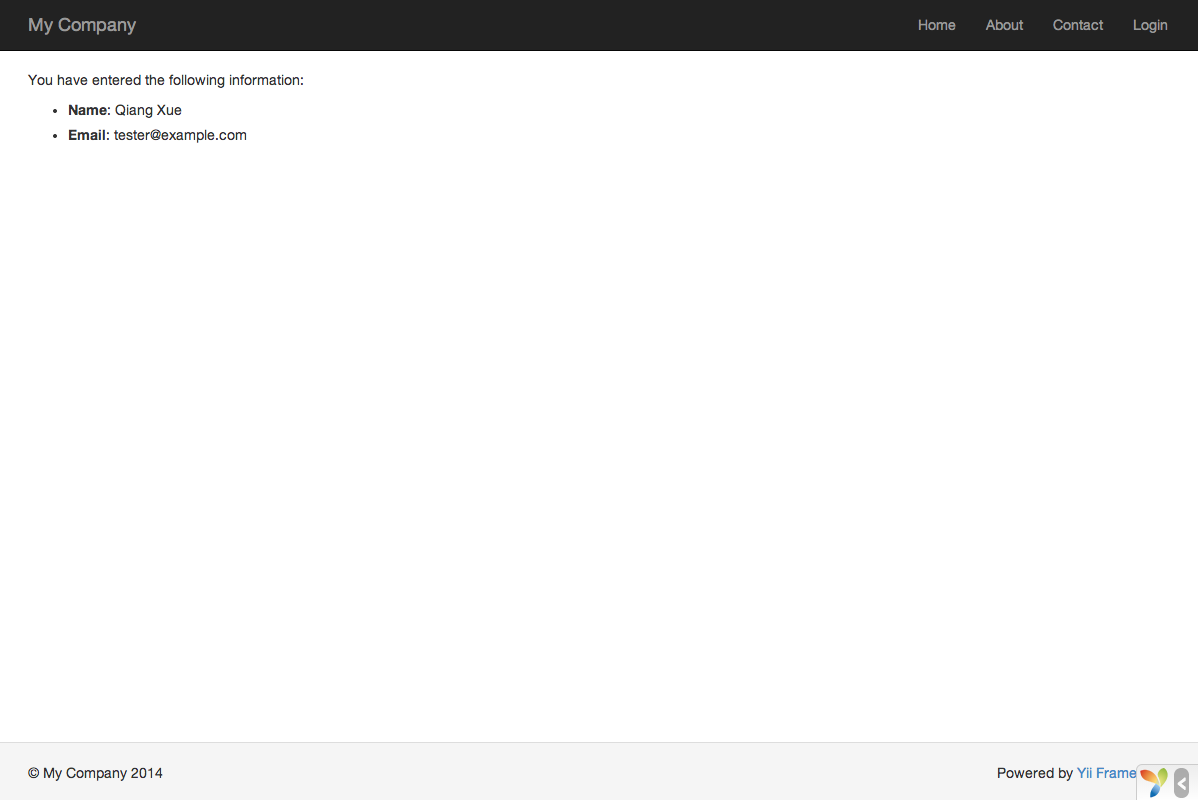
You have entered the following information:

  • : name) ?>
  • : email) ?>
``` The `entry` view displays an HTML form. It should be stored in the file `resources/views/site/entry.php`. ```php field($model, 'name') ?> field($model, 'email') ?>
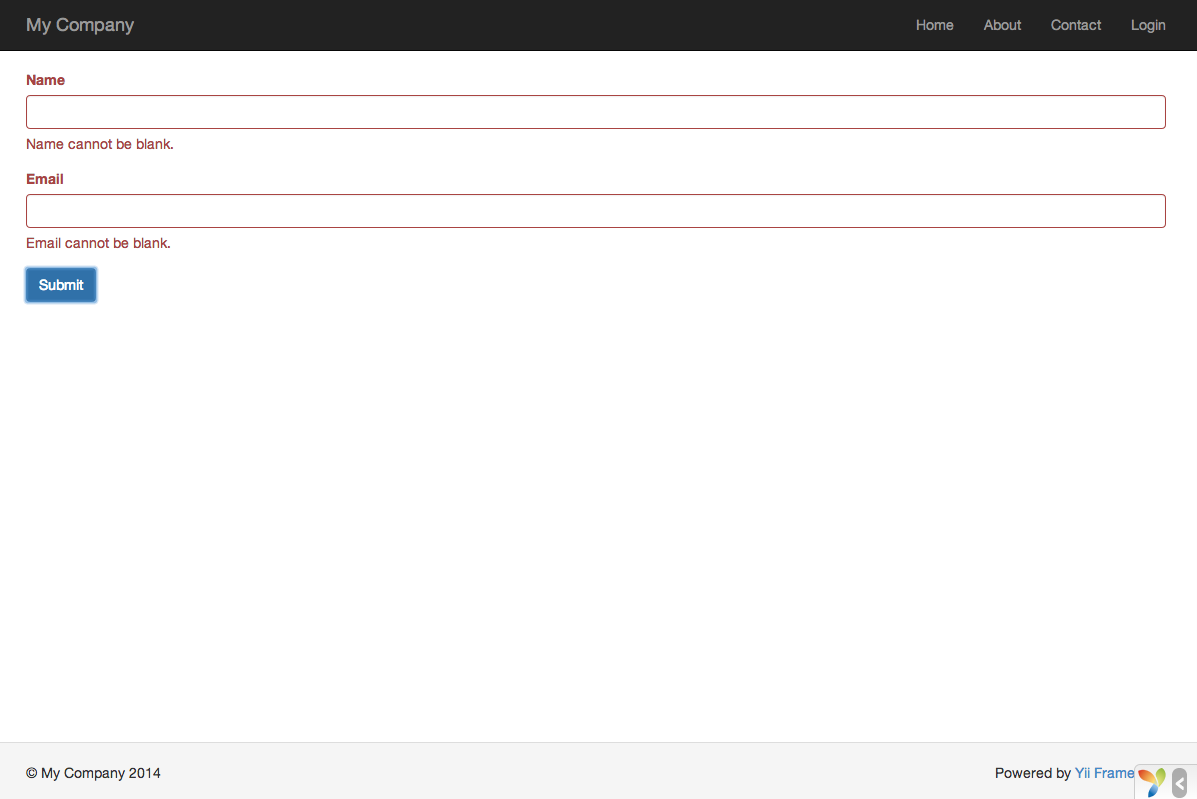
'btn btn-primary']) ?>
``` The view uses a powerful [widget](/docs/guide/structure-widgets/) called [ActiveForm](/docs/api/yii/widgets/activeform/) to build the HTML form. The `begin()` and `end()` methods of the widget render the opening and closing form tags, respectively. Between the two method calls, input fields are created by the [field()](/docs/api/yii/widgets/activeform/#method-field) method. The first input field is for the “name” data, and the second for the “email” data. After the input fields, the [`Html::submitButton()`](/docs/api/yii/helpers/basehtml/#method-submitButton) method is called to generate a submit button. ## Trying it Out To see how it works, use your browser to access the following URL: ```plaintext https://hostname/index.php?r=site%2Fentry ``` You will see a page displaying a form with two input fields. In front of each input field, a label indicates what data is to be entered. If you click the submit button without entering anything, or if you do not provide a valid email address, you will see an error message displayed next to each problematic input field. ![Form with Validation Errors](/docs/guide/images/start-form-validation.png) After entering a valid name and email address and clicking the submit button, you will see a new page displaying the data that you just entered. ![Confirmation of Data Entry](/docs/guide/images/start-entry-confirmation.png) ### Magic Explained You may wonder how the HTML form works behind the scene, because it seems almost magical that it can display a label for each input field and show error messages if you do not enter the data correctly without reloading the page. Yes, the data validation is initially done on the client-side using JavaScript, and secondarily performed on the server-side via PHP. [`ActiveForm`](/docs/api/yii/widgets/activeform/) is smart enough to extract the validation rules that you have declared in `EntryForm`, turn them into executable JavaScript code, and use the JavaScript to perform data validation. In case you have disabled JavaScript on your browser, the validation will still be performed on the server-side, as shown in the `actionEntry()` method. This ensures data validity in all circumstances. > Warning: Client-side validation is a convenience that provides for a better user experience. Server-side validation is always required, whether or not client-side validation is in place. The labels for input fields are generated by the `field()` method, using the property names from the model. For example, the label `Name` will be generated for the `name` property. You may customize a label within a view using the following code: ```php field($model, 'name')->label('Your Name') ?> field($model, 'email')->label('Your Email') ?> ``` ## Summary In this section of the guide, you have touched every part in the MVC architectural pattern. You have learned how to create a model class to represent the user data and validate said data. You have also learned how to get data from users and how to display data back in the browser. This is a task that could take you a lot of time when developing an application, but Yii provides powerful widgets to make this task very easy. In the next section, you will learn how to work with databases, which are needed in nearly every application. # Working with Databases > This section will describe how to create a new page that displays country data fetched from a database table named country. This section will describe how to create a new page that displays country data fetched from a database table named `country`. To achieve this goal, you will configure a database connection, create an [Active Record](/docs/guide/db-active-record/) class, define an [action](/docs/guide/structure-controllers/), and create a [view](/docs/guide/structure-views/). Through this tutorial, you will learn how to: * configure a DB connection, * define an Active Record class, * query data using the Active Record class, * display data in a view in a paginated fashion. Note that in order to finish this section, you should have basic knowledge and experience using databases. In particular, you should know how to create a database, and how to execute SQL statements using a DB client tool. ## Preparing the Database To begin, create a database named `yii2basic`, from which you will fetch data in your application. You may create an SQLite, MySQL, PostgreSQL, MSSQL or Oracle database, as Yii has built-in support for many database applications. For simplicity, MySQL will be assumed in the following description. Next, create a table named `country` in the database, and insert some sample data. You may run the following SQL statements to do so: ```sql CREATE TABLE `country` ( `code` CHAR(2) NOT NULL PRIMARY KEY, `name` CHAR(52) NOT NULL, `population` INT(11) NOT NULL DEFAULT '0' ) ENGINE=InnoDB DEFAULT CHARSET=utf8; INSERT INTO `country` VALUES ('AU','Australia',24016400); INSERT INTO `country` VALUES ('BR','Brazil',205722000); INSERT INTO `country` VALUES ('CA','Canada',35985751); INSERT INTO `country` VALUES ('CN','China',1375210000); INSERT INTO `country` VALUES ('DE','Germany',81459000); INSERT INTO `country` VALUES ('FR','France',64513242); INSERT INTO `country` VALUES ('GB','United Kingdom',65097000); INSERT INTO `country` VALUES ('IN','India',1285400000); INSERT INTO `country` VALUES ('RU','Russia',146519759); INSERT INTO `country` VALUES ('US','United States',322976000); ``` At this point, you have a database named `yii2basic`, and within it a `country` table with three columns, containing ten rows of data. ## Configuring a DB Connection Before proceeding, make sure you have installed both the [PDO](https://www.php.net/manual/en/book.pdo.php) PHP extension and the PDO driver for the database you are using (e.g. `pdo_mysql` for MySQL). This is a basic requirement if your application uses a relational database. The Yii 22.0 Basic Project Template uses SQLite by default. This tutorial uses a separate MySQL database for its examples. With `pdo_mysql` installed, adapt `config/db.php` to that database, for example: ```php 'yii\db\Connection', 'dsn' => 'mysql:host=localhost;dbname=yii2basic', 'username' => 'root', 'password' => '', 'charset' => 'utf8', ]; ``` The `config/db.php` file is a typical file-based [configuration](/docs/guide/concept-configurations/) tool. This particular configuration file specifies the parameters needed to create and initialize a [`Connection`](/docs/api/yii/db/connection/) instance through which you can make SQL queries against the underlying database. The DB connection configured above can be accessed in the application code via the expression `Yii::$app->db`. If you need to work with databases support for which isn’t bundled with Yii, check the following extensions: * [Informix](https://github.com/edgardmessias/yii2-informix) * [IBM DB2](https://github.com/edgardmessias/yii2-ibm-db2) * [Firebird](https://github.com/edgardmessias/yii2-firebird) * [MariaDB](https://github.com/sam-it/yii2-mariadb) ## Creating an Active Record To represent and fetch the data in the `country` table, create an [Active Record](/docs/guide/db-active-record/)-derived class named `Country`, and save it in the file `src/models/Country.php`. ```php orderBy('name')->all(); // get the row whose primary key is "US" $country = Country::findOne('US'); // displays "United States" echo $country->name; // modifies the country name to be "U.S.A." and save it to database $country->name = 'U.S.A.'; $country->save(); ``` ## Creating an Action To expose the country data to end users, you need to create a new action. Instead of placing the new action in the `site` controller, like you did in the previous sections, it makes more sense to create a new controller specifically for all actions related to the country data. Name this new controller `CountryController`, and create an `index` action in it, as shown in the following. ```php 5, 'totalCount' => $query->count(), ]); $countries = $query->orderBy('name') ->offset($pagination->offset) ->limit($pagination->limit) ->all(); return $this->render('index', [ 'countries' => $countries, 'pagination' => $pagination, ]); } } ``` Save the above code in the file `src/controllers/CountryController.php`. First, the `index` action calls `Country::find()`. This [`ActiveRecord::find()`](/docs/api/yii/db/activerecord/#method-find) method creates an [`ActiveQuery`](/docs/api/yii/db/activequery/) object, which provides methods to access data from the `country` table. To limit the number of countries returned in each request, the query object is paginated with the help of a [`Pagination`](/docs/api/yii/data/pagination/) object. The `Pagination` object serves two purposes: * Sets the `offset` and `limit` clauses for the SQL statement represented by the query object so that it only returns a single page of data at a time (at most 5 rows in a page). * It’s used in the view to display a pager consisting of a list of page buttons, as will be explained in the next subsection. Next, [all()](https://www.yiiframework.com/doc/api/2.0/yii-db-activequery#all\(\)-detail) returns all `country` records based on the query results. At the end of the code, the `index` action renders a view named `index`, and passes the returned country data as well as the pagination information to it. ## Creating a View Under the `resources/views` directory, first create a sub-directory named `country`. This folder will be used to hold all the views rendered by the `country` controller. Within the `resources/views/country` directory, create a file named `index.php` containing the following: ```php
Countries

  • code} ({$country->name})") ?>: population ?>
$pagination]) ?> ``` The view has two sections relative to displaying the country data. In the first part, the provided country data is traversed and rendered as an unordered HTML list. In the second part, a [`LinkPager`](/docs/api/yii/widgets/linkpager/) widget is rendered using the pagination information passed from the action. The `LinkPager` widget displays a list of page buttons. Clicking on any of them will refresh the country data in the corresponding page. ## Trying it Out To see how all of the above code works, use your browser to access the following URL: ```plaintext https://hostname/index.php?r=country%2Findex ``` ![Country List](/docs/guide/images/start-country-list.png) At first, you will see a page showing five countries. Below the countries, you will see a pager with four buttons. If you click on the button “2”, you will see the page display another five countries in the database: the second page of records. Observe more carefully and you will find that the URL in the browser also changes to ```plaintext https://hostname/index.php?r=country%2Findex&page=2 ``` Behind the scenes, [Pagination](/docs/api/yii/data/pagination/) is providing all of the necessary functionality to paginate a data set: * Initially, [Pagination](/docs/api/yii/data/pagination/) represents the first page, which reflects the country SELECT query with the clause `LIMIT 5 OFFSET 0`. As a result, the first five countries will be fetched and displayed. * The [LinkPager](/docs/api/yii/widgets/linkpager/) widget renders the page buttons using the URLs created by [Pagination](/docs/api/yii/data/pagination/#method-createUrl). The URLs will contain the query parameter `page`, which represents the different page numbers. * If you click the page button “2”, a new request for the route `country/index` will be triggered and handled. [Pagination](/docs/api/yii/data/pagination/) reads the `page` query parameter from the URL and sets the current page number to 2. The new country query will thus have the clause `LIMIT 5 OFFSET 5` and return the next five countries for display. ## Summary In this section, you learned how to work with a database. You also learned how to fetch and display data in pages with the help of [`Pagination`](/docs/api/yii/data/pagination/) and [`LinkPager`](/docs/api/yii/widgets/linkpager/). In the next section, you will learn how to use the powerful code generation tool, called [Gii](https://www.yiiframework.com/extension/yiisoft/yii2-gii/doc/guide), to help you rapidly implement some commonly required features, such as the Create-Read-Update-Delete (CRUD) operations for working with the data in a database table. As a matter of fact, the code you have just written can all be automatically generated in Yii using the Gii tool. # Generating Code with Gii > This section will describe how to use Gii to automatically generate code that implements some common Web site features. This section will describe how to use [Gii](https://www.yiiframework.com/extension/yiisoft/yii2-gii/doc/guide) to automatically generate code that implements some common Web site features. Using Gii to auto-generate code is simply a matter of entering the right information per the instructions shown on the Gii Web pages. Through this tutorial, you will learn how to: * enable Gii in your application, * use Gii to generate an Active Record class, * use Gii to generate the code implementing the CRUD operations for a DB table, * customize the code generated by Gii. ## Starting Gii [Gii](https://www.yiiframework.com/extension/yiisoft/yii2-gii/doc/guide) is provided in Yii as a [module](/docs/guide/structure-modules/). You can enable Gii by configuring it in the [modules](/docs/api/yii/base/module/#property-modules) property of the application. Depending upon how you created your application, you may find the following code is already provided in the `config/web.php` configuration file: ```php $config = [ ... ]; if (YII_ENV_DEV) { $config['bootstrap'][] = 'gii'; $config['modules']['gii'] = [ 'class' => 'yii\gii\Module', ]; } ``` The above configuration states that when in [development environment](/docs/guide/concept-configurations/#environment-constants), the application should include a module named `gii`, which is of class `yii\gii\Module`. If you check the [entry script](/docs/guide/structure-entry-scripts/) `public/index.php` of your application, you will find the following line, which essentially makes `YII_ENV_DEV` to be `true`. ```php defined('YII_ENV') or define('YII_ENV', 'dev'); ``` Thanks to that line, your application is in development mode, and will have already enabled Gii, per the above configuration. You can now access Gii via the following URL: ```plaintext https://hostname/index.php?r=gii ``` ```php 'gii' => [ 'class' => 'yii\gii\Module', 'allowedIPs' => ['127.0.0.1', '::1', '192.168.0.*', '192.168.178.20'] // adjust this to your needs ], ``` ![Gii](/docs/guide/images/start-gii.png) ### Output paths in the Yii 22.0 template The Gii generators use Yii aliases to locate output files. In the Basic Project Template, Composer maps `app` to `src/`, but `@app` still points to the application root. Add these entries to the existing `aliases` configuration in `config/web.php` before generating models or controllers: ```php 'aliases' => [ // Keep the existing asset aliases. '@app/models' => dirname(__DIR__) . '/src/models', '@app/controllers' => dirname(__DIR__) . '/src/controllers', ], ``` These aliases control generator paths; they do not replace the [Composer autoload mapping](/docs/guide/concept-autoloading/). Inspect Gii’s preview before writing files. The screenshots below show the older template layout; use the paths listed in this text for Yii 22.0. ## Generating an Active Record Class To use Gii to generate an Active Record class, select the “Model Generator” (by clicking the link on the Gii index page). Then fill out the form as follows: * Table Name: `country` * Model Class: `Country` * Namespace: `app\models` ![Model Generator](/docs/guide/images/start-gii-model.png) Next, click on the “Preview” button. You will see `src/models/Country.php` is listed in the resulting class file to be created. You may click on the name of the class file to preview its content. When using Gii, if you have already created the same file and would be overwriting it, click the `diff` button next to the file name to see the differences between the code to be generated and the existing version. ![Model Generator Preview](/docs/guide/images/start-gii-model-preview.png) When overwriting an existing file, check the box next to “overwrite” and then click the “Generate” button. If creating a new file, you can just click “Generate”. Next, you will see a confirmation page indicating the code has been successfully generated. If you had an existing file, you’ll also see a message indicating that it was overwritten with the newly generated code. ## Generating CRUD Code CRUD stands for Create, Read, Update, and Delete, representing the four common tasks taken with data on most Web sites. To create CRUD functionality using Gii, select the “CRUD Generator” (by clicking the link on the Gii index page). For the “country” example, fill out the resulting form as follows: * Model Class: `app\models\Country` * Search Model Class: `app\models\CountrySearch` * Controller Class: `app\controllers\CountryController` * View Path: `@app/resources/views/country` ![CRUD Generator](/docs/guide/images/start-gii-crud.png) Next, click on the “Preview” button. You will see a list of files to be generated, as shown below. ![CRUD Generator Preview](/docs/guide/images/start-gii-crud-preview.png) If you previously created the `src/controllers/CountryController.php` and `resources/views/country/index.php` files (in the databases section of the guide), check the “overwrite” box to replace them. (The previous versions did not have full CRUD support.) ## Trying it Out To see how it works, use your browser to access the following URL: ```plaintext https://hostname/index.php?r=country%2Findex ``` You will see a data grid showing the countries from the database table. You may sort the grid, or filter it by entering filter conditions in the column headers. For each country displayed in the grid, you may choose to view its details, update it, or delete it. You may also click on the “Create Country” button on top of the grid to be provided with a form for creating a new country. ![Data Grid of Countries](/docs/guide/images/start-gii-country-grid.png) ![Updating a Country](/docs/guide/images/start-gii-country-update.png) The following is the list of the files generated by Gii, in case you want to investigate how these features are implemented, or to customize them: * Controller: `src/controllers/CountryController.php` * Models: `src/models/Country.php` and `src/models/CountrySearch.php` * Views: `resources/views/country/*.php` ## Summary In this section, you have learned how to use Gii to generate the code that implements complete CRUD functionality for content stored in a database table. # Looking Ahead > If you've read through the entire "Getting Started" chapter, you have now created a complete Yii application. If you’ve read through the entire “Getting Started” chapter, you have now created a complete Yii application. In the process, you have learned how to implement some commonly needed features, such as getting data from users via an HTML form, fetching data from a database, and displaying data in a paginated fashion. You have also learned how to use [Gii](https://www.yiiframework.com/extension/yiisoft/yii2-gii/doc/guide) to generate code automatically. Using Gii for code generation turns the bulk of your Web development process into a task as simple as just filling out some forms. This section will summarize the Yii resources available to help you be more productive when using the framework. * Documentation * [The Definitive Guide](https://www.yiiframework.com/doc-2.0/guide-README.html): As the name indicates, the guide precisely defines how Yii should work and provides general guidance about using Yii. It is the single most important Yii tutorial, and one that you should read before writing any Yii code. * [The Class Reference](https://www.yiiframework.com/doc-2.0/index.html): This specifies the usage of every class provided by Yii. It should be mainly used when you are writing code and want to understand the usage of a particular class, method, property. Usage of the class reference is best only after a contextual understanding of the entire framework. * [The Wiki Articles](https://www.yiiframework.com/wiki/?tag=yii2): The wiki articles are written by Yii users based on their own experiences. Most of them are written like cookbook recipes, and show how to solve particular problems using Yii. While the quality of these articles may not be as good as the Definitive Guide, they are useful in that they cover broader topics and can often provide ready-to-use solutions. * [Books](https://www.yiiframework.com/books) * [Extensions](https://www.yiiframework.com/extensions/): Yii boasts a library of thousands of user-contributed extensions that can be easily plugged into your applications, thereby making your application development even faster and easier. * Community * Forum: * IRC chat: The #yii channel on the Libera () * Slack channel: * Gitter chat: * GitHub: * Facebook: * Twitter: * LinkedIn: * Stackoverflow: # About > Meet the maintainer, understand the catalog's independence, and explore the scope of professional support. PHP Ecosystem is an independently maintained place to discover PHP libraries, Yii extensions, and practical documentation. The name is provisional while the site’s identity takes shape. ## Maintained by Wilmer Arambula Wilmer Arambula, known as [terabytesoftw on GitHub](https://github.com/terabytesoftw), brings together work from [Yii2 Extensions, PHP Forge, and UI Awesome](/docs/projects/). The portal connects that work with its guides, package requirements, and source repositories. Community packages remain the work of their named maintainers. Their presence here does not transfer authorship, maintenance, or support responsibility to Wilmer. ## An independent resource This portal is not an official Yii website and does not speak for the Yii team. Official framework resources are identified in the [documentation gateway](/docs/documentation/) and the [Yii3 guide](/docs/ecosystems/yii3/). Catalog review checks the information supporting a listing. It is not a security audit, certification, or guarantee that a package suits a particular application. The [contribution policy](/docs/contribute/) explains how records are proposed, reviewed, corrected, and removed. ## Professional support Professional work starts with a specific application problem and an agreed scope. Useful starting points include: * An integration with defined package versions, acceptance checks, and a handoff; * an upgrade assessment covering dependencies, compatibility risks, and a migration plan; * a focused code or architecture review with documented findings and next steps. Review [Wilmer’s public GitHub profile](https://github.com/terabytesoftw) for his work and the contact options he chooses to publish. Availability, deliverables, and terms must be agreed before an engagement begins. A catalog entry does not include professional support. ## Maintenance sponsorship Sponsorship supports ongoing maintenance and is separate from a client engagement. Any future sponsor acknowledgment will be identified clearly. Sponsorship does not buy catalog acceptance, compatibility claims, or preferential ordering. # Propose a package > Submit a Yii2, Yii3, or PHP package for human review through a data pull request or a GitHub issue. Propose a useful extension or library for Yii2, Yii3, or framework-independent PHP. Authors and users may submit packages. State your relationship to the project and provide public evidence for its requirements. ## What a proposal needs * The Composer name, public repository, concise purpose, and documentation URL; * the maintainer’s name and public project or profile URL; * the license and a link to its source; * the exact PHP constraint from the selected revision’s `composer.json`; * each claimed framework constraint and a source that supports it; * the release tag or branch, its full commit ID, and links to the inspected source; * your relationship to the package and any known compatibility limitations. A branch name can move. Pin the inspected commit so that reviewers can understand which source supports a claim. Link to requirements, integration documentation, or published test evidence for that revision. Distinguish a declared requirement from a tested combination; a green badge alone does not establish every supported version. Use the exact framework line when describing Yii compatibility. A package for Yii 22.0 is not automatically compatible with Yii 2.0 or Yii3. A reusable PHP library needs evidence for a claimed framework integration too. ## Submit a data pull request The canonical catalog is one JSON record per package under `src/data/catalog/` in the [site repository](https://github.com/yii2-framework/docs). Copy an existing record as a starting point and keep the proposal limited to catalog data. 1. Check the [catalog](/docs/packages/) for an existing entry. Update that record when the package is already listed. 2. Supply the package’s `id`, `name`, `summary`, `family`, `ecosystems`, `kind`, `php`, `compatibility`, `docsUrl`, `repository`, `license`, `maintainer`, `relationship`, `relationshipEvidence`, and `provenance` fields using the existing record structure. 3. Set an independent proposal’s `family` and `relationship` to `community`. Preserve the real maintainer attribution and provide an immutable HTTPS source in `relationshipEvidence`. The other relationship values, `maintained` and `contributed`, require evidence of the portal maintainer’s role. Project collection membership is reviewed separately. 4. Include a constraint and evidence link for each compatibility entry. Record the inspected source and review date in `provenance`; do not imply that the portal maintainer has already approved your proposal. 5. Explain the addition or correction in the pull request and respond to any request for evidence. The catalog is separate from `packages.json` and `tools.json`, which control documentation imports and executable build work. A package proposal must not add scripts, Composer dependencies, PHP demos, MDX, or agent skills. The catalog does not install or execute submitted packages. ## Prefer a form? [Open a package proposal issue](https://github.com/yii2-framework/docs/issues/new) and provide the information listed above. The repository’s package proposal form collects the same evidence when available. An accepted issue still needs a reviewed catalog data pull request. Use public repository links. Do not include credentials, private application code, personal contact details, or uploaded package archives. ## How review works A moderator checks relevance, attribution, license, evidence, and the catalog record. The proposal may need more information or be declined with an explanation. Passing a data validation check does not approve a listing. Publication requires human approval and the normal site release process. An issue or an open pull request is not a published listing. Review does not certify security, guarantee maintenance, or establish official Yii endorsement. Paid work and sponsorship do not determine acceptance or search ordering. ## Correct or remove a listing Open a data pull request or a [catalog issue](https://github.com/yii2-framework/docs/issues/new) with the package ID, the affected claim, and the supporting source. The package maintainer can also request a correction or removal through that channel. Report package bugs to the package’s own tracker. For a security vulnerability, follow the owning project’s security reporting policy and avoid posting sensitive details in a public catalog issue. # Docker > Debian Trixie images with Apache 2.4, PHP-FPM and HTTP/2 for Yii2 applications *Debian Trixie images with Apache 2.4, PHP-FPM and HTTP/2 for Yii2 applications* These are container images, not Composer extensions. Use them to run an existing Yii application; they do not create an application or install the Yii framework by themselves. Each image runs Apache (event MPM, HTTP/2, HTTPS) in front of PHP-FPM under `supervisord`, serves the application from `/var/www/app/web`, and prepares the application at startup (directories, Composer, migrations) through an entrypoint configured with environment variables. ## Tags Images are published to `ghcr.io/yii2-extensions/apache` for `linux/amd64` and `linux/arm64`. | Tag | Example | Lifecycle | | --- | --- | --- | | `-debian-` | `8.5-debian-prod` | Rolling: rebuilt weekly from the latest release to pick up PHP and Debian security patches. | | `-debian--v` | `8.5-debian-prod-v2.0.0` | Frozen at release time. | | `latest` | `latest` | Rolling: the `prod` variant of the newest stable PHP version (currently 8.5). | * PHP versions: `8.3`, `8.4`, `8.5`. PHP 8.6 is built in CI from its release candidate as an experimental job and is not published until it is stable. * Variants: `prod`, `dev`, `full`. Rolling tags move when the release workflow rebuilds them; an existing container does not update itself. Pull the selected tag and recreate your container to use a newer image. Use a frozen release tag, or pin the registry digest, when you need a fixed image. Verify availability before changing versions: ```bash docker buildx imagetools inspect ghcr.io/yii2-extensions/apache:8.5-debian-dev-v2.0.0 ``` The release workflow publishes stable versions only. Locally generated Bake tags, particularly PHP 8.6 tags, are not evidence that those images exist in the registry. ## Quick start First install [Docker Engine](https://docs.docker.com/engine/install/) or Docker Desktop and confirm `docker info` succeeds. Docker Compose v2 or newer is needed only for Compose examples; Buildx is needed to build these images. Start in an existing application root containing `composer.json` and a Web entry point. The default document root is `web/`; the [Yii 22.0 basic template on branch `22`](https://github.com/yiisoft/yii2-app-basic/tree/22/public) uses `public/` and needs the setting described in the installation guide. Match the application’s own framework and PHP version constraints. See [installation](/docs/development-tools/docker/installation/) for the complete setup. Run the `dev` variant against that application in the current directory. On Linux, pass your own user so the files the container creates (`vendor/`, `runtime/`, `web/assets/`) belong to you: ```bash docker run -d --name app --user "$(id -u):$(id -g)" -p 127.0.0.1:8080:80 -p 127.0.0.1:8443:443 -v "$PWD":/var/www/app \ ghcr.io/yii2-extensions/apache:8.5-debian-dev-v2.0.0 ``` The application answers on `http://localhost:8080` and, with a generated self-signed certificate, on `https://localhost:8443`. Composer installs the dependencies at startup when `vendor/` is missing, as the container user, so the project directory must be writable by it. Without `--user` the stack runs as `www-data` (UID 33), which can suit Docker Desktop. A named volume must also have suitable ownership; mounting one does not grant UID 33 write access automatically. On runtimes that keep ports below 1024 privileged (Kubernetes, `--network host`), set `APACHE_HTTP_PORT=8080` and `APACHE_HTTPS_PORT=8443` and map `-p 8080:8080 -p 8443:8443` instead. With Docker Compose, save this as `compose.yaml` in the application root: ```yaml services: app: image: ghcr.io/yii2-extensions/apache:8.5-debian-dev-v2.0.0 user: "${APP_UID:?Set APP_UID}:${APP_GID:?Set APP_GID}" ports: - "127.0.0.1:8080:80" - "127.0.0.1:8443:443" volumes: - .:/var/www/app environment: YII_ENV: dev YII_DEBUG: "1" FAIL_ON_COMPOSER_ERROR: "true" ``` ```bash APP_UID="$(id -u)" APP_GID="$(id -g)" docker compose up -d docker compose logs app curl --fail http://127.0.0.1:8080/health ``` `YII_ENV` and `YII_DEBUG` are available to PHP, but your application entry scripts must read them; setting container variables does not override constants already defined by the application. The health endpoint checks the stack, so also request an application route. [Usage examples](/docs/development-tools/docker/examples/) cover CLI commands and cleanup. For production, build an application image on top of `prod` so the code and its dependencies are part of the image: ```dockerfile FROM ghcr.io/yii2-extensions/apache:8.5-debian-prod-v2.0.0 COPY --chown=www-data:www-data . /var/www/app RUN composer install --no-dev --optimize-autoloader --no-interaction --no-progress ``` Keep credentials, `.env`, `.git`, local `vendor/`, `node_modules/`, runtime files, and uploads out of the build context with an application `.dockerignore`. Include `composer.lock`; decide which application Composer scripts and plugins may run during the build. The image does not configure your database or persist uploaded files. ## Variants | Variant | PHP extensions | Tools | | --- | --- | --- | | `prod` | apcu, bcmath, gd, imagick, intl, opcache, pcntl, pdo_mysql, pdo_pgsql, redis, zip | Composer | | `dev` | `prod` plus memcached, mongodb, soap, xdebug, yaml | Composer, Node.js 24, npm | | `full` | `dev` plus oci8, pdo_oci, pdo_sqlsrv, sqlsrv, tidy | Composer, Node.js 24, npm, Oracle Instant Client, Microsoft ODBC Driver 18 | * `prod`: OPcache without timestamp validation and with the tracing JIT, session cookies restricted to HTTPS (`session.cookie_secure`) and `SameSite=Strict`, no Composer install at startup by default. * `dev`: OPcache revalidates files on every request, JIT disabled, Xdebug loaded. * `full`: `dev` plus the Oracle and SQL Server drivers and assertions enabled, JIT disabled as in `dev` (Xdebug is loaded); intended for test suites that cover every database driver. Compressed size of the PHP 8.5 images: | Variant | v1.1.0 | v2.0.0 | | --- | --- | --- | | `prod` | 232.9 MiB | 125.1 MiB | | `dev` | 235.3 MiB | 175.4 MiB | | `full` | 275.6 MiB | 215.4 MiB | ## Configuration The most common settings are listed below. See the [configuration reference](/docs/development-tools/docker/configuration/) for every variable, its default and the startup sequence. | Variable | Default | Description | | --- | --- | --- | | `APACHE_DOCUMENT_ROOT` | `/var/www/app/web` | Document root. | | `APACHE_HTTP_PORT` | `80` | HTTP port inside the container. | | `APACHE_HTTPS_PORT` | `443` | HTTPS port inside the container. | | `APACHE_SSL_ENABLED` | `true` | HTTPS with HTTP/2 on `APACHE_HTTPS_PORT`. | | `APACHE_SSL_REDIRECT` | `false` | Redirect HTTP to HTTPS. | | `SSL_AUTO_GENERATE` | `true` | Generate a self-signed certificate when none is mounted. | | `SSL_CERT_FILE` | `/etc/apache2/ssl/cert.pem` | Mounted certificate, readable by the container user. | | `SSL_KEY_FILE` | `/etc/apache2/ssl/key.pem` | Mounted private key, readable by the container user. | | `SKIP_COMPOSER_INSTALL` | `true` for `prod`, `false` otherwise | Skip `composer install` at startup. | | `YII_RUN_MIGRATIONS` | `false` | Run `yii migrate` at startup. | | `WAIT_FOR_SERVICES` | `false` | Wait for the `DB_*_HOST` services before starting. | | `ENABLE_HEALTH_ENDPOINT` | `true` | Serve the public health endpoint at `HEALTHCHECK_PATH`. | | `ENABLE_FPM_STATUS` | `false` | Serve the PHP-FPM status and ping pages to loopback only. | | `PHP_MEMORY_LIMIT` | `256M` | PHP memory limit; every `PHP_*` setting is listed in the docs. | To use your own certificate, mount it and point the entrypoint at it: ```bash docker run -d -p 80:80 -p 443:443 \ -v /path/to/certs:/run/certs:ro \ -e SSL_AUTO_GENERATE=false \ -e SSL_CERT_FILE=/run/certs/fullchain.pem \ -e SSL_KEY_FILE=/run/certs/privkey.pem \ -e APACHE_SSL_REDIRECT=true \ my-app ``` ## Users and privileges The whole stack (the entrypoint, `supervisord`, Apache and PHP-FPM) runs as the container user. The default and arbitrary-UID modes run without root; root mode is an explicit choice: * **`www-data`** (default, the image declares `USER www-data`). * **Any UID**, with `--user :` or Compose `user:`. The UID needs no account in the image, so files created in a bind-mounted project belong to the host user. The entrypoint cannot change ownership in this mode; when the application directory is not writable it says so and names the remedy. * **Root**, as an explicit opt-in with `--user root`: the entrypoint initializes as root (directories, `FIX_PERMS` before a Composer install), then Apache and PHP-FPM drop their workers to `www-data`, as in v1. Nothing root sources, executes or loads may be written by `www-data`, and the generated private key is readable by root only. Runtime state (pid files, sockets, the Apache runtime environment, generated certificates, PHP sessions and temporary files) lives under `/run/yii2` and is created at every start for the running user. In the two non-root modes no process can gain root, so the class of privilege escalation that the root mode must guard against does not exist. Ports 80 and 443 work as a non-root user under `docker run`, because Docker allows unprivileged processes to bind every port. Kubernetes, `--network host` and other runtimes that keep ports below 1024 privileged need `APACHE_HTTP_PORT` and `APACHE_HTTPS_PORT` (for example `8080` and `8443`); the entrypoint stops with that remedy when the configured port cannot be bound. The container side of the port mappings changes with them: `-p 8080:80` becomes `-p 8080:8080`. See the [configuration reference](/docs/development-tools/docker/configuration/#users-and-privileges) for the read-only root filesystem flags. ## Health checks * `GET /health` returns a JSON status document produced by PHP-FPM. Change the path with `HEALTHCHECK_PATH` or disable it with `ENABLE_HEALTH_ENDPOINT=false`. * The Docker `HEALTHCHECK` runs the `healthcheck` command, which requests the reserved, loopback-only `/__health` path through Apache and PHP-FPM. The container becomes unhealthy when either of them stops answering. ## Extending the image The images contain neither the compiler toolchain nor the PHP source tarball. The included `install-extensions` command compiles extensions in a derived image in one step: ```dockerfile FROM ghcr.io/yii2-extensions/apache:8.5-debian-prod USER root RUN install-extensions amqp sockets USER www-data ``` The image runs as `www-data`, so every step that installs packages or extensions needs `USER root` first, and the image should switch back to `USER www-data` afterwards; `install-extensions` stops with that hint when it is not root. It accepts the extension names and version syntax of [`install-php-extensions`](https://github.com/mlocati/docker-php-extension-installer) (PECL and bundled extensions). It downloads the exact PHP source the image was built from and verifies its SHA-256 checksum, installs the toolchain, builds the extensions, then removes the toolchain, the source and the build-only packages while keeping the shared libraries the new extensions load. The build fails when a library is left unresolved or PHP reports a startup warning. The added size depends on the extensions and their runtime libraries. Ghostscript is not included, so Imagick reads and writes raster formats (JPEG, PNG, WebP, GIF and others) but not PDF, PS or EPS. Add it in a derived image when you need them: ```dockerfile USER root RUN apt-get update && apt-get install -y --no-install-recommends ghostscript && rm -rf /var/lib/apt/lists/* USER www-data ``` ## Upgrading from v1 Version 2 contains breaking changes. Review each item before switching tags. * **No toolchain in the image.** Images ship without compilers and PHP sources. Derived images that compile extensions use the included `install-extensions` command (see [Extending the image](#extending-the-image)). * **Runs as `www-data`.** The image declares `USER www-data` and the whole stack runs as the container user; `docker exec` defaults to `www-data`. Use `--user "$(id -u):$(id -g)"` for bind mounts on Linux (v1 changed the owner of the project to `www-data` instead), or `--user root` for the v1 behavior (root initialization, `FIX_PERMS`, workers as `www-data`). Derived images need `USER root` before installing packages or extensions and `USER www-data` after; application files copied into a derived image must be readable by the runtime user, and directories used by Composer or the application must be writable (the quick start uses `COPY --chown=www-data:www-data`). * **Runtime state moved to `/run/yii2`.** Pid files, the PHP-FPM socket (`/run/yii2/php/php-fpm.sock`), the supervisor socket, PHP sessions (`PHP_SESSION_PATH=/run/yii2/sessions`), PHP temporary files and the generated self-signed certificate (`/run/yii2/ssl`) are created at every start. Generated certificates are no longer written to `SSL_DIR` and do not survive a restart; mounted certificates must be readable by the container user, otherwise the container serves HTTP only and logs why. `/etc/apache2` and `/etc/apache2/ssl` belong to root. * **No `sudo`, `gosu`, `vim-tiny` or `brotli` CLI.** `www-data` no longer has passwordless `sudo`, and the entrypoint no longer re-executes itself as root. * **Node.js is no longer downloaded at startup.** `dev` and `full` include Node.js 24 and npm; `prod` does not. Build front-end assets in your application image or in a separate build stage. * **`prod` skips `composer install` by default.** Install dependencies in the application image, or set `SKIP_COMPOSER_INSTALL=false` to restore the v1 behavior. * **`FAIL_ON_*` flags are honored.** `FAIL_ON_SERVICE_TIMEOUT` and `FAIL_ON_COMPOSER_ERROR` default to `false`, so an unreachable service or a failed Composer install is logged and startup continues; v1 aborted the container. Set them to `true` to keep failing fast. `FAIL_ON_MIGRATION_ERROR` defaults to `true`. * **Health endpoint served from the image.** Nothing is written to `web/` any more; remove the `web/health/` directory that v1 created in the application. `/__health` is reserved. The container now turns unhealthy when PHP-FPM is down. * **No User-Agent filter.** Requests from clients whose User-Agent contains `bot`, `curl`, `wget`, `python` or `scan` are no longer rejected with 403. Block unwanted clients at your proxy or firewall if needed. * **Single virtual host file.** `sites-available/vhost-ssl.conf` and `sites-available/vhost-ssl-full.conf` are gone; `sites-available/vhost.conf` is driven by Apache defines and the entrypoint no longer rewrites configuration files. `APACHE_HTTPS_PORT` is not opened when `APACHE_SSL_ENABLED=false`. Images that replaced or patched these files must be updated. * **Apache defaults.** The ineffective `` block, the inert global rewrite rules and `07-rate-limiting.conf` are removed. Debian’s default configuration snippets are disabled, so the `Server` header is `Apache` and nothing is logged to files inside the container. * **Shorter `PHP_DISABLE_FUNCTIONS` default.** Web requests now block only the shell functions (`exec`, `passthru`, `shell_exec`, `system`, `proc_open`, `popen`); `parse_ini_file` and `show_source` are available again. The list is applied to the PHP-FPM master instead of the pool, so pools you add inherit it and cannot re-enable its functions with `php_admin_value[disable_functions]`; set the variable instead. * **PHP-FPM status is opt-in.** Set `ENABLE_FPM_STATUS=true` to serve `PHP_FPM_STATUS_PATH` and `PHP_FPM_PING_PATH` to loopback only. `/fpm-status-full` is replaced by `?full` on the status path. * **SQL Server drivers.** `sqlsrv` and `pdo_sqlsrv` 5.13 come from the extension installer instead of a patched 5.12.0 build. * **Xdebug configuration.** The unused `xdebug.ini` is removed; configure Xdebug with `XDEBUG_MODE` and `XDEBUG_CONFIG` (see the [configuration reference](/docs/development-tools/docker/configuration/#xdebug)). * **No JIT in `full`.** Xdebug made PHP disable the tracing JIT anyway and warn at every startup; `full` now turns it off like `dev`. `prod` keeps the tracing JIT. * **Inert Apache variables removed.** `APACHE_RUN_USER`, `APACHE_RUN_GROUP`, `APACHE_RUN_DIR`, `APACHE_PID_FILE` and `APACHE_LOCK_DIR` are no longer in the image environment. `/etc/apache2/envvars` always overrode them, so setting them never had an effect; drop them from your configuration. * **Published assets are served.** The Yii directory protection is anchored at `/var/www/app`, so files under `web/assets//widgets/` or `web/assets//vendor/` (jQuery UI, for example) no longer return 403. `APACHE_SSL_REDIRECT`, `SSL_AUTO_GENERATE`, `SSL_CERT_FILE`, `SSL_KEY_FILE`, `SSL_DIR`, `SSL_CHAIN_FILE`, `APACHE_DISABLE_OCSP_STAPLING`, `DEBUG_ENTRYPOINT`, `FORCE_COMPOSER_INSTALL`, `FIX_PERMS` and every `APACHE_*` and `PHP_*` tuning variable keep their names, defaults and behavior. ## Development See [testing](/docs/development-tools/docker/testing/) for isolated runtime validation and the distinction between the fixture and a real application test. No build command below publishes images; never use the `digest-*` targets for local validation. `docker-bake.hcl` is the single source of truth for PHP versions, variants and tags. Adding a PHP version is one entry in its `PHP` variable; an entry whose `base` differs from `version` (a release candidate such as `8.6-rc`) is experimental, excluded from the default group and never published. ```bash # Build every stable image (PHP 8.3 to 8.5, all variants) docker buildx bake # Build one image and load it into the local image store docker buildx bake image-8-5-dev --load # Build the experimental PHP 8.6 image docker buildx bake image-8-6-prod --load # Print every image target as JSON docker buildx bake --print image ``` Continuous integration: | Workflow | Trigger | Purpose | | --- | --- | --- | | `build.yml` | Pull requests, pushes to `main` | Builds every PHP version on both architectures. | | `release.yml` | Tags `vX.Y.Z`, weekly schedule, manual run | Publishes a release; the weekly run rebuilds the latest release and moves the rolling tags. | | `quality.yml` | Pull requests, pushes | Organization quality checks, Hadolint and ShellCheck. | | `security.yml` | Pull requests, pushes | Organization security checks. | ## Documentation Practical guides for selecting images, running Yii applications, and validating containers. * 📚 [Installation Guide](/docs/development-tools/docker/installation/): image tags, application mounts, and startup. * ⚙️ [Configuration Guide](/docs/development-tools/docker/configuration/): environment variables, ports, and permissions. * 💡 [Usage Examples](/docs/development-tools/docker/examples/): Compose, CLI commands, and application images. * 🔄 [Upgrading from v1](#upgrading-from-v1) * 🧪 [Testing Guide](/docs/development-tools/docker/testing/): isolated image checks and application validation. ## AI assistance AI agents: use the repository guides and source for the installed revision. For a [documentation deployment](https://yii2-framework.github.io/docs/) with `llms.txt`, read that index first. When Markdown export is enabled, append `index.md` to a page URL. * 🤖 [yii2-docker-environment skill](/docs/development-tools/docker/agents/): image selection, isolated checks, and cleanup. The [skill source](https://github.com/yii2-extensions/docker-images/blob/main/skills/yii2-docker-environment/SKILL.md) covers HTTP/HTTPS, PHP-FPM, and filesystem behavior. If the hosted sources are unavailable, use the repository guides and locally available skills. ## Our social networks [Follow on X](https://x.com/Terabytesoftw) ## License [License](https://github.com/yii2-extensions/docker-images/blob/main/LICENSE) ## Package * Source code and issues: [yii2-extensions/docker-images](https://github.com/yii2-extensions/docker-images). Star the repository if the package is useful to you. * Changelog: [CHANGELOG.md](https://github.com/yii2-extensions/docker-images/blob/main/CHANGELOG.md). # Use the Docker environment skill > The canonical source is skills/yii2-docker-environment/SKILL.md. It guides image selection, application setup, isolated validation and cleanup. The canonical source is [`skills/yii2-docker-environment/SKILL.md`](https://github.com/yii2-extensions/docker-images/blob/main/skills/yii2-docker-environment/SKILL.md). It guides image selection, application setup, isolated validation and cleanup. Its helper tests a dependency-free PHP fixture; validating an actual Yii application remains a separate step. ## Install and activate From the application root, use a local checkout until public listing confirms the skill exists on the default branch: ```bash npx skills@1.7.2 add /absolute/path/to/docker-images --list npx skills@1.7.2 add /absolute/path/to/docker-images \ --skill yii2-docker-environment --agent claude-code codex opencode ``` For published sources, first run `npx skills@1.7.2 add yii2-extensions/docker-images --list`, then use that source instead of the local path. Installation remains project-scoped. Keep the complete skill directory, including its `scripts/`; installing the skill does not install Docker or pull an image. The pinned installer uses `.agents/skills/` for Codex and OpenCode and `.claude/skills/` for Claude Code. This source checkout provides aliases in those two locations to the single canonical `skills/` source. Verify discovery in a fresh client session, then explicitly invoke `$yii2-docker-environment` in Codex, `/yii2-docker-environment` in Claude Code, or ask OpenCode to load it using its skill tool. An installer listing, a manual `SKILL.md` read, native discovery, native activation and a successful container test are separate evidence. Do not claim native client activation from a helper test. The documentation site distributes unchanged skill bundles with provenance and checksums; it does not own another editable copy. ## Verify the environment Run the [isolated helper](/docs/development-tools/docker/testing/#run-an-isolated-image-check), then run the application’s own checks with its actual dependencies and test configuration. Record the image ID, relevant assertions and missing prerequisites. A successful helper run proves its stack checks; native skill discovery and activation require separate client evidence and are not established by reading the skill manually. # Configuration reference > Every setting is an environment variable read when the container starts. Every setting is an environment variable read when the container starts. The default is the value set by the image or, when the image does not set the variable, the value the entrypoint falls back to. ## Startup sequence The entrypoint runs these steps in order and then starts the command. 1. Prints a banner with the variant, PHP version, user, `YII_ENV` and `YII_DEBUG`. 2. Creates the runtime state in `/run/yii2` and the application directories, configures Apache, fixes permissions (root). 3. Waits for the configured services, when enabled. 4. Runs `composer install`, unless skipped. 5. Runs the Yii migrations, when enabled. 6. Starts `supervisord` (Apache and PHP-FPM) or, when a command is given, runs that command instead. Step 2 creates `runtime`, `web/assets` and `web/uploads` under `/var/www/app` and writes the Apache ports and defines for HTTPS, the health endpoint and the PHP-FPM status. As root it also creates the `www-data` home directories and assigns `runtime` and `web/assets` to `www-data`, skipping any path that is or passes through a symbolic link; as any other user it creates what it can and logs the remedy for what it cannot write. Apache configuration lives under `/etc/apache2` and is static: the entrypoint only selects which sections apply through Apache defines, it never rewrites configuration files. ## Users and privileges The stack runs as the container user: `www-data` by default, any UID:GID with `--user` (no passwd entry needed), or root with `--user root`, where Apache and PHP-FPM drop their workers to `www-data`. `supervisord` cannot assign programs to another user unless it is root, so custom programs in `/etc/supervisor/conf.d` only keep `user=` lines in root mode. | Path | Content | | --- | --- | | `/run/yii2/apache` | `runtime.env` (defines, ports, certificate paths), pid file, locks, SSL caches | | `/run/yii2/php` | PHP-FPM socket | | `/run/yii2/supervisor` | `supervisord` pid file and control socket | | `/run/yii2/ssl` | Generated self-signed certificate and key | | `/run/yii2/sessions` | PHP sessions (`PHP_SESSION_PATH`) | | `/run/yii2/tmp` | PHP upload and temporary files | The entrypoint creates these directories at every start for the running user; in root mode they belong to root, except `sessions` and `tmp`, which belong to `www-data`. `/etc/apache2/envvars` sources `runtime.env` only when the calling user owns it, so run `docker exec` as the container user (the default) to get the same Apache configuration. In root mode nothing that root sources, executes or loads as configuration is writable by `www-data`; in the non-root modes no process can become root. A read-only root filesystem works with tmpfs mounts for the runtime state and the temporary directory, plus writable application directories when the application is part of the image: ```bash docker run -d --read-only --tmpfs /run/yii2:mode=1777 --tmpfs /tmp:mode=1777 \ --tmpfs /var/www/app/runtime:uid=33,gid=33 --tmpfs /var/www/app/web/assets:uid=33,gid=33 \ -p 127.0.0.1:8080:80 -p 127.0.0.1:8443:443 my-app ``` Ports 80 and 443 can be bound by a non-root user under `docker run` (Docker sets `net.ipv4.ip_unprivileged_port_start=0`). Kubernetes and `--network host` usually keep the 1024 limit: set `APACHE_HTTP_PORT=8080` and `APACHE_HTTPS_PORT=8443` and map or expose those ports. The entrypoint stops with this remedy when a configured port is privileged for the running user. ## Entrypoint | Variable | Default | Description | | --- | --- | --- | | `DEBUG_ENTRYPOINT` | `false` | `true` prints debug messages from the entrypoint. | | `CUSTOM_DIRECTORIES` | empty | Comma-separated list of extra directories to create and assign to `www-data` at startup (root only). | | `BUILD_TYPE` | variant | Set by the image to `prod`, `dev` or `full`. Selects the Composer defaults below; do not override it. | | `SERVICE_TYPE` | `apache-fpm` | Set by the image. Apache is configured only for `apache-fpm`; do not override it. | | `YII_ENV` | empty | Shown in the banner and the health response. `test` enables the service wait and skips migrations. | | `YII_DEBUG` | empty | Shown in the banner. | ## Service wait The entrypoint opens a TCP connection to every configured host until it succeeds or the timeout expires. | Variable | Default | Description | | --- | --- | --- | | `WAIT_FOR_SERVICES` | `false` | `true` enables the wait. It is also enabled when `YII_ENV=test`. | | `SKIP_DB_WAIT` | `false` | `true` disables the wait in every case. | | `SERVICE_WAIT_TIMEOUT` | `30` | Seconds to wait for each service. | | `FAIL_ON_SERVICE_TIMEOUT` | `false` | `true` exits with status 1 when a service is not reachable; `false` logs and continues. | Only services whose host variable is set are checked. | Host variable | Port variable | Default port | | --- | --- | --- | | `DB_MYSQL_HOST` | `DB_MYSQL_PORT` | `3306` | | `DB_PGSQL_HOST` | `DB_PGSQL_PORT` | `5432` | | `DB_REDIS_HOST` | `DB_REDIS_PORT` | `6379` | | `DB_MONGODB_HOST` | `DB_MONGODB_PORT` | `27017` | | `DB_MSSQL_HOST` | `DB_MSSQL_PORT` | `1433` | | `DB_ORACLE_HOST` | `DB_ORACLE_PORT` | `1521` | ## Composer `composer install` runs in `/var/www/app` as `www-data` (or as the current user when not root), only when `composer.json` exists, with `--no-interaction --no-progress --optimize-autoloader --prefer-dist`. `--no-dev` is added when `YII_ENV=prod` or `BUILD_TYPE=prod`. | Variable | Default | Description | | --- | --- | --- | | `SKIP_COMPOSER_INSTALL` | `true` for `prod`, `false` otherwise | `true` skips the install. An explicit value always wins over the variant default. | | `FORCE_COMPOSER_INSTALL` | `false` | `true` installs even when `vendor/` already exists. | | `FIX_PERMS` | `true` | As root, `true` runs `chown -R www-data:www-data` and `chmod -R g+rwX` on `/var/www/app` before the install. | | `FAIL_ON_COMPOSER_ERROR` | `false` | `true` exits with status 1 when the install fails; `false` logs and continues. | | `COMPOSER_HOME` | `/var/www/.composer` | Set by the image. | `FIX_PERMS` acts only when the install runs (not skipped, `composer.json` present, no `vendor/` unless `FORCE_COMPOSER_INSTALL=true`), as in v1: it gives `www-data` write access for Composer and leaves the application alone otherwise, so the `prod` default never makes the code writable by the web server. In root mode the entrypoint always hands `runtime/` and `web/assets/` to `www-data` when they exist. ## Yii migrations | Variable | Default | Description | | --- | --- | --- | | `YII_RUN_MIGRATIONS` | `false` | `true` runs `php yii migrate --interactive=0`. Skipped without `yii` or in `test`. | | `FAIL_ON_MIGRATION_ERROR` | `true` | `true` exits with status 1 when a migration fails; `false` logs and continues. | Migrations run as the application user: the selected non-root UID, or `www-data` in root mode. ## Apache and HTTPS | Variable | Default | Description | | --- | --- | --- | | `APACHE_HTTP_PORT` | `80` | HTTP port; the healthcheck uses it. | | `APACHE_HTTPS_PORT` | `443` | HTTPS listener and virtual host port. | | `APACHE_SSL_ENABLED` | `true` | `true` serves HTTPS with HTTP/2 on `APACHE_HTTPS_PORT`. `false` serves HTTP only and does not open `APACHE_HTTPS_PORT`. | | `APACHE_SSL_REDIRECT` | `false` | `true` redirects HTTP to HTTPS with status 301 (see below). | | `SSL_AUTO_GENERATE` | `true` | `true` generates a self-signed certificate (RSA 2048, valid 365 days) when the files are missing. | | `SSL_DIR` | `/etc/apache2/ssl` | Searched for mounted certificates and `openssl.conf`. | | `SSL_CERT_FILE` | `${SSL_DIR}/cert.pem` | Certificate file. | | `SSL_KEY_FILE` | `${SSL_DIR}/key.pem` | Private key file. | | `SSL_CHAIN_FILE` | empty | Optional chain file. A path that does not exist is ignored with a warning. | | `APACHE_DISABLE_OCSP_STAPLING` | `false` | `true` disables OCSP stapling. | | `APACHE_DOCUMENT_ROOT` | `/var/www/app/web` | Document root. | | `APACHE_ACCESS_LOG` | `/proc/self/fd/1` | Access log destination (JSON lines). | | `APACHE_ERROR_LOG_FILE` | `/proc/self/fd/2` | Error log destination. | | `APACHE_ARGUMENTS` | empty | Extra arguments for `apache2ctl`; the entrypoint appends its own `-D` defines. | `APACHE_DOCUMENT_ROOT` selects the application’s public directory; it does not relocate the application root `/var/www/app` used by startup, Composer or migrations. The sensitive-directory rule covers source directories at that application root and one level below it, excluding the configured public subtree. If you serve application files from another root or add aliases, configure access restrictions for those paths explicitly. The default configuration preserves application cookie attributes, error response bodies and dynamic JSON cache policy. Static MIME types retain their explicit cache lifetimes. The default CSP upgrades insecure resources on HTTPS responses only; an application-supplied CSP takes precedence. JSON access logs keep their field names and numeric types. Valid UTF-8 is preserved; bytes outside valid UTF-8 sequences are represented as `\u00HH`, one code point per original byte. Literal backslashes remain literal. Encoding runs inside Apache without a logging subprocess, using the selected access-log destination and Apache’s normal write-error reporting. The default unbuffered writer serializes whole records across workers. When HTTPS is enabled but no certificate is usable (files missing and `SSL_AUTO_GENERATE=false`, or generation failed), the container starts HTTP only and logs a warning. With `APACHE_SSL_REDIRECT=true`, requests for `localhost` are redirected to `https://localhost:8443`, matching a `8443:443` port mapping; requests for any other host name are redirected to port 443. With another `APACHE_HTTPS_PORT`, every host is redirected to that port. The internal `/__health` endpoint is never redirected. OCSP stapling is enabled only for certificates you provide: when `SSL_AUTO_GENERATE` is not `true` and `APACHE_DISABLE_OCSP_STAPLING` is not `true`. ### MPM event | Variable | Default | | --- | --- | | `APACHE_ASYNC_REQUEST_WORKER_FACTOR` | `2` | | `APACHE_GRACEFUL_SHUTDOWN_TIMEOUT` | `10` | | `APACHE_LISTEN_BACKLOG` | `511` | | `APACHE_MAX_CONNECTIONS_PER_CHILD` | `5000` | | `APACHE_MAX_REQUEST_WORKERS` | `800` | | `APACHE_MAX_SPARE_THREADS` | `100` | | `APACHE_MIN_SPARE_THREADS` | `25` | | `APACHE_SERVER_LIMIT` | `32` | | `APACHE_START_SERVERS` | `4` | | `APACHE_THREAD_LIMIT` | `64` | | `APACHE_THREADS_PER_CHILD` | `25` | Each variable maps to the [MPM directive](https://httpd.apache.org/docs/2.4/mod/mpm_common.html) of the same name. ## Health endpoints The health script is part of the image and runs through Apache and PHP-FPM. Application rewrite rules and `.htaccess` files do not apply to it, nothing is written to the application directory, and served health requests are not written to the access log. | Variable | Default | Description | | --- | --- | --- | | `ENABLE_HEALTH_ENDPOINT` | `true` | `false` disables the public endpoint; the path then reaches the application. | | `HEALTHCHECK_PATH` | `/health` | Public endpoint path, answered with and without a trailing slash. | | `SERVICE_NAME` | `yii2-app` | `service` field of the response. | | `APP_VERSION` | `unknown` | `version` field of the response. | Non-empty endpoint values are literal absolute URL paths. Whitespace, quotes, backslashes, queries and fragments are rejected at startup. FPM status and ping paths must also use the characters accepted by PHP-FPM. An empty `HEALTHCHECK_PATH` uses `/health`. The response is a JSON document with the fields `status` (`healthy`), `timestamp`, `service`, `version`, `environment` (`YII_ENV`), `php_version` and `checks` (whether `pdo`, `intl` and `opcache` are loaded). The path `/__health` is reserved. It is always enabled, answers loopback requests only and backs the `healthcheck` command that the Docker `HEALTHCHECK` runs, so the container turns unhealthy when Apache or PHP-FPM stops answering. It does not depend on `ENABLE_HEALTH_ENDPOINT` or `APACHE_SSL_REDIRECT`. ## PHP-FPM status | Variable | Default | Description | | --- | --- | --- | | `ENABLE_FPM_STATUS` | `false` | `true` serves the PHP-FPM status and ping pages to loopback only. | | `PHP_FPM_STATUS_PATH` | `/fpm-status` | Status page path. Append `?full` for the per-process status. | | `PHP_FPM_PING_PATH` | `/fpm-ping` | Ping path; answers `pong`. | Explicitly empty FPM values are passed through unchanged; they do not select the defaults. An empty status path disables FPM’s status page. Keep the ping path non-empty because an empty value can prevent FPM workers from starting. To disable the Apache status and ping routes, set `ENABLE_FPM_STATUS=false`. Query them from inside the container: ```bash docker exec app curl -s 'http://127.0.0.1/fpm-status?full' ``` ## PHP These values are applied to web requests through the PHP-FPM pool. The CLI uses the variant `php.ini` settings. `PHP_DISABLE_FUNCTIONS` is passed to the PHP-FPM master on its command line instead, so it also applies to any pool you add. A pool can disable more functions with `php_admin_value[disable_functions]` but cannot re-enable the ones in the variable; change the variable instead (empty disables nothing). When the variable is removed from the container environment (`-e PHP_DISABLE_FUNCTIONS` or Compose `environment: [PHP_DISABLE_FUNCTIONS]` while it is unset on the host), the entrypoint applies the default list. | Variable | Default | | --- | --- | | `PHP_ALLOW_URL_FOPEN` | `0` | | `PHP_ALLOW_URL_INCLUDE` | `0` | | `PHP_DATE_TIMEZONE` | `UTC` | | `PHP_DISABLE_FUNCTIONS` | `exec,passthru,shell_exec,system,proc_open,popen` | | `PHP_DISPLAY_ERRORS` | `0` | | `PHP_DISPLAY_STARTUP_ERRORS` | `0` | | `PHP_ERROR_LOG` | `/proc/self/fd/2` | | `PHP_ERROR_REPORTING` | `E_ALL & ~E_DEPRECATED` | | `PHP_EXPOSE` | `0` | | `PHP_LOG_ERRORS` | `1` | | `PHP_MAX_EXECUTION_TIME` | `30` | | `PHP_MAX_FILE_UPLOADS` | `20` | | `PHP_MAX_INPUT_TIME` | `60` | | `PHP_MAX_INPUT_VARS` | `1000` | | `PHP_MEMORY_LIMIT` | `256M` | | `PHP_POST_MAX_SIZE` | `50M` | | `PHP_SESSION_HANDLER` | `files` | | `PHP_SESSION_PATH` | `/run/yii2/sessions` | | `PHP_UPLOAD_MAX_FILESIZE` | `50M` | ## PHP-FPM pool | Variable | Default | | --- | --- | | `PHP_FPM_ACCESS_LOG` | `/proc/self/fd/1` | | `PHP_FPM_CATCH_OUTPUT` | `yes` | | `PHP_FPM_IDLE_TIMEOUT` | `10s` | | `PHP_FPM_LOG_LEVEL` | `warning` | | `PHP_FPM_MAX_CHILDREN` | `50` | | `PHP_FPM_MAX_REQUESTS` | `500` | | `PHP_FPM_MAX_SPARE` | `35` | | `PHP_FPM_MIN_SPARE` | `5` | | `PHP_FPM_PM` | `dynamic` | | `PHP_FPM_REQUEST_TIMEOUT` | `30` | | `PHP_FPM_RLIMIT_FILES` | `131072` | | `PHP_FPM_SLOWLOG_TIMEOUT` | `5s` | | `PHP_FPM_START_SERVERS` | `5` | Each variable maps to the [pool directive](https://www.php.net/manual/en/install.fpm.configuration.php) of the same role (`pm`, `pm.max_children`, `request_terminate_timeout`, `rlimit_files` and so on). The pool keeps the container environment (`clear_env = no`), so PHP code reads every variable passed to the container. ## Xdebug Xdebug is loaded in `dev` and `full` only. The PHP-FPM pool keeps the container environment (`clear_env = no`), so `XDEBUG_MODE` reaches web requests as well as CLI commands. The image ships no Xdebug settings; configure it with the standard [`XDEBUG_MODE`](https://xdebug.org/docs/all_settings#mode) and [`XDEBUG_CONFIG`](https://xdebug.org/docs/all_settings#XDEBUG_CONFIG) environment variables: ```bash docker run -d -p 127.0.0.1:8080:80 -v "$PWD":/var/www/app \ --add-host=host.docker.internal:host-gateway \ -e XDEBUG_MODE=debug \ -e XDEBUG_TRIGGER=1 \ -e XDEBUG_CONFIG="client_host=host.docker.internal client_port=9003" \ ghcr.io/yii2-extensions/apache:8.5-debian-dev ``` The IDE must listen on port 9003 and map `/var/www/app` to the local application root. Xdebug initiates the connection to the IDE; publishing container port 9003 is unnecessary. `XDEBUG_TRIGGER=1` is a local development example; omit it and trigger selected requests with the `XDEBUG_TRIGGER` query parameter or cookie instead. Use `XDEBUG_MODE=off` when debugging is not required and `XDEBUG_MODE=coverage` for coverage runs. See [testing](/docs/development-tools/docker/testing/) for CLI coverage and [usage examples](/docs/development-tools/docker/examples/) for the distinction between web and CLI PHP settings. # Use the images with an application > The commands below assume the quick start container named app and an application mounted at /var/www/app. The commands below assume the [quick start](/docs/development-tools/docker/#quick-start) container named `app` and an application mounted at `/var/www/app`. Use your actual container name for another environment. ## Composer and console commands `docker exec` runs the command directly as the container user; it does not rerun the entrypoint. Automatic Composer installation is skipped when `vendor/` exists, even if a lockfile changed. Reconcile dependencies explicitly: ```bash docker exec -e COMPOSER_HOME=/tmp/app-composer app composer install --no-interaction --prefer-dist docker exec app php yii help ``` Only run migrations against the database authorized for this application. The opt-in `YII_RUN_MIGRATIONS=true` executes `php yii migrate --interactive=0` at startup, except when `YII_ENV=test`. Service waits check TCP access, not credentials, schema readiness or database health. Use application-specific database variables in its PHP configuration; the image’s `DB_*_HOST` variables configure only the optional TCP wait. A one-off command given to `docker run IMAGE COMMAND` still runs entrypoint initialization first. Disable unwanted startup work explicitly for a test or diagnostic container: ```bash docker run --rm --user "$(id -u):$(id -g)" \ -e SKIP_COMPOSER_INSTALL=true -e SKIP_DB_WAIT=true -e YII_RUN_MIGRATIONS=false \ --mount type=bind,src="$PWD",dst=/var/www/app \ ghcr.io/yii2-extensions/apache:8.5-debian-dev-v2.0.0 php -v ``` ## Mounts and persistence A bind mount of the project at `/var/www/app` hides files copied there by a derived image, including `vendor/`. Do not expect dependencies baked into the image to remain visible under a full project mount. Install them into the mounted project or select application-owned mounts deliberately. The image does not declare application volumes. Files in a container’s writable layer disappear when it is removed. Persist uploads and any file-backed application state using paths chosen for the application. An empty named volume is not guaranteed to be writable by an arbitrary UID; initialize only a new volume you own, and verify permissions using the intended runtime user. Avoid `chmod -R 777` and recursive ownership changes to a shared checkout. PHP sessions default to `/run/yii2/sessions`. Treat runtime state and generated self-signed certificates as ephemeral; use mounted certificates and an application-managed session store when persistence is required. For an advanced template, set `APACHE_DOCUMENT_ROOT` to its actual `frontend/web` or `backend/web` and prepare its corresponding runtime and assets directories; the default paths target a single `web/` entry point. For `v2.0.0`, adapt the [directory override](/docs/development-tools/docker/installation/#match-the-document-root) to that path as well. ## Configuration and diagnostics ```bash docker logs --tail 100 app docker inspect --format '{{json .State.Health}}' app docker exec app healthcheck docker exec app apache2ctl configtest docker exec app php -v docker exec app php -m curl --fail http://127.0.0.1:8080/health curl --fail --insecure https://127.0.0.1:8443/health ``` `--insecure` is for the generated local certificate only. Use trusted certificates for deployed applications. `YII_ENV` and `YII_DEBUG` must be consumed by the application’s bootstrap. The health response echoes `YII_ENV` but does not prove that the application changed its own environment. Most `PHP_*` variables configure the PHP-FPM pool, not CLI PHP. `docker exec app php -i` cannot verify the effective Web request settings. Inspect a controlled application response for those; do not expose a public `phpinfo()` page. For a CLI process, pass `php -d memory_limit=512M ...` as needed. See [Xdebug configuration](/docs/development-tools/docker/configuration/#xdebug) and [test commands](/docs/development-tools/docker/testing/#test-an-application). With `ENABLE_FPM_STATUS=true`, query the status from inside the container because the endpoint is loopback-only: ```bash docker exec app curl --fail 'http://127.0.0.1/fpm-status?full' ``` Production `prod` uses HTTPS-only session cookies. For local HTTP testing, choose `dev` or supply an intentional PHP configuration; do not diagnose missing HTTP session cookies as a database failure. OPcache in `prod` does not validate file timestamps, so use `dev` for bind-mounted live edits. ## Stop an environment you own For the quick-start container, inspect its name and mounts before removing it: ```bash docker inspect --format '{{.Name}} {{json .Mounts}}' app docker stop app docker rm app ``` For Compose, run `docker compose down` from that application’s project. It preserves named volumes by default. Remove test volumes only when you created them for that test and no longer need their data. Do not use `prune`, bulk removal, or another project’s Compose configuration to clean up this environment. # Install a Docker environment > These images provide Apache, PHP-FPM, Composer and optional development tools for an existing Yii application. These images provide Apache, PHP-FPM, Composer and optional development tools for an existing Yii application. They are not PHP extensions and are not installed with `composer require`. ## Requirements * A running [Docker Engine](https://docs.docker.com/engine/install/) or Docker Desktop, with access to its daemon. * A Linux container platform: `linux/amd64` or `linux/arm64` for the published stable images. * An application with `composer.json`, preferably `composer.lock`, and a Web entry point such as `web/index.php`. * A PHP version compatible with that application’s Composer constraints. The image does not select a Yii version. * Network access to GHCR for pulls and to dependency sources if Composer must install packages. Docker Compose v2 or newer is optional. Building the image repository requires Docker Buildx with Bake support. Do not change daemon permissions or use privileged containers to work around an inaccessible Docker service. ```bash docker info docker compose version docker buildx version ``` ## Select and pull an image Read the [tag and variant tables](/docs/development-tools/docker/#tags). PHP 8.3, 8.4 and 8.5 have `prod`, `dev` and `full` variants; PHP 8.6 is an experimental local/CI build, excluded from release publication. `latest` currently selects PHP 8.5 `prod`, which skips Composer at startup and is not the development default. ```bash docker buildx imagetools inspect ghcr.io/yii2-extensions/apache:8.5-debian-dev-v2.0.0 docker pull ghcr.io/yii2-extensions/apache:8.5-debian-dev-v2.0.0 ``` Use the exact tag or digest you inspected. A successful local Bake build does not prove that a tag is published. A missing or denied manifest can mean a wrong tag or registry access problem; do not substitute an invented tag. Rolling tags require a pull and container recreation to adopt updates. ## Match the document root The image defaults to `/var/www/app/web`. The [Yii 22.0 basic template on branch `22`](https://github.com/yiisoft/yii2-app-basic/tree/22/public) uses `public/` instead; templates with `web/index.php` use the image default. From the Yii 22.0 application’s root, prepare its writable directories and pass its actual document root: For the `v2.0.0` image below, also adapt its virtual-host configuration so Apache reads the application’s `public/.htaccess` front-controller rules and serves published assets. Extract the configuration from the image you pulled, adjust its public-directory paths and keep both files outside the document root: ```bash mkdir -p docker runtime public/assets docker run --rm --pull never --entrypoint cat ghcr.io/yii2-extensions/apache:8.5-debian-dev-v2.0.0 \ /etc/apache2/conf-available/vhost-common.conf > docker/vhost-common.original.conf sed 's|/var/www/app/web|/var/www/app/public|g; s|(?!web/)|(?!public/)|g' \ docker/vhost-common.original.conf > docker/vhost-common.conf docker run -d --name yii22-app --user "$(id -u):$(id -g)" \ -p 127.0.0.1:8080:80 -p 127.0.0.1:8443:443 \ -e APACHE_DOCUMENT_ROOT=/var/www/app/public \ --mount type=bind,src="$PWD",dst=/var/www/app \ --mount type=bind,src="$PWD/docker/vhost-common.conf",dst=/etc/apache2/conf-available/vhost-common.conf,readonly \ ghcr.io/yii2-extensions/apache:8.5-debian-dev-v2.0.0 ``` With Compose, add `APACHE_DOCUMENT_ROOT: /var/www/app/public` to the service environment and the same read-only configuration mount. For another document root, adapt the replacement paths and the public-subtree exclusion in the extracted configuration. The entrypoint’s generic `web/assets` setup does not prepare every custom document root; ensure the application’s own public assets path is writable. Advanced templates similarly need the correct `frontend/web` or `backend/web` and their own runtime paths. See the [Yii installation guide](https://yii2-framework.github.io/docs/guide/start-installation/) for application creation; keep that separate from pulling a runtime image. ## Start the application Use the [README quick start](/docs/development-tools/docker/#quick-start) for `docker run` or Compose. On Linux, run as your host UID:GID and grant that user access to the mounted project. The entrypoint creates `runtime/`, `web/assets/` and `web/uploads/`; Composer also needs write access when it installs dependencies. Avoid root startup on a developer checkout: its Composer permission repair can recursively change project ownership. An arbitrary UID has a temporary Composer home during automatic installation. For a manual Composer command, set a writable cache explicitly as shown in [usage examples](/docs/development-tools/docker/examples/#composer-and-console-commands). Compose reads `.env` for interpolation; it does not automatically pass every value to the container. To use the repository’s [.env.example](https://github.com/yii2-extensions/docker-images/blob/main/.env.example), copy it to an application-specific file, review its development values, and reference it using `env_file:` or `docker run --env-file`. It is an example, not the image defaults: notably it disables automatic certificate generation and enables displayed PHP errors. Check container logs, `/health`, and an application route. A healthy PHP stack does not prove the application’s routes, database credentials or migrations work. [Configuration](/docs/development-tools/docker/configuration/) describes startup behavior and [testing](/docs/development-tools/docker/testing/) explains isolated validation. # Validate a Docker environment > Validate the image stack separately from the application. Validate the image stack separately from the application. The portable helper checks Apache, PHP-FPM and filesystem behavior; it does not install Yii, connect to a database or replace application tests. ## Run an isolated image check From a source checkout, pull a verified release and run the skill’s portable helper: ```bash docker pull ghcr.io/yii2-extensions/apache:8.5-debian-dev-v2.0.0 bash skills/yii2-docker-environment/scripts/validate.sh \ ghcr.io/yii2-extensions/apache:8.5-debian-dev-v2.0.0 ``` Requirements: Bash, Docker with a reachable local rootful Linux daemon without user-namespace remapping, curl, Python 3, and a non-root host user. The image must already exist locally. Rootless Docker and `userns-remap` change [bind-mount UID/GID mapping](https://docs.docker.com/engine/security/rootless/uid-gid-mapping/); the helper rejects those modes before creating a fixture or container. These are helper restrictions, not an image compatibility claim; use application-specific mount ownership when running images with remapped UIDs. Do not change daemon configuration just to run the helper. The helper uses a temporary dependency-free fixture, the host UID:GID, an exclusive container ID, and dynamically allocated loopback HTTP/HTTPS ports. It checks application output, effective FPM memory settings, HTTPS, the internal health command, blocked external access to `/__health`, CLI execution, expected tools, and host file ownership. It removes its own container and fixture on success or failure, preserving images and all unrelated resources. It does not run Composer scripts or application migrations. The helper uses a private `:Z` bind label for its disposable fixture so Docker can relabel it on SELinux hosts. Only the newly created fixture is relabeled; do not apply this option to system directories or shared application checkouts. See Docker’s [SELinux bind-mount guidance](https://docs.docker.com/engine/storage/bind-mounts/#configure-the-selinux-label). Local image builds use the public image targets: ```bash docker buildx bake image-8-5-dev --load bash skills/yii2-docker-environment/scripts/validate.sh ghcr.io/yii2-extensions/apache:8.5-debian-dev ``` The CI build workflow builds images; maintainer regression tests are private and run separately. Image builds may download dependencies. Avoid the `digest-*` Bake targets for local validation: they push to the registry. ## Test an application Install the application’s locked dependencies, including its development tools, before running its own test command. The image does not include PHPUnit, Codeception, a database server or a default test suite. From the quick-start container, when the application actually defines the `tests` Composer script: ```bash docker exec -e COMPOSER_HOME=/tmp/app-composer app composer install --no-interaction --prefer-dist docker exec app composer run tests ``` For an application with PHPUnit installed at `vendor/bin/phpunit`, use `dev` or `full` for Xdebug coverage: ```bash docker exec -e XDEBUG_MODE=coverage app php vendor/bin/phpunit --coverage-text ``` `XDEBUG_MODE=off` avoids debugger overhead for ordinary test runs. Configure dedicated test database credentials and application state before tests that write data. `YII_ENV=test` enables entrypoint service waiting and skips startup migrations; it does not select or isolate a database for your test suite. Record the image tag/digest, architecture, user, commands, assertions and any skipped checks. Read [configuration](/docs/development-tools/docker/configuration/) when web and CLI PHP settings differ, and [agent setup](/docs/development-tools/docker/agents/) for skill installation and activation checks. # Documentation > Find framework guides, package documentation, API references, and focused resources for coding agents. Start with the framework or package used by your application. The catalog brings projects together; each project’s requirements and documentation determine how to use it. ## Yii application development The local [Yii guide](/docs/guide/) and [API reference](/docs/api/) document the Yii 22.0 line. Existing translations remain available through the language selector. For Yii3, use the separate [Yii3 resources](/docs/ecosystems/yii3/). | Task | Start here | | --- | --- | | Set up a Yii 22.0 application | [Installing Yii](/docs/guide/start-installation/) | | Understand application structure | [Application structure](/docs/guide/structure-overview/) | | Look up a framework type | [API reference](/docs/api/) | | Choose an extension or PHP library | [Package catalog](/docs/packages/) | ## Package guides and examples Open a package’s catalog entry for its repository, requirements, source revision, and documentation. Imported guides and API references remain available at their existing addresses. | Integration | Documentation | | --- | --- | | Bootstrap widgets | [Bootstrap 6](/docs/extensions/bootstrap6/) | | File uploads | [FilePond](/docs/extensions/filepond/) | | Client-driven navigation | [Inertia](/docs/extensions/inertia/) | | Container-based development | [Docker environments](/docs/development-tools/docker/) | PHP Forge, UI Awesome, and community entries link to their owning projects when their documentation is hosted elsewhere. Catalog inclusion does not create a local copy or broaden a package’s compatibility. ## Coding agents and Markdown The [AI assistance guide](/docs/project/ai-agents/) explains skill selection, installation, discovery, and verification. Choose a skill for the installed package and the task at hand. For focused reading, use a page’s Markdown version by appending `index.md` to its URL. The [documentation index](/docs/llms.txt) lists English pages and topic bundles. The [skill index](/docs/skills/index.json) records the distributed bundles and their provenance. ## Improve the documentation The [site maintenance guide](/docs/project/) identifies the sources of guides, API references, and generated assets. To propose a package listing, follow the separate [catalog contribution workflow](/docs/contribute/). # Yii3 > Find official Yii3 documentation and understand the evidence required for Yii3 package listings. Use the official Yii3 resources for framework guidance. This portal provides a separate place to discover packages and review their declared compatibility. ## Official resources | Resource | Use it for | | --- | --- | | [Yii3 guide](https://yiisoft.github.io/docs/guide/) | Application concepts and development workflows | | [Yii3 API reference](https://www.yiiframework.com/doc/api/3.0) | Package APIs | | [Yii3 community cookbook](https://yiisoft.github.io/docs/cookbook/) | Recipes contributed to the Yii3 documentation project | These are external resources linked by the [official Yii website](https://www.yiiframework.com/). The portal does not maintain a copy of the Yii3 manual or represent the Yii team. ## Find a package for your application Use the Yii3 filter in the [package catalog](/docs/packages/). Each entry records its own PHP requirement, compatibility evidence, and inspected source. Read that evidence alongside the upstream documentation before choosing a package. Yii2 and Yii3 are distinct ecosystems. Neither membership in a project collection nor framework-independent PHP code establishes compatibility with a specific Yii3 integration. A lack of listings means the catalog has no reviewed entry for that selection; it is not a statement about the availability of packages elsewhere. ## Contribute a Yii3 extension [Propose a package](/docs/contribute/) with its repository, license, documentation, PHP constraint, and the exact Yii3 dependencies or integration evidence. Record the release or commit that the evidence describes. Community authors keep their own attribution and support channels. For the Yii 22.0 guide hosted here, return to [Documentation](/docs/documentation/). # Bootstrap 6 > Bootstrap 6 widgets, forms, and asset bundles for Yii2 **Bootstrap 6 widgets, forms, and asset bundles for Yii2** *ESM-only Bootstrap bundle installed through Foxy, plugins loaded without a global* Important This package pins Bootstrap `6.0.0-alpha.1`. Its classes, markup, and plugin options may change before beta. Supported browsers start at Chrome/Edge 130, Firefox 132, and Safari 18. ## Features ![Feature Overview](/docs/_astro/features.CKot2fpa_Z1c362K.svg) ## Quick start ### Installation Select the native manager in the application’s root `composer.json`: ```json { "config": { "foxy": { "manager": "native" } } } ``` Then install the extension: ```bash composer config allow-plugins.php-forge/foxy true composer require php-forge/foxy:^0.4 yii2-extensions/bootstrap6:^0.1 ``` Foxy’s native manager installs the frontend assets with PHP and `ext-zlib`; Node.js is unnecessary. Configure it in the application’s root `composer.json` before requiring the extension. Its default install directory is `node_modules`. Point `@npm` to that actual directory; use `@app/node_modules` only when the application base path is the Composer project root. For Yii2 `2.0.x`, native installation into `vendor/npm` matches its default alias. See [installation](/docs/extensions/bootstrap6/installation/) for the complete configuration and optional package managers. ### Basic usage Place this in a Yii view. The button opens a native dialog with a title, content, and a working close action: ```php use yii2\extensions\bootstrap6\{Dialog, Html}; use yii2\extensions\bootstrap6\enum\DialogSize; Dialog::begin( [ 'title' => 'Welcome to your next project', 'size' => DialogSize::LG, 'toggleButton' => ['label' => 'Preview welcome'], 'footer' => Html::button( 'Start exploring', [ 'class' => 'btn-solid theme-primary', 'data' => ['bs-dismiss' => 'dialog'], ] ), ], ); echo '

Build clear interfaces with Yii2 and Bootstrap 6.

'; Dialog::end(); ``` Widgets load their CSS and JavaScript on demand. The JavaScript bundle uses `type="module"` and exposes no `window.bootstrap` by default; use the registered bundle’s `importJs()` helper for custom plugin code. Titles and labels are encoded by default, while body and footer content require encoding when they contain user data. ## Documentation Practical guides and complete examples, with API details generated from PHPDoc. * 📚 [Installation Guide](/docs/extensions/bootstrap6/installation/): packages, aliases, assets, and CDN delivery. * ⚙️ [Configuration Guide](/docs/extensions/bootstrap6/configuration/): practical choices for plugins, items, forms, and icons. * 💡 [Usage Examples](/docs/extensions/bootstrap6/examples/): widget gallery and complete view recipes. * 🔄 [Migration from Bootstrap 5](/docs/extensions/bootstrap6/migration/) * 🧪 [Testing Guide](/docs/extensions/bootstrap6/testing/) * 📖 [Generated API Reference](https://yii2-framework.github.io/docs/extensions/bootstrap6/reference/) ## AI assistance AI agents: read , the index of the documentation site, and fetch the Markdown version of a page by appending `index.md` to its URL, for example . For the Yii conventions this package builds on, install the [`yii2-framework` agent skill](https://github.com/yii2-framework/docs/blob/main/skills/yii2-framework/SKILL.md) with `npx skills add yii2-framework/docs --skill yii2-framework`. * 🤖 [yii2-bootstrap6-widgets skill](/docs/extensions/bootstrap6/agents/): installation for Claude Code, Codex, and OpenCode. If the hosted sources are unavailable, use the repository guides and locally available skills. ## Our social networks [Follow on X](https://x.com/Terabytesoftw) ## License [License](https://github.com/yii2-extensions/bootstrap6/blob/main/LICENSE) ## Package * Source code and issues: [yii2-extensions/bootstrap6](https://github.com/yii2-extensions/bootstrap6). Star the repository if the package is useful to you. * Composer package: [yii2-extensions/bootstrap6](https://packagist.org/packages/yii2-extensions/bootstrap6). * Changelog: [CHANGELOG.md](https://github.com/yii2-extensions/bootstrap6/blob/main/CHANGELOG.md). # Agent skill > The editable source is skills/yii2-bootstrap6-widgets/SKILL.md in this package. The editable source is `skills/yii2-bootstrap6-widgets/SKILL.md` in this package. Its workflow covers Bootstrap 6 widget selection, configuration, migration, assets, and output encoding. Guides stay in `docs/`; API contracts stay in PHPDoc and the generated API reference. The documentation site consumes these sources to generate its published pages and skill distribution. Edit the package sources, not generated copies. ## Install in an application Run the pinned installer from the application root and select the clients you use: ```bash npx skills@1.7.2 add yii2-extensions/bootstrap6 --skill yii2-bootstrap6-widgets ``` For a local checkout, pass its directory instead: ```bash npx skills@1.7.2 add /path/to/bootstrap6 --skill yii2-bootstrap6-widgets ``` To inspect the source without installing, add `--list`. Omit `--global` for an application-specific installation. Review the selected destination paths before proceeding; installing a Composer dependency in `vendor/` does not make its skills automatically discoverable from the application root. ## Native discovery and activation This package checkout includes links to the same canonical skill in `.agents/skills/` and `.claude/skills/`. They provide native project discovery without separate editable copies: | Client | Project skill path | Explicit activation | | --- | --- | --- | | Codex | `.agents/skills/yii2-bootstrap6-widgets/SKILL.md` | `$yii2-bootstrap6-widgets` or the skill selector | | Claude Code | `.claude/skills/yii2-bootstrap6-widgets/SKILL.md` | `/yii2-bootstrap6-widgets` | | OpenCode | `.opencode/skills/`, `.agents/skills/`, or `.claude/skills/`, followed by the skill folder | Native `skill` tool with `yii2-bootstrap6-widgets` | OpenCode supports both shared paths; inspect its available skills and keep one effective entry if multiple aliases produce duplicates. The installer can create a destination or alias for the selected client. For project paths and client behavior, see [Codex skills](https://learn.chatgpt.com/docs/build-skills), [Claude Code skills](https://code.claude.com/docs/en/skills), and [OpenCode skills](https://opencode.ai/docs/skills/). Installation places files or links. Discovery exposes the skill’s name and description. Activation loads its instructions, either explicitly or when the client’s selection matches the task. These are separate stages: installation alone does not prove activation. After activation, the skill directs selective reading of the relevant local guides, generated references, or published Markdown. A copied skill does not depend on `../../docs` existing. To check setup, start a fresh client session at the application root, inspect the available skills, then invoke the skill for one small widget task. Record discovery and activation separately from PHP lint, rendered output, and browser behavior. For automatic selection, repeat with a natural task prompt that does not name the skill. # Configuration guide > Use this guide to choose widget behavior and combine options in a Yii view. Use this guide to choose widget behavior and combine options in a Yii view. The [generated API](https://yii2-framework.github.io/docs/extensions/bootstrap6/reference/) is the source for property names, types, defaults, item constructors, and method signatures. The [gallery](/docs/extensions/bootstrap6/examples/) contains runnable view examples. Classes live in `yii2\extensions\bootstrap6`, with `enum`, `item`, and `asset` subnamespaces. ## Asset bundles Widgets register their own assets. For a layout that also needs Bootstrap on pages without widgets, register `BootstrapPluginAsset`; it includes the CSS bundle. Configure application-wide delivery through `components.assetManager.bundles`, or call `registerWith($view, cdn: true)` for a page. Existing asset-manager configuration takes precedence. See [installation](/docs/extensions/bootstrap6/installation/#load-the-assets) for aliases, CDN configuration, minification, and optional Bootstrap Icons. Bootstrap’s JavaScript is an ES module, with no `window.bootstrap` by default. For custom plugin code, capture the registered bundle and use its **instance** helper. It imports the same URL as the module script tag: ```php use yii2\extensions\bootstrap6\asset\BootstrapPluginAsset; $bundle = BootstrapPluginAsset::register($this); $this->registerJs($bundle->importJs( $this, 'bootstrap.Toast.getOrCreateInstance(document.getElementById("notice")).show();', )); ``` `importJs()` and `moduleUrl()` are instance methods. For a temporary global during migration, set `exposeGlobal` on this bundle and account for its asynchronous assignment; prefer `importJs()` for new scripts. ## Translations The package bootstrap registers `yii.bootstrap6` translations automatically when Yii loads Composer extensions. If an application disables extension loading, [register the bootstrap](/docs/extensions/bootstrap6/installation/#register-the-bootstrap). Override the category in `components.i18n.translations` to replace widget labels; the bootstrap preserves an existing configuration. Changing `language` selects the appropriate translation; source messages use `en-US`. ## Common widget properties Put HTML attributes in `options`, plugin constructor settings in `clientOptions`, and event handlers in `clientEvents`. Input widgets also support Yii’s `model`/`attribute` or `name`/`value` modes. A widget’s HTML `options` may address an input, container, or trigger; the notes below identify the distinctions that matter. Labels and titles are encoded by default. Body, footer, tab/accordion/slide content, and content echoed between `begin()` and `end()` are HTML. Encode user-controlled text with the package’s `Html::encode()` before putting it in those slots. Disable label encoding only for trusted markup. ### Fluent attribute methods For a configured instance, use `addClass()` to append classes or `class()` to replace user-supplied classes; the widget still adds its structural classes when rendering. Attribute methods mutate the widget and return the same instance. `widget()` already returns HTML, so cannot be chained: ```php use yii2\extensions\bootstrap6\Alert; $notice = new Alert(['body' => 'Saved.']); echo $notice->addClass('mb-5')->attribute('data-status', 'saved')->run(); ``` For `Dialog`, `Drawer`, and `Collapse`, the toggler attribute methods enable the toggle button if it was omitted. Supplying a toggler class replaces its default button style, so include both a variant and a theme: ```php use yii2\extensions\bootstrap6\Dialog; Dialog::begin(['title' => 'Confirm']) ->addClass('shadow-lg') ->addTogglerClass('btn-outline', 'theme-danger'); echo '

Review your changes before continuing.

'; Dialog::end(); ``` `ButtonMenu` uses `options` for its trigger: use the ordinary attribute methods there. Input widgets’ `attribute` property still identifies the model field; their `attribute()` method sets an HTML attribute. ### Plugin initialization Widgets emit `data-bs-*` attributes, and a non-empty `clientOptions` array requests explicit initialization through the ES module. `Chips`, `Combobox`, `NavOverflow`, `OtpInput`, `Range`, `Strength`, and inline or preselected `Datepicker` widgets also initialize with empty options so they work in fragments inserted after page load. `Carousel` and `Toast` initialize with empty options too; `Button` initializes when `clientOptions` is an array. Set `clientOptions` to `false` to skip explicit initialization; rendered data attributes can still activate the Bootstrap data API. `clientEvents` handlers use `addEventListener` independently of `clientOptions`. Menu options and events belong on `ButtonMenu` or the trigger carrying `data-bs-toggle="menu"`, not on a standalone menu panel. Menu and tab events bubble, allowing `Nav` and `Tabs` to listen on their lists. `NavBar` uses the drawer data API and ignores these plugin properties; CSS-only widgets ignore them too. See [JavaScript recipes](/docs/extensions/bootstrap6/examples/#javascript) for handlers and custom plugin access. ### Begin and end widgets Call matching `begin()` and `end()` as statements in a view or layout: both return widget instances, and `end()` renders and echoes the captured HTML. `Alert`, `Collapse`, `Dialog`, `Drawer`, `NavBar`, `Toast`, `Popover`, and `Tooltip` support this pattern. For `Popover` and `Tooltip`, the captured content is the **trigger**, not the popup body. Keep rendering inside a view’s output buffer, including under worker runtimes. ## Icons Use the DI container to replace the icons of `Accordion` and `Combobox` throughout the application: ```php use UIAwesome\Html\Svg\Svg; use yii2\extensions\bootstrap6\IconSet; return [ 'container' => [ 'definitions' => [ IconSet::class => ['accordionChevron' => Svg::icon('Flowbite:chevron-down')], ], ], ]; ``` Widget-level `icon`, `caretIcon`, or `checkIcon` options override the shared icon. `Svg` instances receive structural classes from the widgets; plain markup must supply `accordion-icon`, `combobox-caret`, or `menu-item-check` itself so Bootstrap can size, rotate, and hide it. Optional font icons need `BootstrapIconAsset`. ## Enumerations Prefer enum cases to strings when configuring themes, sizes, placement, and navigation style. Enum-typed properties also accept a valid case value; unknown strings raise `InvalidConfigException`. The [enum reference](https://yii2-framework.github.io/docs/extensions/bootstrap6/reference/) lists the available cases. Use `Breakpoint::prefix()` for responsive classes rather than Bootstrap 5 suffixes such as `col-md-6`. ## Widgets Choose a widget from the [gallery](/docs/extensions/bootstrap6/examples/#widgets), then consult its generated API only for the options needed. For lists, prefer the immutable item objects, while retaining arrays where they are convenient. Each `with*()` on an item returns a copy: assign or chain its result. This differs from the mutable widget attribute methods. ```php use yii2\extensions\bootstrap6\Nav; use yii2\extensions\bootstrap6\enum\NavStyle; use yii2\extensions\bootstrap6\item\NavItem; echo Nav::widget([ 'style' => NavStyle::PILLS, 'items' => [ NavItem::to('Home', ['/site/index']), NavItem::to('Coming soon')->withDisabled(true), ], ]); ``` Keep an item’s `encode` unset to inherit the widget’s label policy, and its `active` unset when the widget should choose the active state. Objects and array configurations can be mixed, including nested menus. ### Accordion Use it for expandable content without JavaScript: it renders native `
` elements. `autoCloseItems` groups them so at most one item is open at a time; all items can be closed. Disable it for independently open sections. Encode user text in item content. [Example](/docs/extensions/bootstrap6/examples/#accordion). ### Alert Use `theme` for status instead of a v5 `alert-*` class. Content captured between `begin()` and `end()` precedes `body`; encode user text in both. [Example](/docs/extensions/bootstrap6/examples/#alert). ### Avatar Supply an image with meaningful alternative text, or use initials when no image is available. A status indicator can carry its own accessible label. [Example](/docs/extensions/bootstrap6/examples/#avatar). ### Badge Use it for a label or count; combine its shape and appearance options with a theme rather than supplying v5 color classes. [Example](/docs/extensions/bootstrap6/examples/#badge). ### Breadcrumbs Build route links followed by a current-page label; an empty `links` list renders nothing. Customize the divider without rewriting the navigation wrapper. [Example](/docs/extensions/bootstrap6/examples/#breadcrumbs). ### Button Choose `variant`, `theme`, and `size` for the appearance. Use `toggle` for pressed-state interaction; ordinary action buttons do not need an explicit plugin instance. [Example](/docs/extensions/bootstrap6/examples/#button). ### ButtonGroup Group related actions with an accessible group label in `options`; use `vertical` when stacking them. [Example](/docs/extensions/bootstrap6/examples/#buttongroup). ### ButtonMenu Configure menu items through `menu`. `options`, `clientOptions`, and `clientEvents` address the menu trigger; `buttonOptions` addresses the separate action button in split mode. [Example](/docs/extensions/bootstrap6/examples/#buttonmenu). ### ButtonToolbar Combine button groups rather than rebuilding each group’s markup. [Example](/docs/extensions/bootstrap6/examples/#buttontoolbar). ### Carousel Provide at least one slide. Use `autoplay` deliberately, and consider `playPause` for an automatically cycling carousel. Put captions in slide content; v5 caption options are gone. [Example](/docs/extensions/bootstrap6/examples/#carousel). ### Chips The text control edits chips while a synchronized hidden input submits their joined value. Validate that submitted format on the server; the hidden input also follows the field’s disabled state and form association. [Example](/docs/extensions/bootstrap6/examples/#chips). ### Collapse Use `toggleButton` for a self-contained disclosure, or provide an external trigger. Captured content becomes the collapsible region. [Example](/docs/extensions/bootstrap6/examples/#collapse). ### Combobox Supply a non-empty list and enable search for a large set. Multiple selections submit a comma-separated value; match the server-side parsing and validation to that format. [Example](/docs/extensions/bootstrap6/examples/#combobox). ### Datepicker Choose input mode when the submitted value should be the displayed locale-formatted text. Inline mode synchronizes a hidden `YYYY-MM-DD` value, comma-separated for multiple dates. Validate the chosen format on the server. [Example](/docs/extensions/bootstrap6/examples/#datepicker). ### Dialog For a large dialog that stays open on backdrop click while only its body scrolls: ```php use yii2\extensions\bootstrap6\Dialog; use yii2\extensions\bootstrap6\enum\DialogSize; Dialog::begin([ 'title' => 'Terms of service', 'size' => DialogSize::LG, 'backdrop' => 'static', 'scrollable' => true, 'toggleButton' => ['label' => 'Review terms'], ]); echo '

Read the terms before continuing.

'; Dialog::end(); ``` `backdrop: false` hides the backdrop; it does not mean “keep open on click”. Escape still closes the dialog unless `keyboard` is disabled. Supply a title or an accessible label, and encode user data echoed into the body or footer. [More examples](/docs/extensions/bootstrap6/examples/#dialog). ### Drawer Choose placement through `DrawerPlacement`. A responsive drawer becomes inline content above the selected breakpoint; page scrolling and fullscreen display are separate choices. [Example](/docs/extensions/bootstrap6/examples/#drawer). ### LinkPager For consistent pagination in every grid and list, define the package `LinkPager` as the DI replacement for `yii\widgets\LinkPager`. Custom page labels contain HTML, so encode user text. [Example](/docs/extensions/bootstrap6/examples/#linkpager). ### Menu Use `ButtonMenu` or `Nav` for a complete trigger/panel pair. Standalone `Menu` renders only the panel and must follow its trigger; configure plugin options on that trigger. [Example](/docs/extensions/bootstrap6/examples/#menu). ### Nav Use route arrays and leave `active` unset to let the widget detect the current route. Explicit active state is useful when the navigation does not follow the current controller route. [Example](/docs/extensions/bootstrap6/examples/#nav). ### NavBar Navigation collapses into a drawer. Set `drawerOptions` to `false` for content that should always render inline; configure drawer behavior there rather than through the navbar’s `clientOptions`. [Example](/docs/extensions/bootstrap6/examples/#navbar). ### NavOverflow Use it when a navigation row should move excess links into a “More” menu instead of wrapping. [Example](/docs/extensions/bootstrap6/examples/#navoverflow). ### OtpInput Use the model/name binding for the submitted code and `groups` for presentation. `options` targets the input, while `containerOptions` targets its visual slots. [Example](/docs/extensions/bootstrap6/examples/#otpinput). ### Placeholder Use skeletons while content loads. `pulse` and `glow` animations require a container; `wave` can apply directly. [Example](/docs/extensions/bootstrap6/examples/#placeholder). ### Popover and Tooltip Capture the trigger between `begin()` and `end()`. Set a popover’s `content` separately; keep `html` disabled for plain text. [Popover example](/docs/extensions/bootstrap6/examples/#popover), [tooltip example](/docs/extensions/bootstrap6/examples/#tooltip). ### Progress Use a descriptive accessible label, and keep values inside the configured bounds. Use `ProgressBar` items for stacked segments. [Example](/docs/extensions/bootstrap6/examples/#progress). ### Range `options` targets the input, while `containerOptions` targets the plugin wrapper. Supply meaningful tick labels when the scale needs explanation. [Example](/docs/extensions/bootstrap6/examples/#range). ### Spinner Keep a descriptive status label for assistive technology, especially when nearby text does not explain the pending operation. [Example](/docs/extensions/bootstrap6/examples/#spinner). ### Stepper Provide at least one step. Mark the current step explicitly and add URLs when users may revisit earlier steps. [Example](/docs/extensions/bootstrap6/examples/#stepper). ### Strength Render it beside the password input, or set `input` to a selector. Its client-side feedback does not replace server-side password validation. [Example](/docs/extensions/bootstrap6/examples/#strength). ### Tabs When no item is active, the first visible, enabled pane is activated. Keep label and content encoding separate; content is HTML. [Example](/docs/extensions/bootstrap6/examples/#tabs). ### Toast A toast initializes its plugin but stays hidden until `show()` is called. This view shows a dismissible notification using the same ES module URL as the registered bundle: ```php use yii2\extensions\bootstrap6\Toast; use yii2\extensions\bootstrap6\asset\BootstrapPluginAsset; echo Toast::widget([ 'options' => ['id' => 'notice'], 'title' => 'Saved', 'body' => 'Your changes have been saved.', ]); $bundle = BootstrapPluginAsset::register($this); $this->registerJs($bundle->importJs( $this, 'bootstrap.Toast.getOrCreateInstance(document.getElementById("notice")).show();', )); ``` For a user-supplied body, pass `Html::encode($text)`. Use `dateTime: null` to omit the time; the v5 `false` value is not accepted. [More examples](/docs/extensions/bootstrap6/examples/#toast). ### ToggleButtonGroup Choose checkbox or radio behavior to match the model attribute. With a model, the hidden input submits an empty value when nothing is selected; `options['unselect']` changes that value. [Example](/docs/extensions/bootstrap6/examples/#togglebuttongroup). ### Toggler Use it to toggle a class or attribute on target elements. It is independent of the model `attribute` concept used by input widgets. [Example](/docs/extensions/bootstrap6/examples/#toggler). ## Forms ### ActiveForm Use this package’s `ActiveForm` so its fields render Bootstrap 6 markup. Given a model with `email` and `notify` attributes, this view uses a floating email field and a switch: ```php use yii2\extensions\bootstrap6\ActiveForm; $form = ActiveForm::begin(['layout' => ActiveForm::LAYOUT_FLOATING, 'nativeValidation' => true]); echo $form->field($model, 'email')->textInput(['type' => 'email']); echo $form->field($model, 'notify')->checkbox(['switch' => true]); ActiveForm::end(); ``` `nativeValidation` opts into Bootstrap’s `:user-invalid` styling; `'valid'` also styles valid controls. Server-side validation still uses `is-invalid`, and remains necessary regardless of the browser styling. ### Layouts Choose stacked fields for general forms, horizontal fields for aligned labels, inline fields for short toolbars, and floating fields for controls suited to floating labels. Use the package `LAYOUT_*` constants and customize individual fields through `fieldConfig`. Floating checkbox/radio lists fall back to stacked markup; inline fields omit the individual error elements. See the [form recipes](/docs/extensions/bootstrap6/examples/#forms) before choosing that tradeoff. ### ActiveField Use `checkbox(['switch' => true])` for a switch. Set `inputTemplate` for an input group, and override the horizontal label/wrapper grid through `horizontalCssClasses`. List values replace the corresponding default classes. A caller-supplied class on a select retains `form-control`; select controls do not inherit an input placeholder. [Field recipes](/docs/extensions/bootstrap6/examples/#select-range-static-control-and-input-group). ## HTML helpers Use `yii2\extensions\bootstrap6\Html` when helper output must match Bootstrap 6 controls, badges, validation feedback, or theme classes. It extends Yii’s HTML helper, including `encode()`. Its generated API documents signatures; [helper recipes](/docs/extensions/bootstrap6/examples/#html-helpers) show combinations. ## Next steps * [Installation](/docs/extensions/bootstrap6/installation/). * [Usage examples](/docs/extensions/bootstrap6/examples/). * [Migration from Bootstrap 5](/docs/extensions/bootstrap6/migration/). * [Agent skill](/docs/extensions/bootstrap6/agents/). * [Testing](/docs/extensions/bootstrap6/testing/). # Usage examples > Each snippet renders in a fresh view, so widget id values start at w0. Each snippet renders in a fresh view, so widget `id` values start at `w0`. Long inline SVG icons are shortened to `...`, and asset URLs are shown as `/assets//...`. ## Widgets ### Accordion ```php use yii2\extensions\bootstrap6\Accordion; echo Accordion::widget( [ 'items' => [ ['label' => 'What is Yii?', 'content' => 'A high-performance PHP framework.', 'open' => true], 'Is it free?' => 'Yes, under the BSD-3-Clause license.', ], ], ); ``` ```html
What is Yii? ...
A high-performance PHP framework.
Is it free? ...
Yes, under the BSD-3-Clause license.
``` The same accordion built with value objects renders the same markup: ```php use yii2\extensions\bootstrap6\Accordion; use yii2\extensions\bootstrap6\item\AccordionItem; echo Accordion::widget( [ 'items' => [ AccordionItem::to('What is Yii?', 'A high-performance PHP framework.')->withOpen(true), AccordionItem::to('Is it free?', 'Yes, under the BSD-3-Clause license.'), ], ], ); ``` ### Alert ```php use yii2\extensions\bootstrap6\Alert; use yii2\extensions\bootstrap6\enum\Theme; echo Alert::widget(['body' => 'Profile saved.', 'heading' => 'Done', 'theme' => Theme::SUCCESS]); ``` ```html ``` Content between `begin()` and `end()` is not encoded: ```php Alert::begin(['theme' => Theme::WARNING, 'closeButton' => false]); echo 'Check your input.'; Alert::end(); ``` ```html ``` ### Avatar ```php use yii2\extensions\bootstrap6\Avatar; use yii2\extensions\bootstrap6\enum\{Size, Theme}; echo Avatar::widget(['initials' => 'WA', 'size' => Size::LG, 'theme' => Theme::PRIMARY, 'status' => 'online']); echo Avatar::widget(['src' => '/img/user.png', 'alt' => 'Wilmer']); ``` ```html WA Wilmer ``` ### Badge ```php use yii2\extensions\bootstrap6\Badge; use yii2\extensions\bootstrap6\enum\Theme; echo Badge::widget(['label' => 'New', 'theme' => Theme::SUCCESS, 'pill' => true]); ``` ```html New ``` ### Breadcrumbs ```php use yii2\extensions\bootstrap6\Breadcrumbs; echo Breadcrumbs::widget(['links' => [['label' => 'Library', 'url' => ['/library/index']], 'Data']]); ``` ```html ``` The same trail built with value objects renders the same markup: ```php use yii2\extensions\bootstrap6\Breadcrumbs; use yii2\extensions\bootstrap6\item\BreadcrumbLink; echo Breadcrumbs::widget( ['links' => [BreadcrumbLink::to('Library', ['/library/index']), BreadcrumbLink::to('Data')]], ); ``` ### Button ```php use yii2\extensions\bootstrap6\Button; use yii2\extensions\bootstrap6\enum\{ButtonVariant, Size, Theme}; echo Button::widget(['label' => 'Save', 'theme' => Theme::PRIMARY]); echo Button::widget(['label' => 'Bold', 'variant' => ButtonVariant::OUTLINE, 'size' => Size::SM, 'toggle' => true]); ``` ```html ``` ### ButtonGroup ```php use yii2\extensions\bootstrap6\ButtonGroup; echo ButtonGroup::widget( [ 'buttons' => [['label' => 'Left'], ['label' => 'Middle'], ['label' => 'Right']], 'options' => ['aria-label' => 'Alignment'], ], ); ``` ```html
``` ### ButtonMenu ```php use yii2\extensions\bootstrap6\ButtonMenu; use yii2\extensions\bootstrap6\enum\Theme; echo ButtonMenu::widget( [ 'label' => 'Actions', 'theme' => Theme::PRIMARY, 'menu' => [ 'items' => [ ['label' => 'Edit', 'url' => ['/post/update', 'id' => 1]], ['label' => 'Archive'], '-', ['label' => 'Delete', 'disabled' => true], ], ], ], ); ``` ```html ``` A split button renders the action button and a separate toggle inside `.btn-group`: ```php use yii2\extensions\bootstrap6\enum\Placement; echo ButtonMenu::widget( [ 'label' => 'Save', 'split' => true, 'placement' => Placement::BOTTOM_END, 'menu' => ['items' => [['label' => 'Save as draft']]], ], ); ``` ```html
``` ### ButtonToolbar ```php use yii2\extensions\bootstrap6\ButtonToolbar; echo ButtonToolbar::widget( [ 'buttonGroups' => [ ['buttons' => [['label' => '1'], ['label' => '2']], 'options' => ['class' => 'me-2']], ['buttons' => [['label' => '3']]], ], ], ); ``` ```html ``` ### Carousel ```php use yii2\extensions\bootstrap6\Carousel; echo Carousel::widget( [ 'autoplay' => true, 'playPause' => true, 'items' => [ 'First', ['content' => 'Second'], ], ], ); ``` ```html ``` The plugin is always created: ```js import("/assets//bootstrap.bundle.js").then((bootstrap) => { bootstrap.Carousel.getOrCreateInstance(document.getElementById("w0"), {}); }); ``` The same slides as value objects render the same markup: ```php use yii2\extensions\bootstrap6\Carousel; use yii2\extensions\bootstrap6\item\CarouselItem; echo Carousel::widget( [ 'autoplay' => true, 'playPause' => true, 'items' => [ CarouselItem::to('First'), CarouselItem::to('Second'), ], ], ); ``` ### Chips ```php use yii2\extensions\bootstrap6\Chips; echo Chips::widget(['name' => 'tags', 'value' => ['php', 'yii'], 'placeholder' => 'Add a tag']); ``` ```html
php yii
``` The widget keeps the hidden input in sync with the plugin: ```js document.getElementById("w0-chips").addEventListener("change.bs.chips", (event) => { document.getElementById("w0-value").value = event.values.join(","); }); ``` ### Collapse ```php use yii2\extensions\bootstrap6\Collapse; Collapse::begin(['toggleButton' => ['label' => 'Details']]); echo 'Hidden content.'; Collapse::end(); ``` ```html
Hidden content.
``` The fluent methods chain on the value returned by `begin()`. A toggler method enables the toggle button, and a class added to it replaces the default `btn-solid theme-primary`: ```php Collapse::begin() ->addClass('border-bottom') ->addCssStyle(['max-width' => '30rem']) ->addTogglerClass('btn-outline', 'theme-secondary'); echo 'Hidden content.'; Collapse::end(); ``` ```html
Hidden content.
``` ### Combobox ```php use yii2\extensions\bootstrap6\Combobox; echo Combobox::widget( [ 'name' => 'fruit', 'items' => ['apple' => 'Apple', 'pear' => 'Pear'], 'placeholder' => 'Choose a fruit', 'value' => 'pear', ], ); ``` ```html ``` `multiple`, `search`, and `check` add `data-bs-multiple="true"`, `data-bs-search="true"`, the `.combobox-search` field, the `.combobox-no-results` element, and a `.menu-item-check` icon in every item. ### Datepicker ```php use yii2\extensions\bootstrap6\Datepicker; echo Datepicker::widget(['name' => 'date', 'locale' => 'en-US', 'dateMin' => '2026-01-01']); ``` ```html ``` In input mode the field submits the locale-formatted text shown to the user, so parse it with the same locale on the server. Inline mode keeps the `YYYY-MM-DD` values in a hidden input: ```php echo Datepicker::widget( [ 'name' => 'range', 'inline' => true, 'selectionMode' => 'multiple-ranged', 'value' => '2026-10-01,2026-10-05', ], ); ``` ```html
``` ### Dialog ```php use yii2\extensions\bootstrap6\Dialog; Dialog::begin( [ 'title' => 'Delete post', 'toggleButton' => ['label' => 'Delete'], 'footer' => '', ], ); echo '

This action cannot be undone.

'; Dialog::end(); ``` ```html

Delete post

This action cannot be undone.

``` The same dialog configured with the fluent methods, which chain on the value returned by `begin()`; the `dialog` class is still added while rendering: ```php Dialog::begin(['title' => 'Delete post', 'toggleButton' => ['label' => 'Delete']]) ->addClass('shadow-lg') ->addTogglerClass('btn-outline', 'theme-danger') ->addTogglerAttribute('aria-haspopup', 'dialog'); echo '

This action cannot be undone.

'; Dialog::end(); ``` ```html

Delete post

This action cannot be undone.

``` Sizes, responsive fullscreen, and backdrop behavior: ```php use yii2\extensions\bootstrap6\enum\{Breakpoint, DialogSize}; Dialog::begin( [ 'title' => 'Terms of service', 'toggleButton' => ['label' => 'Read the terms'], 'size' => DialogSize::LG, 'fullscreenBelow' => Breakpoint::MD, 'backdrop' => 'static', 'scrollable' => true, ], ); echo '

A static backdrop keeps the dialog open on outside clicks; close it with the button.

'; echo '

The body scrolls inside the dialog when the content is taller than the viewport.

'; Dialog::end(); ``` ```html

Terms of service

A static backdrop keeps the dialog open on outside clicks; close it with the button.

The body scrolls inside the dialog when the content is taller than the viewport.

``` ### Drawer ```php use yii2\extensions\bootstrap6\Drawer; use yii2\extensions\bootstrap6\enum\DrawerPlacement; Drawer::begin( ['title' => 'Filters', 'placement' => DrawerPlacement::END, 'toggleButton' => ['label' => 'Show filters']], ); echo 'Filter form'; Drawer::end(); ``` ```html
Filters
Filter form
``` `'responsive' => Breakpoint::LG` renders `class="lg:drawer drawer-start"`: the content is a drawer below `lg` and inline from `lg` up. ### LinkPager ```php use yii\data\Pagination; use yii2\extensions\bootstrap6\LinkPager; use yii2\extensions\bootstrap6\enum\{Size, Theme}; echo LinkPager::widget( [ 'pagination' => new Pagination(['totalCount' => 30, 'pageSize' => 10, 'page' => 1, 'route' => 'post/index']), 'size' => Size::SM, 'theme' => Theme::PRIMARY, ], ); ``` ```html ``` Use it in every grid and list view through the DI container: add the definition to `container.definitions` in `config/web.php`, or set it at runtime: ```php use yii\data\ArrayDataProvider; use yii\widgets\ListView; // config/web.php: 'container' => ['definitions' => [\yii\widgets\LinkPager::class => LinkPager::class]] Yii::$container->set(\yii\widgets\LinkPager::class, LinkPager::class); echo ListView::widget( [ 'dataProvider' => new ArrayDataProvider( ['allModels' => range(1, 30), 'pagination' => ['pageSize' => 10, 'route' => 'post/index']], ), 'itemView' => static fn(int $number): string => "Post $number", 'layout' => '{pager}', ], ); ``` ### Menu `Menu` renders only the panel; place it after your own toggle: ```php use yii2\extensions\bootstrap6\{Html, Menu}; echo Html::button('Options', ['class' => 'btn-solid', 'data-bs-toggle' => 'menu', 'aria-expanded' => 'false']); echo Menu::widget( [ 'items' => [ ['header' => 'Account'], ['label' => 'Profile', 'url' => ['/user/profile'], 'active' => true], ['label' => 'More', 'items' => [['label' => 'Settings', 'url' => '#']]], '-', ['text' => 'Signed in as admin'], ], ], ); ``` ```html ``` The same panel built with value objects renders the same markup: ```php use yii2\extensions\bootstrap6\item\MenuItem; use yii2\extensions\bootstrap6\Menu; echo Menu::widget( [ 'items' => [ MenuItem::header('Account'), MenuItem::link('Profile', ['/user/profile'])->withActive(true), MenuItem::submenu('More', [MenuItem::link('Settings', '#')]), MenuItem::divider(), MenuItem::text('Signed in as admin'), ], ], ); ``` The Menu plugin binds to the toggle, so `clientOptions` and `clientEvents` set on a standalone `Menu` target the panel and have no effect on the toggle. Put the options on the toggle as `data-bs-*` attributes, or use `ButtonMenu`. ### Nav ```php use yii2\extensions\bootstrap6\Nav; use yii2\extensions\bootstrap6\enum\NavStyle; echo Nav::widget( [ 'style' => NavStyle::PILLS, 'items' => [ ['label' => 'Home', 'url' => ['/site/index'], 'active' => true], ['label' => 'Docs', 'items' => [['label' => 'Guide', 'url' => '#'], ['label' => 'API', 'url' => '#']]], ['label' => 'Disabled', 'disabled' => true], ], ], ); ``` ```html ``` The same nav built with value objects renders the same markup; leave `active` as `null` to detect it from the route: ```php use yii2\extensions\bootstrap6\enum\NavStyle; use yii2\extensions\bootstrap6\item\{MenuItem, NavItem}; use yii2\extensions\bootstrap6\Nav; echo Nav::widget( [ 'style' => NavStyle::PILLS, 'items' => [ NavItem::to('Home', ['/site/index'])->withActive(true), NavItem::menu('Docs', [MenuItem::link('Guide', '#'), MenuItem::link('API', '#')]), NavItem::to('Disabled')->withDisabled(true), ], ], ); ``` ### NavBar ```php use yii2\extensions\bootstrap6\{Nav, NavBar}; NavBar::begin(['brandLabel' => 'My App', 'brandUrl' => '/', 'options' => ['class' => 'bg-1']]); echo Nav::widget( [ 'options' => ['class' => 'navbar-nav'], 'items' => [['label' => 'Home', 'url' => '/', 'active' => true], ['label' => 'About', 'url' => '/about']], ], ); NavBar::end(); ``` ```html ``` `'drawerOptions' => false` renders the content inline without toggler and drawer, and `'expand' => null` renders `navbar-expand` for every width. ### NavOverflow ```php use yii2\extensions\bootstrap6\NavOverflow; use yii2\extensions\bootstrap6\enum\NavStyle; echo NavOverflow::widget( [ 'moreText' => 'More', 'nav' => [ 'style' => NavStyle::UNDERLINE, 'items' => [['label' => 'Overview', 'url' => '#', 'active' => true], ['label' => 'Reports', 'url' => '#']], ], ], ); ``` ```html ``` ### OtpInput ```php use yii2\extensions\bootstrap6\OtpInput; echo OtpInput::widget(['name' => 'code', 'length' => 6, 'groups' => [3, 3]]); ``` ```html
``` ### Placeholder ```php use yii2\extensions\bootstrap6\Placeholder; use yii2\extensions\bootstrap6\enum\Size; echo Placeholder::widget(['width' => 6, 'animation' => 'wave']); echo Placeholder::widget(['width' => 8, 'animation' => 'pulse', 'container' => true, 'size' => Size::LG]); ``` ```html

``` ### Popover ```php use yii2\extensions\bootstrap6\Popover; use yii2\extensions\bootstrap6\enum\Placement; Popover::begin(['title' => 'Popover title', 'content' => 'And here is some content.', 'placement' => Placement::RIGHT]); echo ''; Popover::end(); ``` ```html ``` ### Progress ```php use yii2\extensions\bootstrap6\Progress; use yii2\extensions\bootstrap6\enum\Theme; echo Progress::widget( ['percent' => 60, 'label' => '60%', 'theme' => Theme::SUCCESS, 'striped' => true, 'ariaLabel' => 'Upload'], ); ``` ```html
60%
``` Stacked segments size the `.progress` elements: ```php echo Progress::widget( [ 'bars' => [ ['percent' => 30, 'theme' => Theme::PRIMARY, 'ariaLabel' => 'Segment one'], ['percent' => 20, 'theme' => Theme::WARNING, 'ariaLabel' => 'Segment two'], ], ], ); ``` ```html
``` The same segments as value objects render the same markup: ```php use yii2\extensions\bootstrap6\item\ProgressBar; echo Progress::widget( [ 'bars' => [ ProgressBar::to(30)->withTheme(Theme::PRIMARY)->withAriaLabel('Segment one'), ProgressBar::to(20)->withTheme(Theme::WARNING)->withAriaLabel('Segment two'), ], ], ); ``` ### Range ```php use yii2\extensions\bootstrap6\Range; echo Range::widget( [ 'name' => 'volume', 'value' => 40, 'min' => 0, 'max' => 100, 'step' => 10, 'bubble' => true, 'ticks' => [0 => 'Mute', 50 => null, 100 => 'Max'], ], ); ``` ```html
``` ### Spinner ```php use yii2\extensions\bootstrap6\Spinner; use yii2\extensions\bootstrap6\enum\Theme; echo Spinner::widget(['theme' => Theme::PRIMARY]); echo Spinner::widget(['type' => Spinner::TYPE_GROW, 'small' => true, 'label' => '']); ``` ```html
Loading...
``` ### Stepper ```php use yii2\extensions\bootstrap6\Stepper; use yii2\extensions\bootstrap6\enum\Breakpoint; echo Stepper::widget( [ 'items' => [ ['label' => 'Cart', 'active' => true], ['label' => 'Shipping', 'active' => true], ['label' => 'Payment'], ], ], ); ``` ```html
  1. Cart
  2. Shipping
  3. Payment
``` A responsive horizontal stepper with a description and a link: ```php echo Stepper::widget( [ 'horizontal' => Breakpoint::MD, 'items' => [ ['label' => 'Account', 'description' => 'Create your login', 'active' => true], ['label' => 'Profile', 'url' => ['/profile']], ], ], ); ``` ```html
Account
Create your login
Profile
``` The same stepper built with value objects renders the same markup: ```php use yii2\extensions\bootstrap6\item\StepItem; echo Stepper::widget( [ 'horizontal' => Breakpoint::MD, 'items' => [ StepItem::to('Account', 'Create your login')->withActive(true), StepItem::to('Profile')->withUrl(['/profile']), ], ], ); ``` ### Strength ```php use yii2\extensions\bootstrap6\{Html, Strength}; echo Html::passwordInput('password', null, ['class' => 'form-control']); echo Strength::widget(['showText' => true, 'messages' => ['weak' => 'Too weak', 'strong' => 'Great']]); ``` ```html
``` `messages` are passed to the plugin constructor: ```js import("/assets//bootstrap.bundle.js").then((bootstrap) => { bootstrap.Strength.getOrCreateInstance(document.getElementById("w0"), {"messages":{"weak":"Too weak","strong":"Great"}}); }); ``` ### Tabs ```php use yii2\extensions\bootstrap6\Tabs; echo Tabs::widget( [ 'items' => [ ['label' => 'Home', 'content' => 'Home pane.'], ['label' => 'Profile', 'content' => 'Profile pane.'], ['label' => 'Disabled', 'disabled' => true], ], ], ); ``` ```html
Home pane.
Profile pane.
``` The same tabs built with value objects render the same markup: ```php use yii2\extensions\bootstrap6\item\TabItem; use yii2\extensions\bootstrap6\Tabs; echo Tabs::widget( [ 'items' => [ TabItem::to('Home', 'Home pane.'), TabItem::to('Profile', 'Profile pane.'), TabItem::to('Disabled')->withDisabled(true), ], ], ); ``` ### Toast ```php use yii2\extensions\bootstrap6\Toast; echo Toast::widget(['title' => 'Bootstrap', 'body' => 'Hello, world! This is a toast message.']); ``` ```html ``` The widget creates the plugin instance but does not show the toast. Show it from the view with the bundle helper: ```php use yii2\extensions\bootstrap6\asset\BootstrapPluginAsset; $bundle = BootstrapPluginAsset::register($this); $this->registerJs( $bundle->importJs($this, 'bootstrap.Toast.getOrCreateInstance(document.getElementById("w0")).show();'), ); ``` Set `dateTime` to render a relative time such as `2 minutes ago` in the header. ### ToggleButtonGroup ```php use yii2\extensions\bootstrap6\ToggleButtonGroup; use yii2\extensions\bootstrap6\enum\Theme; echo ToggleButtonGroup::widget( [ 'name' => 'style', 'type' => ToggleButtonGroup::TYPE_RADIO, 'items' => ['b' => 'Bold', 'i' => 'Italic'], 'value' => 'b', 'theme' => Theme::PRIMARY, ], ); ``` ```html
``` ### Toggler ```php use yii2\extensions\bootstrap6\Toggler; echo Toggler::widget(['label' => 'Toggle highlight', 'value' => 'theme-primary']); echo Toggler::widget(['label' => 'Show details', 'target' => '#details']); ``` ```html ``` With `target`, the matching elements carry their own `data-bs-value` and `data-bs-attribute` attributes. ### Tooltip ```php use yii2\extensions\bootstrap6\Tooltip; use yii2\extensions\bootstrap6\enum\Placement; Tooltip::begin(['title' => 'Copied!', 'placement' => Placement::TOP]); echo 'Hover me'; Tooltip::end(); ``` ```html Hover me ``` ## Forms The examples use this model, validated with an invalid `email` so the forms show the error state; the CSRF input rendered after `
` is omitted from the output. ```php use yii\base\Model; use yii2\extensions\bootstrap6\Html; final class SignupForm extends Model { public $email; public $password; public $remember = true; public $notify; public $topics = ['php']; public $plan = 'pro'; public $country; public $volume = 50; public $username = 'admin'; public $amount; public $tags; public $fruit; public $birthday; public function attributeHints(): array { return ['password' => 'At least 8 characters.']; } public function rules(): array { return [[['email', 'password'], 'required'], ['email', 'email']]; } } $model = new SignupForm(['email' => 'not-an-email']); $model->validate(['email']); echo Html::errorSummary($model, ['class' => 'alert theme-danger']); ``` ```html

Please fix the following errors:

  • Email is not a valid email address.
``` ### Default layout ```php use yii2\extensions\bootstrap6\ActiveForm; $form = ActiveForm::begin(['action' => '/signup']); echo $form->field($model, 'email')->textInput(['type' => 'email']); echo $form->field($model, 'password')->passwordInput(); echo $form->field($model, 'remember')->checkbox(); ActiveForm::end(); ``` ```html
At least 8 characters.
``` ### Horizontal layout ```php $form = ActiveForm::begin(['action' => '/signup', 'layout' => ActiveForm::LAYOUT_HORIZONTAL]); echo $form->field($model, 'email'); echo $form->field($model, 'remember')->checkbox(); ActiveForm::end(); ``` With an error on `email`: ```html
``` Change the grid through `fieldConfig`: ```php $form = ActiveForm::begin( [ 'action' => '/signup', 'layout' => ActiveForm::LAYOUT_HORIZONTAL, 'fieldConfig' => [ 'horizontalCssClasses' => [ 'label' => 'md:col-3 col-form-label', 'offset' => 'md:col-9 md:offset-3', 'wrapper' => 'md:col-9', ], ], ], ); echo $form->field($model, 'username'); ActiveForm::end(); ``` ```html
``` ### Floating layout The label comes before the control inside `.form-floating`; the hint and the error follow the wrapper. The wrapper receives `is-invalid` on the server so the sibling feedback is displayed. On the client, a `:has()` rule registered once per form displays the feedback when the control carries `is-invalid`, so client validation needs no jQuery: ```php $form = ActiveForm::begin(['action' => '/signup', 'layout' => ActiveForm::LAYOUT_FLOATING]); echo $form->field($model, 'email'); ActiveForm::end(); ``` ```html ``` ### Inline layout ```php $form = ActiveForm::begin(['action' => '/signup', 'layout' => ActiveForm::LAYOUT_INLINE]); echo $form->field($model, 'email'); echo $form->field($model, 'remember')->checkbox(); ActiveForm::end(); ``` ```html
``` ### Switch ```php echo $form->field($model, 'notify')->checkbox(['switch' => true, 'switchOptions' => ['class' => 'theme-success']]); ``` ```html
``` ### Checkbox and radio lists ```php echo $form->field($model, 'topics')->inline()->checkboxList(['php' => 'PHP', 'js' => 'JavaScript']); echo $form->field($model, 'plan')->radioList(['free' => 'Free', 'pro' => 'Pro']); ``` ```html
``` ### Select, range, static control, and input group ```php echo $form->field($model, 'country')->dropDownList(['es' => 'Spain', 've' => 'Venezuela'], ['prompt' => 'Select...']); echo $form->field($model, 'volume')->rangeInput( ['min' => 0, 'max' => 100, 'rangeOptions' => ['data-bs-bubble' => 'true']], ); echo $form->field($model, 'username')->staticControl(); echo $form->field( $model, 'amount', ['inputTemplate' => '
${input}
'], ); ``` ```html
$
``` Bootstrap 6 uses `.form-control` for `
Email is not a valid email address.
``` ### Widgets as fields Input widgets work with `ActiveField::widget()` (the `tags`, `fruit`, and `birthday` attributes of `SignupForm`): ```php use yii2\extensions\bootstrap6\{Chips, Combobox, Datepicker}; echo $form->field($model, 'tags')->widget(Chips::class, ['placeholder' => 'Add a tag']); echo $form->field($model, 'fruit')->widget(Combobox::class, ['items' => ['apple' => 'Apple', 'pear' => 'Pear']]); echo $form->field($model, 'birthday')->widget(Datepicker::class, ['inline' => true]); ``` ## HTML helpers ```php use yii2\extensions\bootstrap6\Html; use yii2\extensions\bootstrap6\enum\Theme; echo Html::badge('New', Theme::PRIMARY); echo Html::closeButton(['data-bs-dismiss' => 'alert']); echo Html::staticControl('email@example.com', ['id' => 'staticEmail']); echo Html::checkbox('notify', true, ['switch' => true, 'label' => 'Email me']); echo Html::radioList( 'plan', 'pro', ['free' => 'Free', 'pro' => 'Pro'], ['itemOptions' => ['wrapperOptions' => ['class' => 'form-field-card']]], ); $options = ['class' => 'card']; Html::theme($options, Theme::ACCENT); echo Html::tag('div', 'Card', $options); ``` ```html New
Card
``` ## JavaScript ### Plugin options and client events ```php use yii2\extensions\bootstrap6\Toast; echo Toast::widget( [ 'body' => 'Saved.', 'clientOptions' => ['autohide' => false], 'clientEvents' => ['hidden.bs.toast' => 'function (event) { console.log(event.type); }'], ], ); ``` The widget registers, at the end of the body: ```js import("/assets//bootstrap.bundle.js").then((bootstrap) => { bootstrap.Toast.getOrCreateInstance(document.getElementById("w0"), {"autohide":false}); }); document.getElementById("w0").addEventListener("hidden.bs.toast", function (event) { console.log(event.type); }); ``` ### Accessing plugin instances with `import()` The bundle is an ES module without globals. Import the same URL the page loaded, so the browser reuses the evaluated module; `BootstrapPluginAsset::importJs()` builds the call from PHP: ```php use yii2\extensions\bootstrap6\Dialog; use yii2\extensions\bootstrap6\asset\BootstrapPluginAsset; Dialog::begin(['title' => 'Saved', 'options' => ['id' => 'confirm']]); echo '

Opened from PHP through import().

'; Dialog::end(); $bundle = BootstrapPluginAsset::register($this); $this->registerJs( $bundle->importJs($this, 'bootstrap.Dialog.getOrCreateInstance(document.getElementById("confirm")).show();'), ); ``` In your own module scripts, read the URL with `$bundle->moduleUrl($this)` and import it: ```js const { Dialog } = await import(moduleUrl); Dialog.getOrCreateInstance(document.getElementById("confirm")).show(); ``` ### Accessing plugin instances through `window.bootstrap` Enable `exposeGlobal` (see the [installation guide](/docs/extensions/bootstrap6/installation/#the-javascript-bundle-is-an-es-module)) for scripts written against the Bootstrap 5 global. The assignment happens when the module import resolves, so wait for the `load` event: ```js window.addEventListener("load", () => { bootstrap.Toast.getOrCreateInstance(document.getElementById("w0")).show(); }); ``` ## Next steps * 📚 [Installation Guide](/docs/extensions/bootstrap6/installation/) * ⚙️ [Configuration Reference](/docs/extensions/bootstrap6/configuration/) * 🔄 [Migration Guide](/docs/extensions/bootstrap6/migration/) * 🧪 [Testing Guide](/docs/extensions/bootstrap6/testing/) # Installation guide > Yii2 2.0.x also needs its Bower asset packages. ## Requirements * PHP 8.3 or later. * Composer 2.10.2 or later. * Yii2 `2.0.55` or later, or the Yii2 `22.x` development line. * [`php-forge/foxy`](https://github.com/php-forge/foxy) `^0.4`, using its native manager with PHP `ext-zlib` to install frontend packages without Node.js. npm, pnpm, Yarn, Bun, and Deno remain optional alternatives. * Browsers supported by Bootstrap 6: Chrome and Edge 130, Firefox 132, Safari 18 (macOS, iOS, and iPadOS) or later. Important The extension pins Bootstrap `6.0.0-alpha.1`, the only Bootstrap 6 release published so far. Bootstrap announced more alphas before beta, so class names, plugin options, and markup may still change. Widgets follow the alpha.1 documentation at . Yii2 `2.0.x` also needs its Bower asset packages. If the application’s root `composer.json` does not already configure an asset repository, add Asset Packagist: ```json { "repositories": [ { "type": "composer", "url": "https://asset-packagist.org" } ] } ``` This setting belongs to the application root; Composer does not load repository settings from dependencies. ## Install the extension Select the native manager in the application’s root `composer.json` before installing the extension. Dependency packages cannot select the application’s manager: ```json { "config": { "foxy": { "manager": "native" } } } ``` Authorize Foxy and install the extension: ```bash composer config allow-plugins.php-forge/foxy true composer require php-forge/foxy:^0.4 yii2-extensions/bootstrap6:^0.1 ``` Foxy merges the extension’s frontend requirements into the Composer project’s `package.json`, downloads the published npm packages, verifies their integrity, and extracts them with PHP alone. By default, it installs into `node_modules` beside that manifest. Commit the application’s `composer.lock` and `foxy.lock`; `composer install` reuses a fresh frontend lock, while `composer update` resolves the frontend requirements again. The native manager installs one version per package in a flat directory and runs no lifecycle scripts and creates no executable links. Bootstrap 6 ships ready-to-use CSS and JavaScript, so it needs no build step. Its bundle inlines Floating UI and Vanilla Calendar Pro, while its declared peer dependencies (`@floating-ui/dom` and `vanilla-calendar-pro`) are still resolved and installed by Foxy. Applications that need frontend build tooling can select `npm`, `pnpm`, `yarn`, `bun`, or `deno` instead and keep that manager’s lockfile. These application settings are independent of this library’s development configuration. ## Point the `@npm` alias to the install directory Yii2 `22.x` defaults `@npm` to `@app/node_modules`; Yii2 `2.0.x` defaults it to `@vendor/npm`. Point the alias to the directory where Foxy actually installed the frontend packages. Use `@app/node_modules` only when the application base path is the Composer project root and Foxy uses its default directory. For an advanced template or a shared Composer root, configure each application with the shared directory’s absolute path (replace the example path below): config/web.php ```php return [ 'aliases' => [ '@npm' => '/absolute/path/to/composer-project/node_modules', ], ]; ``` Alternatively, with Yii2 `2.0.x` and the default Composer vendor directory, configure the `native` manager to install into `vendor/npm`: ```json { "config": { "foxy": { "manager": "native", "native-install-dir": "vendor/npm" } } } ``` `native-install-dir` is relative to Foxy’s `root-package-json-dir` (the Composer project root by default). Use the actual directory when either setting or Composer’s vendor directory is customized. The asset bundles publish their files from the `@npm` alias. The native manager owns its install directory and removes packages outside the resolved dependency set. Choose a directory dedicated to Foxy; do not share it with another frontend manager or with Composer Asset Packagist packages. ## Register the bootstrap The package declares `yii2\extensions\bootstrap6\Bootstrap` in its Composer metadata, so applications that load `@vendor/yiisoft/extensions.php` register the `yii.bootstrap6` message source automatically. Applications that disable extension loading register it explicitly: config/web.php ```php return [ 'bootstrap' => [\yii2\extensions\bootstrap6\Bootstrap::class], ]; ``` The bootstrap never overrides a `yii.bootstrap6` translation source configured by the application. The widget labels (`Close`, `Next`, `Previous`, `Toggle navigation`, and others) ship translated into 52 languages. ## Load the assets Every widget registers the bundle it needs, so most applications do not register anything by hand. Register the bundles in the layout to load Bootstrap on pages without widgets: views/layouts/main.php ```php use yii2\extensions\bootstrap6\asset\BootstrapPluginAsset; BootstrapPluginAsset::register($this); ``` | Bundle | Publishes | Files | | --- | --- | --- | | `BootstrapAsset` | `@npm/bootstrap/dist/css` | `bootstrap.css` or `bootstrap.min.css` | | `BootstrapPluginAsset` | `@npm/bootstrap/dist/js` | `bootstrap.bundle.js` or `bootstrap.bundle.min.js` | | `BootstrapIconAsset` | `@npm/bootstrap-icons/font` | `bootstrap-icons.css` and the `fonts/` web fonts | All bundles live under `yii2\extensions\bootstrap6\asset`. `BootstrapPluginAsset` depends on `BootstrapAsset`. The minified files are served outside debug mode (`YII_DEBUG` set to `false`), together with their source maps. ### The JavaScript bundle is an ES module Bootstrap 6 ships `bootstrap.bundle.js` as an ES module only, so `BootstrapPluginAsset` always registers it with `type="module"`: ```html ``` The module defines no `window.bootstrap` global. Widgets initialize their plugins with a dynamic `import()` of the same module URL, so the browser evaluates the bundle once: ```js import("/assets/5e6f7a8b/bootstrap.bundle.js").then((bootstrap) => { bootstrap.Toast.getOrCreateInstance(document.getElementById("w0"), {}); }); ``` Scripts written against the Bootstrap 5 global keep working when the bundle exposes it: config/web.php ```php return [ 'components' => [ 'assetManager' => [ 'bundles' => [ \yii2\extensions\bootstrap6\asset\BootstrapPluginAsset::class => [ 'exposeGlobal' => true, ], ], ], ], ]; ``` With `exposeGlobal` the bundle adds `import("...").then((bootstrap) => { window.bootstrap = bootstrap; });` at the end of the body. The global is assigned asynchronously, so code that reads it must run after that promise resolves, for example in a `load` event listener. ## Load the assets from a CDN Set `cdn` on the bundles to link the files from jsDelivr instead of publishing them. The URL is pinned to the version installed under `@npm`, so both delivery modes always serve the same release: config/web.php ```php return [ 'components' => [ 'assetManager' => [ 'bundles' => [ \yii2\extensions\bootstrap6\asset\BootstrapAsset::class => ['cdn' => true], \yii2\extensions\bootstrap6\asset\BootstrapPluginAsset::class => ['cdn' => true], ], ], ], ]; ``` Outside debug mode this renders: ```html ``` `cdnUrl` changes the CDN base URL (files resolve as `{cdnUrl}/{package}@{version}/{directory}/{file}`), and `minified` forces or disables the `.min` files regardless of `YII_DEBUG`. The CDN mode still reads the version from `@npm//package.json`, so the npm packages must be installed. `registerWith()` selects the mode for a bundle and its npm-backed dependencies from a view, unless the asset manager already configures them: ```php use yii2\extensions\bootstrap6\asset\BootstrapPluginAsset; BootstrapPluginAsset::registerWith($this, cdn: true); ``` ## Optional Bootstrap Icons `BootstrapIconAsset` publishes the [Bootstrap Icons](https://icons.getbootstrap.com/) web font. The extension does not require the package, so add it to the application `package.json` and run `composer update` to refresh `foxy.lock` and install the font: ```json { "dependencies": { "bootstrap-icons": "^1.13.2" } } ``` ```php use yii2\extensions\bootstrap6\asset\BootstrapIconAsset; BootstrapIconAsset::register($this); ``` ## Next steps * ⚙️ [Configuration Reference](/docs/extensions/bootstrap6/configuration/) * 💡 [Usage Examples](/docs/extensions/bootstrap6/examples/) * 🔄 [Migration Guide](/docs/extensions/bootstrap6/migration/) * 🧪 [Testing Guide](/docs/extensions/bootstrap6/testing/) # Migrating from yii2-bootstrap5 > This guide maps yiisoft/yii2-bootstrap5 to yii2-extensions/bootstrap6. This guide maps `yiisoft/yii2-bootstrap5` to `yii2-extensions/bootstrap6`. Bootstrap 6 is a rewrite of many components, so expect markup changes in custom views as well as in widget calls. Read the upstream [migration guide](https://getbootstrap.com/docs/6.0/guides/migration/) for the CSS changes that do not involve widgets. Important Bootstrap 6 is an alpha (`6.0.0-alpha.1`) and drops browsers below Chrome/Edge 130, Firefox 132, and Safari 18. Keep `yii2-bootstrap5` for applications that must support older browsers. ## Migration sequence 1. Check the browser requirements and migrate on a branch with representative views available for testing. 2. Replace the package, namespace, and asset classes, then configure the `@npm` alias as described in [installation](/docs/extensions/bootstrap6/installation/#point-the-npm-alias-to-the-install-directory). 3. Replace renamed widget options and custom CSS selectors; migrate plugin scripts to the ES module helper. 4. Render and exercise dialogs, drawers, menus, tabs, toasts, and form validation before removing legacy styles. ## Package and namespace ```bash composer remove yiisoft/yii2-bootstrap5 composer config allow-plugins.php-forge/foxy true composer require php-forge/foxy:^0.4 yii2-extensions/bootstrap6:^0.1 ``` Replace the namespace `yii\bootstrap5\` with `yii2\extensions\bootstrap6\` in every `use` statement and configuration array. Enumerations are new and live in `yii2\extensions\bootstrap6\enum`; asset bundles moved to `yii2\extensions\bootstrap6\asset`. ## Renamed classes | yii2-bootstrap5 | yii2-extensions/bootstrap6 | Notes | | --- | --- | --- | | `yii\bootstrap5\Modal` | `yii2\extensions\bootstrap6\Dialog` | Native ``. | | `yii\bootstrap5\Offcanvas` | `yii2\extensions\bootstrap6\Drawer` | Native ``. | | `yii\bootstrap5\Dropdown` | `yii2\extensions\bootstrap6\Menu` | `.menu` panel with `.menu-item` elements. | | `yii\bootstrap5\ButtonDropdown` | `yii2\extensions\bootstrap6\ButtonMenu` | `data-bs-toggle="menu"`. | | `yii\bootstrap5\Popover` | `yii2\extensions\bootstrap6\Popover` | Now wraps the trigger; see below. | | `yii\bootstrap5\BootstrapAsset` | `yii2\extensions\bootstrap6\asset\BootstrapAsset` | CSS only. | | `yii\bootstrap5\BootstrapPluginAsset` | `yii2\extensions\bootstrap6\asset\BootstrapPluginAsset` | ES module. | | `yii\bootstrap5\BootstrapIconAsset` | `yii2\extensions\bootstrap6\asset\BootstrapIconAsset` | Same files. | `Accordion`, `ActiveField`, `ActiveForm`, `Alert`, `Breadcrumbs`, `Button`, `ButtonGroup`, `ButtonToolbar`, `Carousel`, `Html`, `LinkPager`, `Nav`, `NavBar`, `Progress`, `Tabs`, `Toast`, and `ToggleButtonGroup` keep their names. See the [gallery](/docs/extensions/bootstrap6/examples/) for components added in Bootstrap 6. ## JavaScript Do not replace `bootstrap.Modal` with `bootstrap.Dialog` in a classic inline script alone: the module still provides no global. Register the bundle and call its instance helper, as shown in the [Toast migration](#toast). A global exposure is a temporary compatibility option and does not restore removed Bootstrap 5 plugin names. * `BootstrapPluginAsset` registers `bootstrap.bundle.js` with `type="module"`. The bundle has no `window.bootstrap`, so inline scripts such as `new bootstrap.Modal(...)` fail. Capture the instance returned by `BootstrapPluginAsset::register($view)` and call `$bundle->importJs($view, $code)`, use a dynamic `import()` of `$bundle->moduleUrl($view)`, or set `exposeGlobal` to `true` while migrating; see the [examples](/docs/extensions/bootstrap6/examples/#javascript). * Popper is gone; Floating UI is inlined in the bundle. Rename `popperConfig` plugin options to `floatingConfig`. * Plugin names and events follow the components: `Modal` becomes `Dialog` (`*.bs.dialog`), `Offcanvas` becomes `Drawer` (`*.bs.drawer`), and `Dropdown` becomes `Menu` (`*.bs.menu`). * A non-empty `clientOptions` array requests `getOrCreateInstance()` initialization; some widgets also initialize with empty options. See [Plugin initialization](/docs/extensions/bootstrap6/configuration/#plugin-initialization). `clientEvents` handlers are attached with `addEventListener` at `View::POS_END`. * The Menu plugin binds to the toggle, so options and events of a menu belong on `ButtonMenu` (or the toggle element), not on a standalone `Menu`. * `Toast` creates the plugin instance but does not show the toast; call `show()` on the instance. ## Markup changes | Bootstrap 5 | Bootstrap 6 | | --- | --- | | `btn btn-primary` | `btn-solid theme-primary` | | `btn btn-outline-primary` | `btn-outline theme-primary` | | `badge bg-primary`, `alert alert-danger` | `badge theme-primary`, `alert theme-danger` | | `text-primary`, `text-bg-primary` | `fg-primary`, `bg-primary fg-contrast-primary` | | `navbar-expand-lg`, `col-md-6`, `d-md-none` | `lg:navbar-expand`, `md:col-6`, `md:d-none` | | `xxl` breakpoint | `2xl` (`Breakpoint::XXL`) | | `mb-3` (1rem) | `mb-5`; the spacer scale has 13 steps and `mb-3` is 0.5rem | | `.form-check` + `.form-check-input` | `` or `` in a `.form-field` | | `.form-switch` | `
` | | `.form-select` | `.form-control` on `` tag which will allow users to select a file to upload. ## Wiring Up Now in a controller action, write the code to wire up the model and the view to implement file uploading: ```php namespace app\controllers; use Yii; use yii\web\Controller; use app\models\UploadForm; use yii\web\UploadedFile; class SiteController extends Controller { public function actionUpload() { $model = new UploadForm(); if (Yii::$app->request->isPost) { $model->imageFile = UploadedFile::getInstance($model, 'imageFile'); if ($model->upload()) { // file is uploaded successfully return; } } return $this->render('upload', ['model' => $model]); } } ``` In the above code, when the form is submitted, the [`UploadedFile::getInstance()`](/docs/api/yii/web/uploadedfile/#method-getInstance) method is called to represent the uploaded file as an `UploadedFile` instance. We then rely on the model validation to make sure the uploaded file is valid and save the file on the server. ## Uploading Multiple Files You can also upload multiple files at once, with some adjustments to the code listed in the previous subsections. First you should adjust the model class by adding the `maxFiles` option in the `file` validation rule to limit the maximum number of files allowed to upload. Setting `maxFiles` to `0` means there is no limit on the number of files that can be uploaded simultaneously. The maximum number of files allowed to be uploaded simultaneously is also limited with PHP directive [`max_file_uploads`](https://www.php.net/manual/en/ini.core.php#ini.max-file-uploads), which defaults to 20. The `upload()` method should also be updated to save the uploaded files one by one. ```php namespace app\models; use yii\base\Model; use yii\web\UploadedFile; class UploadForm extends Model { /** * @var UploadedFile[] */ public $imageFiles; public function rules() { return [ [['imageFiles'], 'file', 'skipOnEmpty' => false, 'extensions' => 'png, jpg', 'maxFiles' => 4], ]; } public function upload() { if ($this->validate()) { foreach ($this->imageFiles as $file) { $file->saveAs('uploads/' . $file->baseName . '.' . $file->extension); } return true; } else { return false; } } } ``` In the view file, you should add the `multiple` option to the `fileInput()` call so that the file upload field can receive multiple files. You also need to change `imageFiles` to `imageFiles[]` so that the attribute values are submitted as an array: ```php ['enctype' => 'multipart/form-data']]) ?> field($model, 'imageFiles[]')->fileInput(['multiple' => true, 'accept' => 'image/*']) ?> ``` And finally in the controller action, you should call `UploadedFile::getInstances()` instead of `UploadedFile::getInstance()` to assign an array of `UploadedFile` instances to `UploadForm::imageFiles`. ```php namespace app\controllers; use Yii; use yii\web\Controller; use app\models\UploadForm; use yii\web\UploadedFile; class SiteController extends Controller { public function actionUpload() { $model = new UploadForm(); if (Yii::$app->request->isPost) { $model->imageFiles = UploadedFile::getInstances($model, 'imageFiles'); if ($model->upload()) { // file is uploaded successfully return; } } return $this->render('upload', ['model' => $model]); } } ``` # Extending ActiveForm on the Client Side > The ActiveForm widget comes with a set of JavaScript methods that are used for client validation. The [`ActiveForm`](/docs/api/yii/widgets/activeform/) widget comes with a set of JavaScript methods that are used for client validation. Its implementation is very flexible and allows you to extend it in different ways. In the following these are described. ## ActiveForm events ActiveForm triggers a series of dedicated events. Using the code like the following you can subscribe to these events and handle them: ```javascript $("#contact-form").on("beforeSubmit", function (e) { if (!confirm("Everything is correct. Submit?")) { return false; } return true; }); ``` In the following we’ll review events available. ### `beforeValidate` `beforeValidate` is triggered before validating the whole form. The signature of the event handler should be: ```javascript function (event, messages, deferreds) ``` where * `event`: an Event object. * `messages`: an associative array with keys being attribute IDs and values being error message arrays for the corresponding attributes. * `deferreds`: an array of Deferred objects. You can use `deferreds.add(callback)` to add a new deferred validation. If the handler returns a boolean `false`, it will stop further form validation after this event. And as a result, `afterValidate` event will not be triggered. ### `afterValidate` `afterValidate` event is triggered after validating the whole form. The signature of the event handler should be: ```javascript function (event, messages, errorAttributes) ``` where * `event`: an Event object. * `messages`: an associative array with keys being attribute IDs and values being error message arrays for the corresponding attributes. * `errorAttributes`: an array of attributes that have validation errors. Please refer to `attributeDefaults` for the structure of this parameter. ### `beforeValidateAttribute` `beforeValidateAttribute` event is triggered before validating an attribute. The signature of the event handler should be: ```javascript function (event, attribute, messages, deferreds) ``` where * `event`: an Event object. * `attribute`: the attribute to be validated. Please refer to `attributeDefaults` for the structure of this parameter. * `messages`: an array to which you can add validation error messages for the specified attribute. * `deferreds`: an array of Deferred objects. You can use `deferreds.add(callback)` to add a new deferred validation. If the handler returns a boolean `false`, it will stop further validation of the specified attribute. And as a result, `afterValidateAttribute` event will not be triggered. ### `afterValidateAttribute` `afterValidateAttribute` event is triggered after validating the whole form and each attribute. The signature of the event handler should be: ```javascript function (event, attribute, messages) ``` where * `event`: an Event object. * `attribute`: the attribute being validated. Please refer to `attributeDefaults` for the structure of this parameter. * `messages`: an array to which you can add additional validation error messages for the specified attribute. ### `beforeSubmit` `beforeSubmit` event is triggered before submitting the form after all validations have passed. The signature of the event handler should be: ```javascript function (event) ``` where event is an Event object. If the handler returns a boolean `false`, it will stop form submission. ### `ajaxBeforeSend` `ajaxBeforeSend` event is triggered before sending an AJAX request for AJAX-based validation. The signature of the event handler should be: ```javascript function (event, jqXHR, settings) ``` where * `event`: an Event object. * `jqXHR`: a jqXHR object * `settings`: the settings for the AJAX request ### `ajaxComplete` `ajaxComplete` event is triggered after completing an AJAX request for AJAX-based validation. The signature of the event handler should be: ```javascript function (event, jqXHR, textStatus) ``` where * `event`: an Event object. * `jqXHR`: a jqXHR object * `textStatus`: the status of the request (“success”, “notmodified”, “error”, “timeout”, “abort”, or “parsererror”). ## Submitting the form via AJAX While validation can be made on client side or via AJAX request, the form submission itself is done as a normal request by default. If you want the form to be submitted via AJAX, you can achieve this by handling the `beforeSubmit` event of the form in the following way: ```javascript var $form = $("#formId"); $form.on("beforeSubmit", function () { var data = $form.serialize(); $.ajax({ url: $form.attr("action"), type: "POST", data: data, success: function (data) { // Implement successful }, error: function (jqXHR, errMsg) { alert(errMsg); }, }); return false; // prevent default submit }); ``` To learn more about the jQuery `ajax()` function, please refer to the [jQuery documentation](https://api.jquery.com/jQuery.ajax/). ## Adding fields dynamically In modern web applications you often have the need of changing a form after it has been displayed to the user. This can for example be the addition of new fields after click on a “plus”-icon. To enable client validation for these fields, they have to be registered with the ActiveForm JavaScript plugin. You have to add a field itself and then add it to validation list: ```javascript $("#contact-form").yiiActiveForm("add", { id: "address", name: "address", container: ".field-address", input: "#address", error: ".help-block", validate: function (attribute, value, messages, deferred, $form) { yii.validation.required(value, messages, { message: "Validation Message Here", }); }, }); ``` To remove a field from validation list so it’s not validated you can do the following: ```javascript $("#contact-form").yiiActiveForm("remove", "address"); ``` # Creating Forms > The primary way of using forms in Yii is through ActiveForm. This approach should be preferred when the form is based upon a model. ## ActiveRecord based forms: ActiveForm The primary way of using forms in Yii is through [`ActiveForm`](/docs/api/yii/widgets/activeform/). This approach should be preferred when the form is based upon a model. Additionally, there are some useful methods in [`Html`](/docs/api/yii/helpers/html/) that are typically used for adding buttons and help text to any form. A form, that is displayed on the client-side, will in most cases have a corresponding [model](/docs/guide/structure-models/) which is used to validate its input on the server-side (Check the [Validating Input](/docs/guide/input-validation/) section for more details on validation). When creating model-based forms, the first step is to define the model itself. The model can be either based upon an [Active Record](/docs/guide/db-active-record/) class, representing some data from the database, or a generic Model class (extending from [`Model`](/docs/api/yii/base/model/)) to capture arbitrary input, for example a login form. In the following example, we show how a generic model can be used for a login form: ```php 'login-form', 'options' => ['class' => 'form-horizontal'], ]) ?> field($model, 'username') ?> field($model, 'password')->passwordInput() ?>
'btn btn-primary']) ?>
``` The example supplies its own Bootstrap classes. Core widgets in Yii 22.0 do not add Bootstrap field, input or label classes; configure the needed classes or use the corresponding UI extension. For browser validation, configure the [client-script strategies](/docs/guide/input-validation/#client-side-validation) as well as server-side validation. ### Client behavior and styling An `ActiveForm` with no `clientScript` strategy renders its HTML, but does not install browser validation or Ajax submission behavior. Setting `enableClientValidation` alone does not provide a strategy. Server validation still uses the model’s rules. Follow [client-side validation](/docs/guide/input-validation/#client-side-validation) to configure the jQuery implementation or a custom strategy. Configure CSS classes for the UI you use. For example, an application loading Bootstrap CSS can set: ```php $form = ActiveForm::begin([ 'fieldConfig' => [ 'options' => ['class' => 'mb-3'], 'inputOptions' => ['class' => 'form-control'], 'labelOptions' => ['class' => 'form-label'], 'errorOptions' => ['class' => 'field-error'], ], ]); ``` Pair this call with `ActiveForm::end()` after rendering the fields. CSS classes and client-script strategies are separate configuration choices; neither installs the other. ### Wrapping with `begin()` and `end()` In the above code, [ActiveForm::begin()](/docs/api/yii/base/widget/#method-begin) not only creates a form instance, but also marks the beginning of the form. All of the content placed between [ActiveForm::begin()](/docs/api/yii/base/widget/#method-begin) and [ActiveForm::end()](/docs/api/yii/base/widget/#method-end) will be wrapped within the HTML `
` tag. As with any widget, you can specify some options as to how the widget should be configured by passing an array to the `begin` method. In this case, an extra CSS class and identifying ID are passed to be used in the opening `` tag. For all available options, please refer to the API documentation of [`ActiveForm`](/docs/api/yii/widgets/activeform/). ### ActiveField In order to create a form element in the form, along with the element’s label, and any applicable JavaScript validation, the [ActiveForm::field()](/docs/api/yii/widgets/activeform/#method-field) method is called, which returns an instance of [`ActiveField`](/docs/api/yii/widgets/activefield/). When the result of this method is echoed directly, the result is a regular (text) input. To customize the output, you can chain additional methods of [ActiveField](/docs/api/yii/widgets/activefield/) to this call: ```php // a password input field($model, 'password')->passwordInput() ?> // adding a hint and a customized label field($model, 'username')->textInput()->hint('Please enter your name')->label('Name') ?> // creating a HTML5 email input element field($model, 'email')->input('email') ?> ``` This will create all the `