HTML Helper
此内容尚不支持你的语言。
Framework-independent helpers for HTML output in PHP
Render attributes, encode content, manage CSS classes, and normalize form names and templates.
Features
Section titled “Features”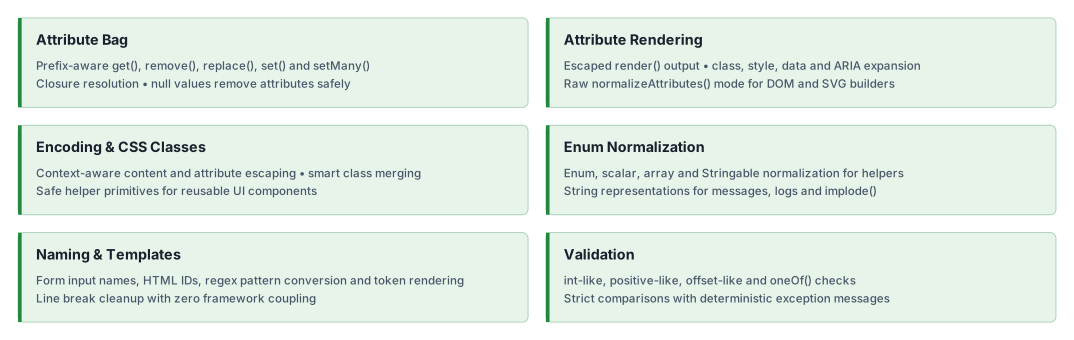
Quick start
Section titled “Quick start”Installation
Section titled “Installation”composer require ui-awesome/html-helper:^0.7Basic usage
Section titled “Basic usage”Attribute key normalization
Section titled “Attribute key normalization”Ensures attribute keys have the correct prefix (like aria-, data-, or on), supporting strings, Enums, and
Stringables.
<?php
declare(strict_types=1);
namespace App;
use UIAwesome\Html\Helper\AttributeBag;
// normalize string key (adds prefix if missing)echo AttributeBag::normalizeKey('label', 'aria-');// aria-label
// normalize Enum keyecho AttributeBag::normalizeKey(Data::ACTION, 'data-');// data-action
// normalize event (flexible prefixing)echo AttributeBag::normalizeKey('click', 'on');// onclick
Attribute bag operations
Section titled “Attribute bag operations”Use AttributeBag to query and mutate an attribute array in-place with a minimal API (get(), remove(), replace(),
set(), setMany()).
<?php
declare(strict_types=1);
namespace App;
use UIAwesome\Html\Helper\AttributeBag;
$attributes = ['id' => 'submit'];
// update several values with key normalization and `null` removalAttributeBag::setMany(    $attributes,    [        'class' => ['btn', 'btn-primary'],        'type' => 'submit',    ],);
// replace the complete bagAttributeBag::replace($attributes, ['id' => 'replacement']);
// get with fallback default$type = AttributeBag::get($attributes, 'type', 'button');
// get with prefix normalization$label = AttributeBag::get($attributes, 'label', null, 'aria-');
// remove unwanted keysAttributeBag::remove($attributes, 'readonly');
// set values (closures are resolved)AttributeBag::set($attributes, 'disabled', true);AttributeBag::set($attributes, 'id', static fn () => 'submit');
// set one key (raw value)AttributeBag::set($attributes, 'aria-label', 'Save');
// booleans for `aria`, `data`, and `on*` attributes are stored as literal stringsAttributeBag::set($attributes, 'expanded', true, 'aria-');// $attributes['aria-expanded'] === 'true'
// set many keys at onceAttributeBag::setMany(    $attributes,    [        'data-toggle' => 'modal',        'onclick' => 'handleClick()',    ],);
// remove a key explicitlyAttributeBag::remove($attributes, 'id');
Universal Stringable support
Section titled “Universal Stringable support”Pass your domain objects directly to helpers like Encode, Attributes, or CSSClass. The library automatically
handles __toString().
<?php
declare(strict_types=1);
namespace App;
use UIAwesome\Html\Helper\Encode;
class User implements \Stringable{ public function __construct(private string $name) {}
public function __toString(): string { return $this->name; }}
$user = new User('<John Doe>');
// automatically casts and safely encodesecho Encode::content($user);// <John Doe>Rendering HTML attributes
Section titled “Rendering HTML attributes”Use Attributes::render() to generate an escaped HTML attribute string from an array. It automatically handles class arrays, style arrays, and data-* expansions.
<?php
declare(strict_types=1);
namespace App;
use UIAwesome\Html\Helper\Attributes;?>
<?= Attributes::render(    [        'id' => 'submit-btn',        // automatically joined        'class' => ['btn', 'btn-primary'],        // `true` booleans are rendered as valueless attributes        'disabled' => true,        // `false` booleans are skipped        'readonly' => false,        // JSON encoded automatically        'data' => [            'id' => 42,            'options' => ['modal' => true],        ],        'style' => [            'color' => '#fff',            'margin-top' => '10px'        ],    ]) ?>// class="btn btn-primary" id="submit-btn" disabled data-id="42" data-options='{"modal":true}' style='color: #fff; margin-top: 10px;'
Advanced: DOM & SVG Integration
Section titled “Advanced: DOM & SVG Integration”When working with DOMDocument, SimpleXMLElement, or other XML/SVG builders, you should not use pre-escaped strings to avoid “double escaping” (for example, &lt;).
Use Attributes::normalizeAttributes() with encode: false to get a flat array of raw values ready for insertion.
use UIAwesome\Html\Helper\Attributes;
$attributes = [    'class' => ['icon', ButtonType::PRIMARY],    'data-config' => ['key' => '<val>'],    'title' => '<Safe Title>',];
// Get raw values (encode: `false`)$rawAttributes = Attributes::normalizeAttributes($attributes, encode: false);// ['class' => 'icon btn-primary', 'data-config' => '{"key":"<val>"}', 'title' => '<Safe Title>']
// Perfect for DOMDocumentforeach ($rawAttributes as $name => $value) {    // Boolean attributes are represented by their presence.    if ($value === true) {        $domElement->setAttribute($name, $name);        continue;    }
    // DOMDocument handles the escaping automatically here.    $domElement->setAttribute($name, $value);}
Managing CSS classes
Section titled “Managing CSS classes”Allows you to merge, add, or override CSS classes within an attributes array smartly.
<?php
declare(strict_types=1);
namespace App;
use UIAwesome\Html\Helper\CSSClass;
$attributes = ['class' => 'base-class'];
// add new classes (merges efficiently)CSSClass::add($attributes, ['text-center', 'mt-5']);
// override existing classesCSSClass::add($attributes, 'alert alert-danger', true);
echo $attributes['class'];// alert alert-danger
Encoding
Section titled “Encoding”Encodes HTML text and quoted attribute values. Encoding does not validate URL schemes or sanitize JavaScript or CSS.
<?php
declare(strict_types=1);
namespace App;
use UIAwesome\Html\Helper\Encode;
// safe Contentecho Encode::content('<script>alert("xss")</script>');// <script>alert("xss")</script>
// safe Attribute Valueecho Encode::value('Name "Quote"');// Name "Quote"Enum normalization
Section titled “Enum normalization”Normalizes enum values and arrays without validating them against an allowed set. Use Validator::oneOf() for allowed-value validation.
<?php
declare(strict_types=1);
namespace App;
use App\Enums\Status;use UIAwesome\Html\Helper\Enum;
// normalize array of Enums$result = Enum::normalizeArray([Status::ACTIVE, Status::INACTIVE]);// ['active', 'inactive']
// normalize mixed array$result = Enum::normalizeArray(['foo', Status::ACTIVE, 42]);// ['foo', 'active', 42]
// normalize value from EnumEnum::normalizeValue(Status::ACTIVE);// 'active'
// normalize value from mixedEnum::normalizeValue('foo');// 'foo'
Form naming & IDs
Section titled “Form naming & IDs”Generates standard PHP form names and valid HTML IDs, handling arrayable and nested properties effortlessly.
<?php
declare(strict_types=1);
namespace App;
use UIAwesome\Html\Helper\Naming;
// generate input name (Nested)echo Naming::generateInputName('User', 'profile[0][email]');// User[profile][0][email]
// generate input ID (Sanitized)echo Naming::generateInputId('User', 'profile[0][email]');// user-profile-0-email
// convert regex to patternecho Naming::convertToPattern('/^[a-z]+$/i');// ^[a-z]+$
Template rendering
Section titled “Template rendering”Performs clean token replacement with normalized line endings.
<?php
declare(strict_types=1);
namespace App;
use UIAwesome\Html\Helper\Template;
echo Template::render("Hello, {name}!", ['{name}' => 'Yii3']);// Hello, Yii3!
Line break normalization
Section titled “Line break normalization”Collapses multiple line breaks into a single \n, useful for cleaning up user input or generated text.
<?php
declare(strict_types=1);
namespace App;
use UIAwesome\Html\Helper\LineBreakNormalizer;
echo LineBreakNormalizer::normalize("Hello\n\n\nWorld");// Hello\nWorld
Validation
Section titled “Validation”Enforces strict types and approved values for your HTML logic.
<?php
declare(strict_types=1);
namespace App;
use UIAwesome\Html\Helper\Validator;
// validate integer-like string$isValid = Validator::intLike('123', 0, 1000);
// validate against allowed list (supports Enums)Validator::oneOf('sm', ['sm', 'md', 'lg'], 'size');// passes
// validate positive-like number$isPositive = Validator::positiveLike('42.5', 0, 100);// true
// validate SVG offset-like values (ratio: 0..1, percent: 0%..100%)$isOffsetValid = Validator::offsetLike('50%');// true
Documentation
Section titled “Documentation”Practical guides for framework-independent HTML helpers and their development checks.
AI assistance
Section titled “AI assistance”AI agents: read the documentation index and fetch the Markdown version
of a page by appending index.md to its URL. The
AI agents guide covers skill
installation, client setup and verification.
- 🤖
ui-awesome-html-helperskill: attribute rendering, context-aware encoding, CSS classes, form naming and template composition.
See the repository guides, the skill source, the source PHPDoc and the changelog. This package is framework-independent; no Yii application skill is required.
Our social networks
Section titled “Our social networks”Follow on X Follow on Facebook
License
Section titled “License”Package
Section titled “Package”- Source code and issues: ui-awesome/html-helper. Star the repository if the package is useful to you.
- Composer package: ui-awesome/html-helper.
- Changelog: CHANGELOG.md.