Model
Typed model mapping for modern PHP applications
Nested properties, explicit input mapping, runtime defaults, custom casting, and selective key serialization
Features
Section titled “Features”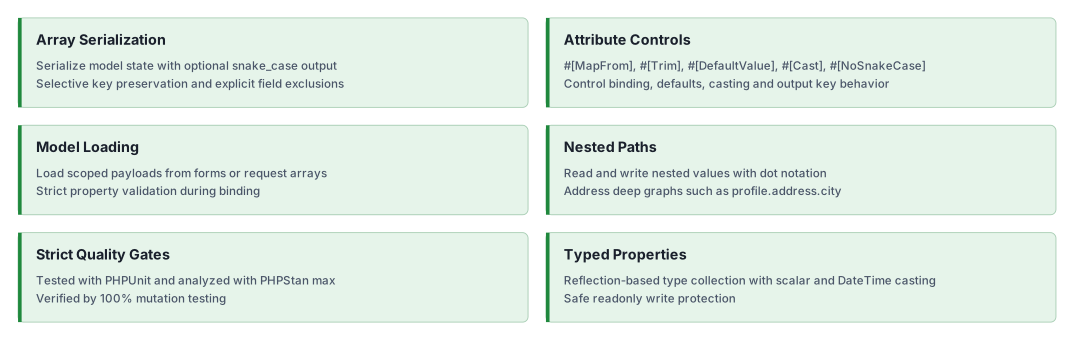
Installation
Section titled “Installation”composer require ui-awesome/model:^0.2Quick start
Section titled “Quick start”<?php
declare(strict_types=1);
namespace App\Model;
use UIAwesome\Model\Attribute\{Cast, DefaultValue, MapFrom, NoSnakeCase, Timestamp, Trim};use UIAwesome\Model\BaseModel;
final class User extends BaseModel{ #[NoSnakeCase] public string $apiVersion = 'v1';
#[DefaultValue('Guest')] public string $displayName = '';
#[MapFrom('user-email-address')] public string $email = '';
#[Trim] public string $name = '';
#[Cast('array')] public array $tags = [];
#[Timestamp] private int $updatedAt = 0;}
$model = new User();
$model->load( [ 'User' => [ 'apiVersion' => 'v2', 'displayName' => '', 'name' => ' Ada Lovelace ', 'tags' => 'php, yii2, model', 'user-email-address' => 'ada@example.com', ], ],);
$types = $model->getTypes();/*[ 'apiVersion' => 'string', 'displayName' => 'string', 'name' => 'string', 'email' => 'string', 'tags' => 'array', 'updatedAt' => 'timestamp',]*/$payload = $model->toArray(snakeCase: true, exceptProperties: ['updatedAt']);/*[ 'apiVersion' => 'v2', 'display_name' => 'Guest', 'name' => 'Ada Lovelace', 'email' => 'ada@example.com', 'tags' => ['php', 'yii2', 'model'],]*/Explicit payload mapping with MapFrom
Section titled “Explicit payload mapping with MapFrom”Use #[MapFrom('external-key')] when incoming payload keys do not follow snake_case or camelCase naming.
<?php
declare(strict_types=1);
namespace App\Model;
use UIAwesome\Model\Attribute\MapFrom;use UIAwesome\Model\BaseModel;
final class JsonLdPayload extends BaseModel{    #[MapFrom('@context')]    public string $context = '';}
$payload = new JsonLdPayload();
$payload->setValues(['@context' => 'https://schema.org']);
Automatic input trimming with Trim
Section titled “Automatic input trimming with Trim”Use #[Trim] to normalize leading and trailing spaces for string values during assignment.
<?php
declare(strict_types=1);
namespace App\Model;
use UIAwesome\Model\Attribute\Trim;use UIAwesome\Model\BaseModel;
final class Profile extends BaseModel{    #[Trim]    public string $displayName = '';}
$profile = new Profile();
$profile->setValues(['display_name' => '  Ada Lovelace  ']);
Forced custom casting with Cast
Section titled “Forced custom casting with Cast”Use #[Cast('array')] to transform transport formats such as comma-separated strings.
<?php
declare(strict_types=1);
namespace App\Model;
use UIAwesome\Model\Attribute\Cast;use UIAwesome\Model\BaseModel;
final class SearchFilter extends BaseModel{    #[Cast('array')]    public array $tags = [];}
$filter = new SearchFilter();
$filter->setValue('tags', 'php, yii2, model');
Runtime fallback with DefaultValue
Section titled “Runtime fallback with DefaultValue”Use #[DefaultValue(...)] to apply a fallback when input values are null or ''.
<?php
declare(strict_types=1);
namespace App\Model;
use UIAwesome\Model\Attribute\DefaultValue;use UIAwesome\Model\BaseModel;
final class Profile extends BaseModel{    #[DefaultValue('Guest')]    public string $displayName = '';}
$profile = new Profile();
$profile->setValue('displayName', '');// 'Guest'
Preserve selected output keys with NoSnakeCase
Section titled “Preserve selected output keys with NoSnakeCase”Use #[NoSnakeCase] to keep specific property names unchanged when serializing with snakeCase: true.
<?php
declare(strict_types=1);
namespace App\Model;
use UIAwesome\Model\Attribute\NoSnakeCase;use UIAwesome\Model\BaseModel;
final class ApiPayload extends BaseModel{    #[NoSnakeCase]    public string $apiVersion = 'v1';
    public string $publicEmailPersonal = 'admin@example.com';}
$payload = new ApiPayload();
$data = $payload->toArray(snakeCase: true);/*[    'apiVersion' => 'v1',    'public_email_personal' => 'admin@example.com',]*/
Documentation
Section titled “Documentation”For detailed configuration options and advanced usage.
AI assistance
Section titled “AI assistance”AI agents: read the documentation index and fetch the Markdown version
of a page by appending index.md to its URL. The
AI agents guide covers skill
installation, client setup and verification.
- 🤖
ui-awesome-modelskill: typed input mapping, property attributes, nested values with dot notation and model serialization.
See the repository guides, the skill source, the source PHPDoc and the changelog. This package is framework-independent; it is not a database model or a validation layer.
Our social networks
Section titled “Our social networks”Follow on X Follow on Facebook
License
Section titled “License”Package
Section titled “Package”- Source code and issues: ui-awesome/model. Star the repository if the package is useful to you.
- Composer package: ui-awesome/model.
- Changelog: CHANGELOG.md.